6 Functions Common to More Than One Operating Mode
Narda SRM-3006 75
6.4 Selecting the result type (Result Type)
Safety Evaluation • Result Type
Spectrum Analysis • Result Type
UMTS • Result Type
The result type defines how the measured values are evaluated. One value
for each type is shown for each service.
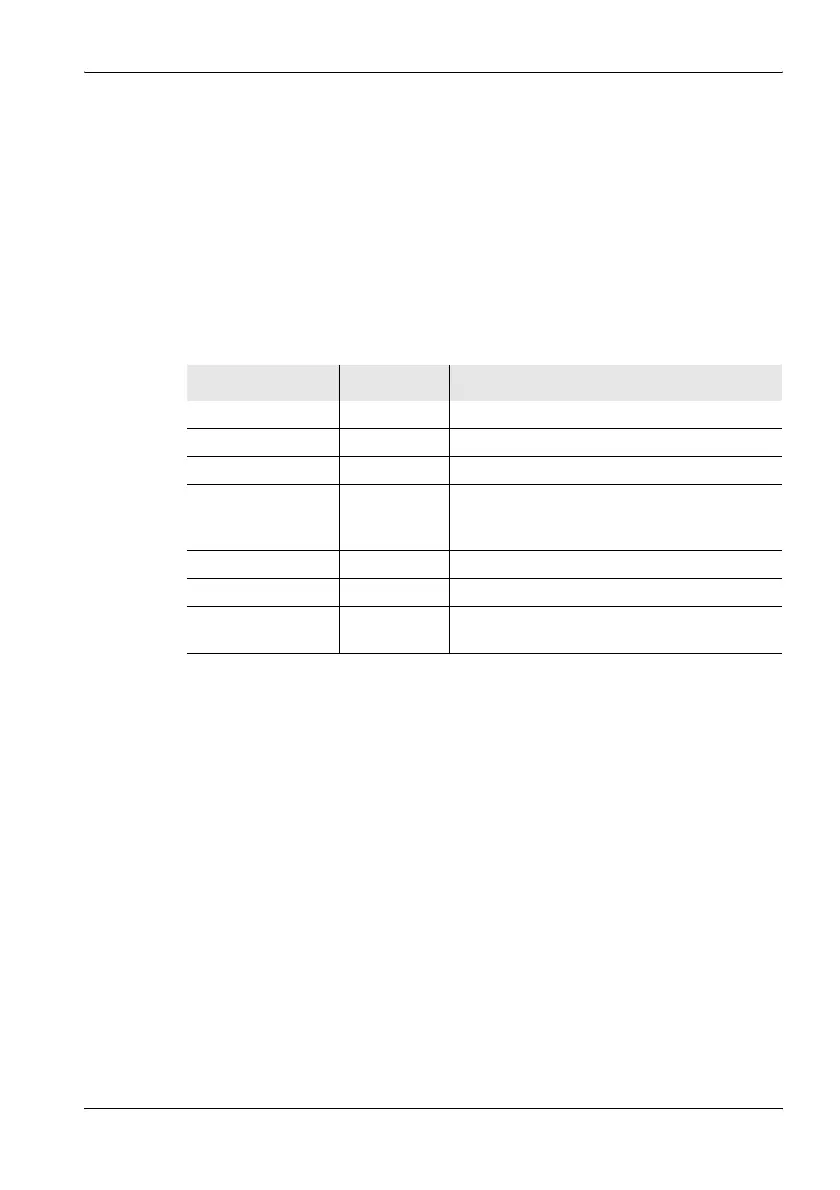
The following Result Types can be selected / deselected (more than one
can be selected at the same time):
To select or deselect a result type:
1. Press the Result Type softkey.
2. Use the rotary control and the softkeys to make the desired selection.
For information on how to do this, see Selecting entries from a list
on page 47.
3. When you have made your selection, press the OK key.
ª The selected result types will be used.
Information about the Standard (Std) result type:
• The Standard (Std) result type is only displayed when an antenna has
been selected or a Narda antenna is used.
• If you set the units to “%”, Standard (Std) will be set to 100%.
• Std corresponds to the unweighted limit value curve when field strength
units are used. If this value is way above the measured values, it is
possible that the limit value curve may no longer be displayed.
Table 20: Result types listed in the Result Type box
Type Abbreviation Explanation
Actual Act Actual value measured at the moment.
Maximum Max Maximum value measured.
Maximum Average MxA Maximum value of all averaged values.
Average Avg Average value over a specified number of
measurements or over a specified time
(RMS).
Minimum Average MnA Minimum value of all averaged values.
Minimum Min Minimum value measured.
Standard Std Shows the permitted limit value as an
unweighted limit curve.



 To Next Page