6 Functions Common to More Than One Operating Mode
80 SRM-3006 Narda
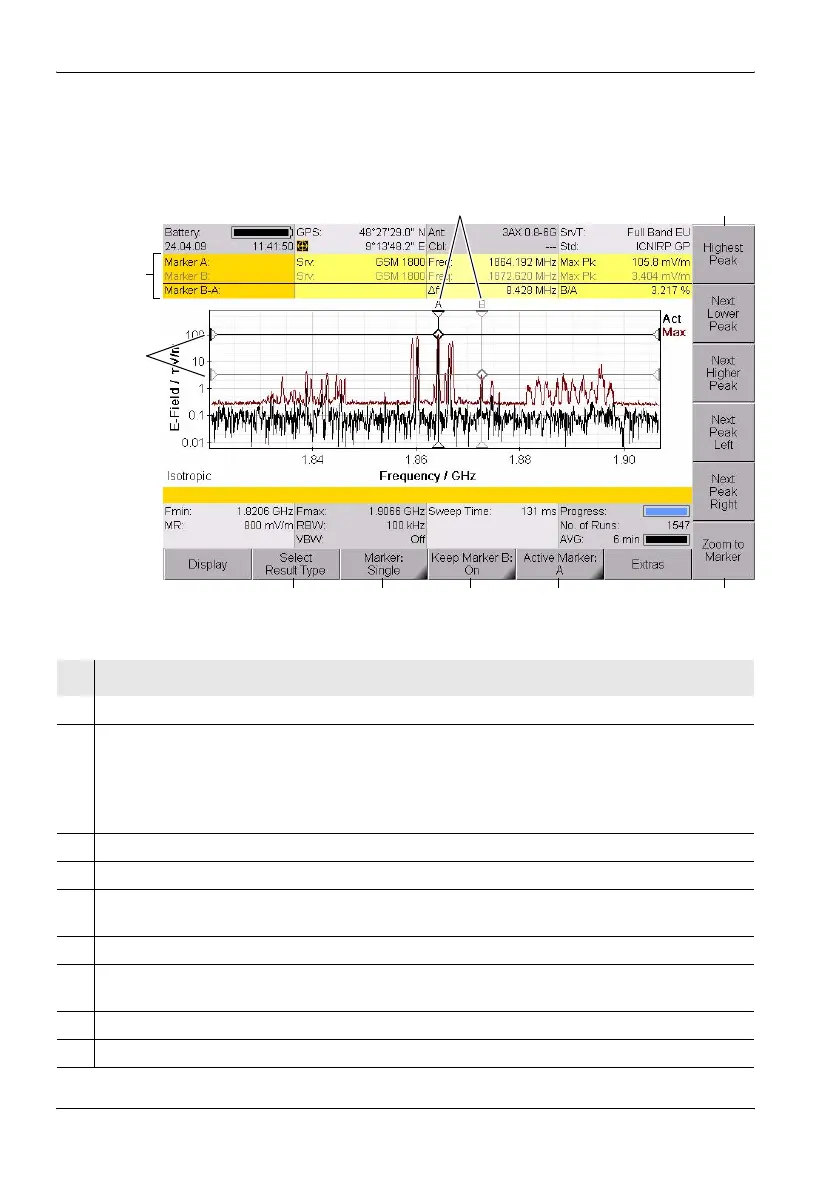
6.5.2 Using both markers to determine a difference
The difference between the two marker positions can be determined using
the Delta B-A marker function.
Figure 18: Display with both markers
68
1
2
3
579
4
No. Function / Description
1 Graphical display of the measurement values at the marker positions.
2 Marker information:
• Marker...: Marker A is active (black lettering), Display of difference B-A.
• Service: Selected services.
• Freq: Frequencies at the marker positions, frequency difference f
B
- f
A
.
• Max. Pk: Selected result types and measured values, ratio of measured values B/A.
3 Graphical display of the marker positions (for result types Act and Max in the example).
4 Marker functions for peak value selection (see Table 21 on page 79).
5 Zoom function: Sets the marker to the center frequency and enlarges the display around the
marker (reduces the span). See also The Zoom function (Zoom) on page 114.
6 Active marker (Marker B is active in the example)
7 Marker display on the measurement screen (Marker B is not shown on the measurement
screen in the example).
8 Display type (the difference (Delta B-A) is selected in the example.
9 Result type selection for the active marker.



 To Next Page