Troubleshooting
When a Message Displays
274
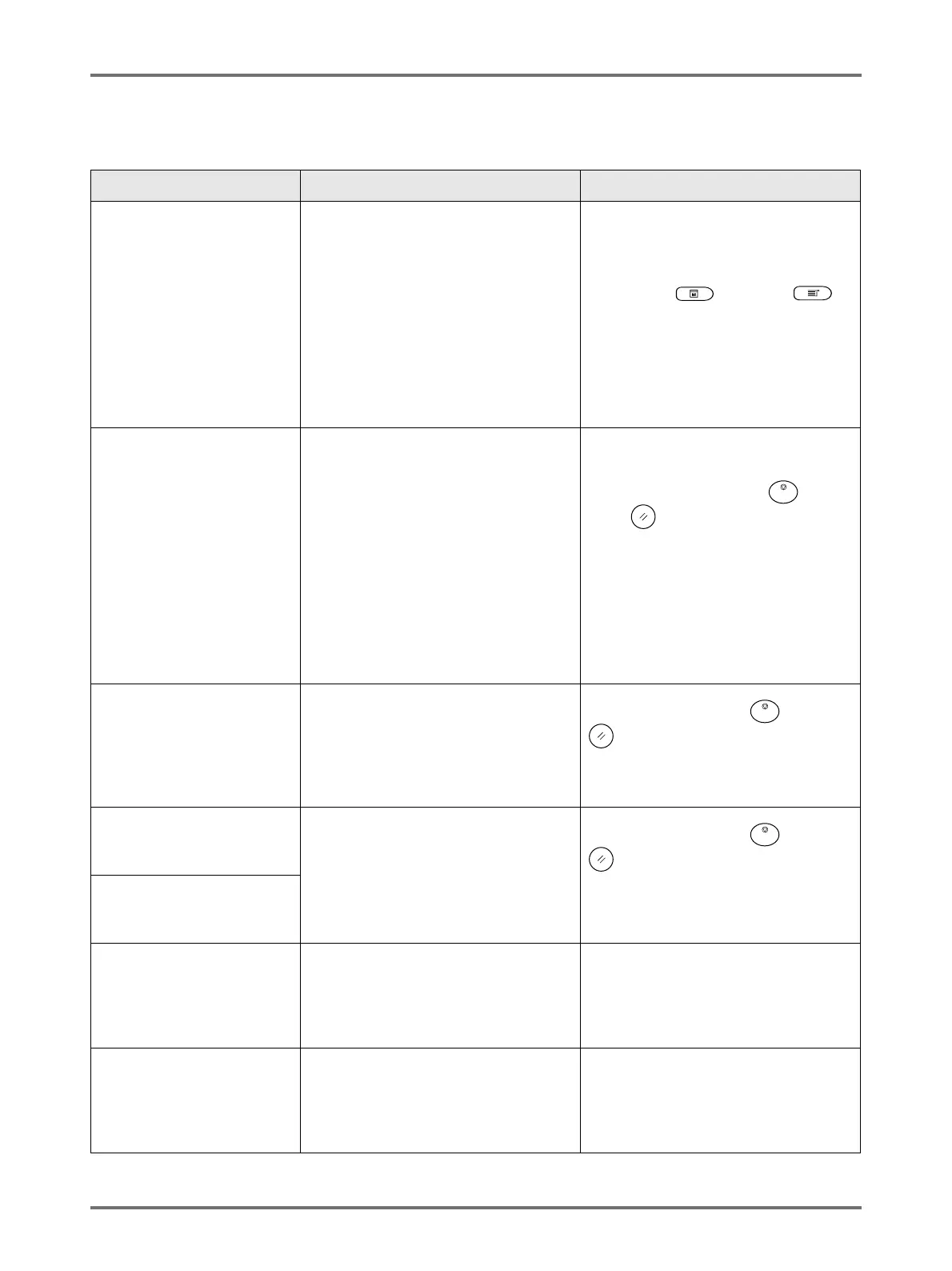
F00-000:Warning Messages (in alphabetical order)
Message Symptom Action
Acquiring Linked Printer
Configuration Data
Please Wait a Moment
The machine system is retrieving Linked
Printer information. Link Mode printing is
disabled while the retrieval is underway.
Touch [Close] to clear the Pop-Up
Message and return to the previous
screen.
• When printing from the machine;
Press the key or the
key.
• When printing from a Linked
Printer;
Wait until the information has been
retrieved. (This may take several
minutes.)
!!Auto-Link Operation is
Not Available!!
Specified Linked Printer
may be in Error or
Turned OFF
Linked Printer is sending an error signal.
Link Mode has been activated due to
low print volume since “Link-Free
Volume” is currently set to ON.
• When returning to the Master
Screen;.
Touch [Cancel].
(Alternatively, press the key or
the key to clear.)
• When changing to another
available Linked Printer;
Touch [Link Switch] and select
another Linked Printer on the Link Sw.
screen.
([Link Switch] will not display if no
other Linked Printer is available.)
)p.230
!! Book Shadow Editor
is Not Available
with ADF !!
Place Original on
Platen Glass
ADF unit is disabled while Book Shadow
function is active.
Touch [Close].
(Alternatively, press the key or the
key to clear.)
Place the original on the Platen Glass.
)p.84
Check Stock of
Required Ink and
Please Order If Needed
The remaining quantity of Ink Cartridge
or Master Roll has become less than
specified on “Stock Management”.
)p.177
Touch [Close].
(Alternatively, press the key or the
key to clear.)
Order Ink Cartridges or Master Rolls if
necessary.
Check Stock of
Required Master and
Please Order If Needed
!! Complicated Area Form !!
Re-circle Editing Areas and
Redo Colour Separation
The shape of the selected area is too
complicated to be recognized.
Do not overlap the pen areas. If the
edges touch, the specified area may not
be recognized. Make the shape of the
area as simple as possible.
)p.50
Dual-Colour Printing is Not
Available for This Paper
Size
Load Paper Larger than
B5 (Portrait)
This machine cannot perform 2-Colour
printing on paper smaller than B5 size.
Touch [Close] and proceed to load
paper with vertical dimention larger than
that of B5 (257 mm).



 To Next Page