5.3
Date Code 20120126 Instruction Manual SEL-2032 Communications Processor
Message Strings
Special Sequences
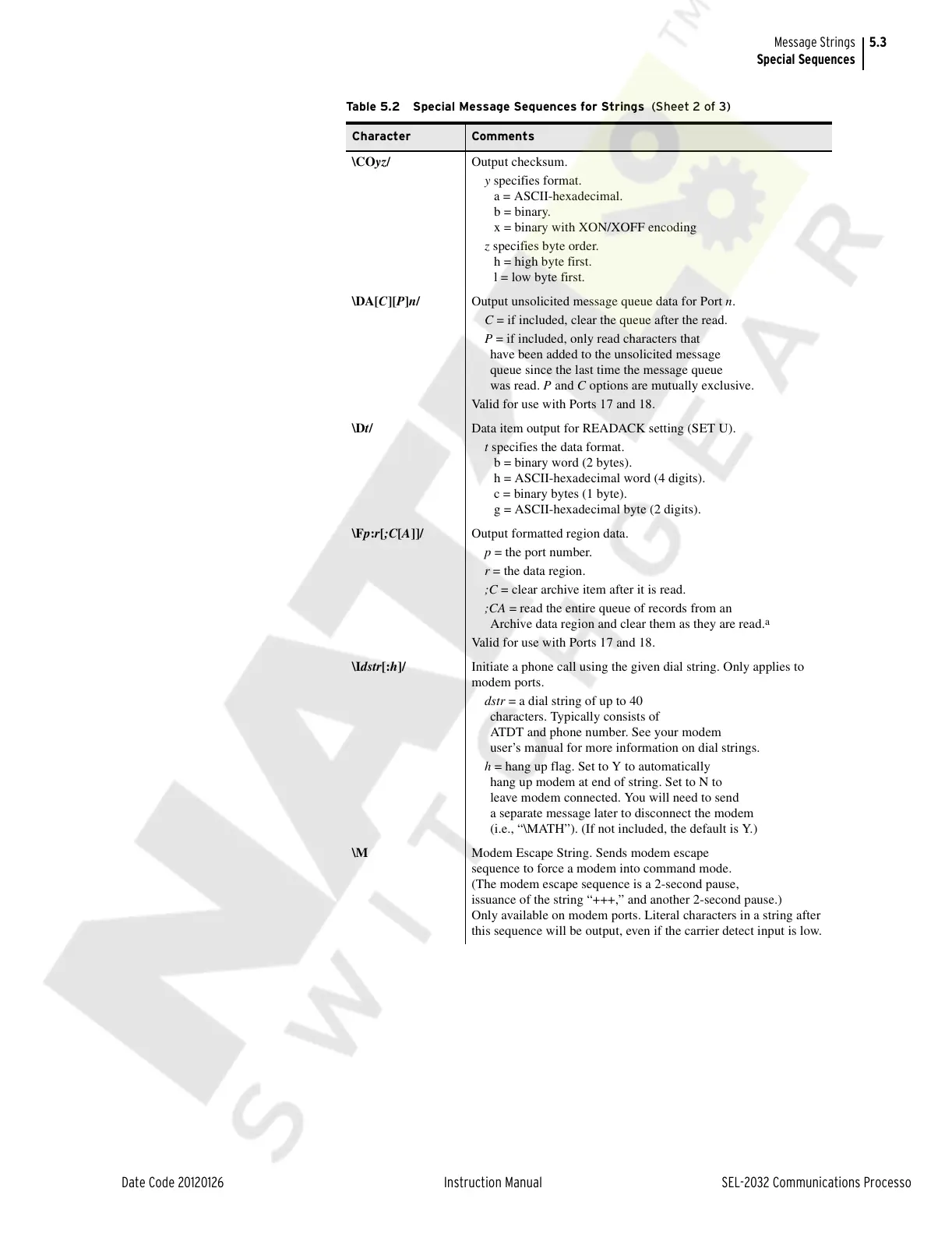
\COyz/ Output checksum.
y specifies format.
a = ASCII-hexadecimal.
b = binary.
x = binary with XON/XOFF encoding
z specifies byte order.
h = high byte first.
l = low byte first.
\DA[C][P]n/ Output unsolicited message queue data for Port n.
C = if included, clear the queue after the read.
P = if included, only read characters that
have been added to the unsolicited message
queue since the last time the message queue
was read. P and C options are mutually exclusive.
Valid for use with Ports 17 and 18.
\Dt/ Data item output for READACK setting (SET U).
t specifies the data format.
b = binary word (2 bytes).
h = ASCII-hexadecimal word (4 digits).
c = binary bytes (1 byte).
g = ASCII-hexadecimal byte (2 digits).
\Fp:r[;C[A]]/ Output formatted region data.
p = the port number.
r = the data region.
;C = clear archive item after it is read.
;CA = read the entire queue of records from an
Archive data region and clear them as they are read.
a
Valid for use with Ports 17 and 18.
\Idstr[:h]/ Initiate a phone call using the given dial string. Only applies to
modem ports.
dstr = a dial string of up to 40
characters. Typically consists of
ATDT and phone number. See your modem
user’s manual for more information on dial strings.
h = hang up flag. Set to Y to automatically
hang up modem at end of string. Set to N to
leave modem connected. You will need to send
a separate message later to disconnect the modem
(i.e., “\MATH”). (If not included, the default is Y.)
\M Modem Escape String. Sends modem escape
sequence to force a modem into command mode.
(The modem escape sequence is a 2-second pause,
issuance of the string “+++,” and another 2-second pause.)
Only available on modem ports. Literal characters in a string after
this sequence will be output, even if the carrier detect input is low.
Table 5.2 Special Message Sequences for Strings (Sheet 2 of 3)
Character Comments
Courtesy of NationalSwitchgear.com



 To Next Page