5.4
SEL-2032 Communications Processor Instruction Manual Date Code 20120126
Message Strings
Special Sequences
EXAMPLE 5.1 Message Strings
The following are examples of using special message sequences in
strings:
MESG1="\F1:METER/"
Output the formatted meter data from Port 1. The screen below
shows a sample response to this message.
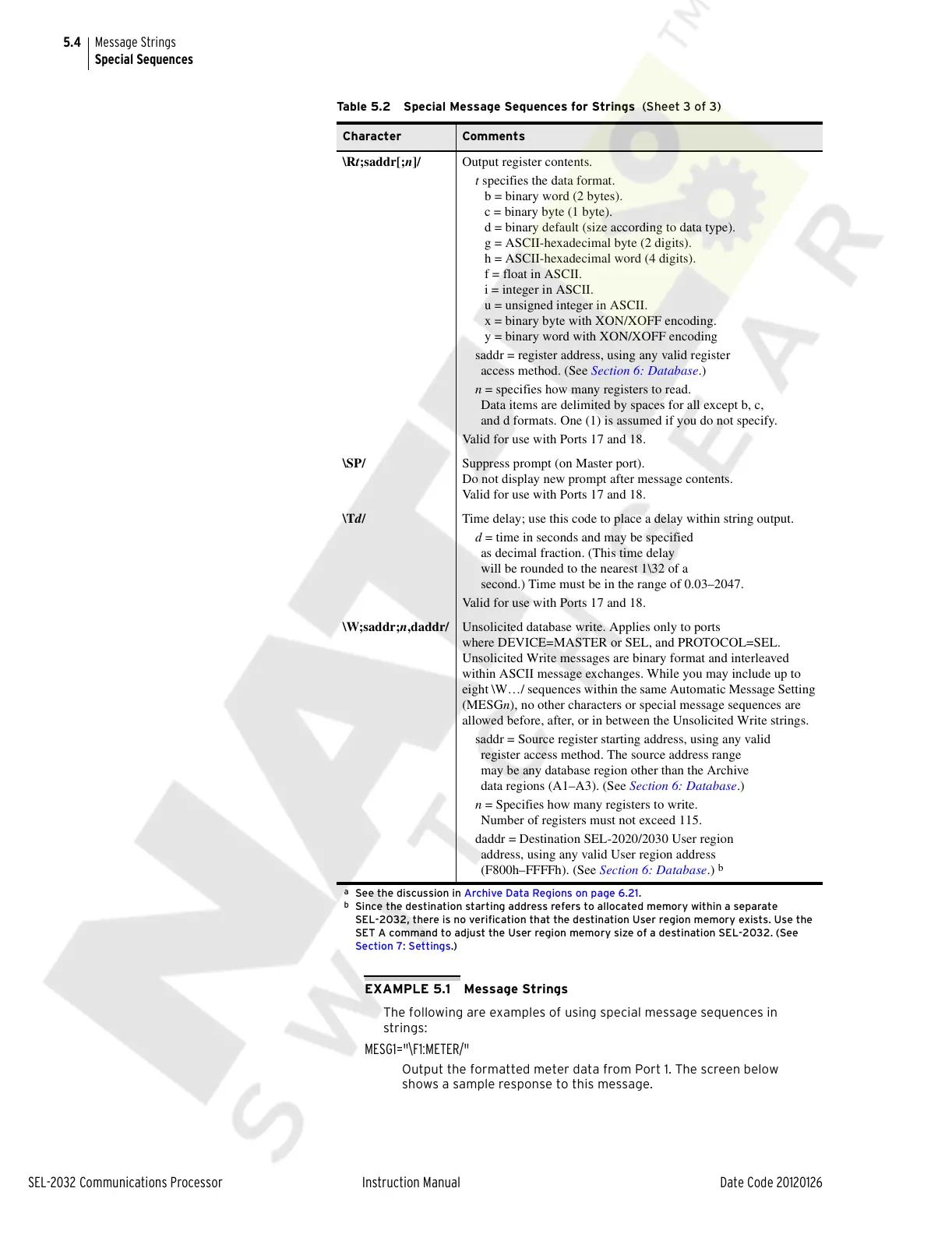
\Rt;saddr[;n]/ Output register contents.
t specifies the data format.
b = binary word (2 bytes).
c = binary byte (1 byte).
d = binary default (size according to data type).
g = ASCII-hexadecimal byte (2 digits).
h = ASCII-hexadecimal word (4 digits).
f = float in ASCII.
i = integer in ASCII.
u = unsigned integer in ASCII.
x = binary byte with XON/XOFF encoding.
y = binary word with XON/XOFF encoding
saddr = register address, using any valid register
access method. (See Section 6: Database.)
n = specifies how many registers to read.
Data items are delimited by spaces for all except b, c,
and d formats. One (1) is assumed if you do not specify.
Valid for use with Ports 17 and 18.
\SP/ Suppress prompt (on Master port).
Do not display new prompt after message contents.
Valid for use with Ports 17 and 18.
\Td/ Time delay; use this code to place a delay within string output.
d = time in seconds and may be specified
as decimal fraction. (This time delay
will be rounded to the nearest 1\32 of a
second.) Time must be in the range of 0.03–2047.
Valid for use with Ports 17 and 18.
\W;saddr;n,daddr/ Unsolicited database write. Applies only to ports
where DEVICE=MASTER or SEL, and PROTOCOL=SEL.
Unsolicited Write messages are binary format and interleaved
within ASCII message exchanges. While you may include up to
eight \W…/ sequences within the same Automatic Message Setting
(MESGn), no other characters or special message sequences are
allowed before, after, or in between the Unsolicited Write strings.
saddr = Source register starting address, using any valid
register access method. The source address range
may be any database region other than the Archive
data regions (A1–A3). (See Section 6: Database.)
n = Specifies how many registers to write.
Number of registers must not exceed 115.
daddr = Destination SEL-2020/2030 User region
address, using any valid User region address
(F800h–FFFFh). (See Section 6: Database.)
b
a
See the discussion in Archive Data Regions on page 6.21.
b
Since the destination starting address refers to allocated memory within a separate
SEL-2032, there is no verification that the destination User region memory exists. Use the
SET A command to adjust the User region memory size of a destination SEL-2032. (See
Section 7: Settings.)
Table 5.2 Special Message Sequences for Strings (Sheet 3 of 3)
Character Comments
Courtesy of NationalSwitchgear.com



 To Next Page