Section 07 BODY AND HULL
Subsection 01 (BODY)
219100963-021-013
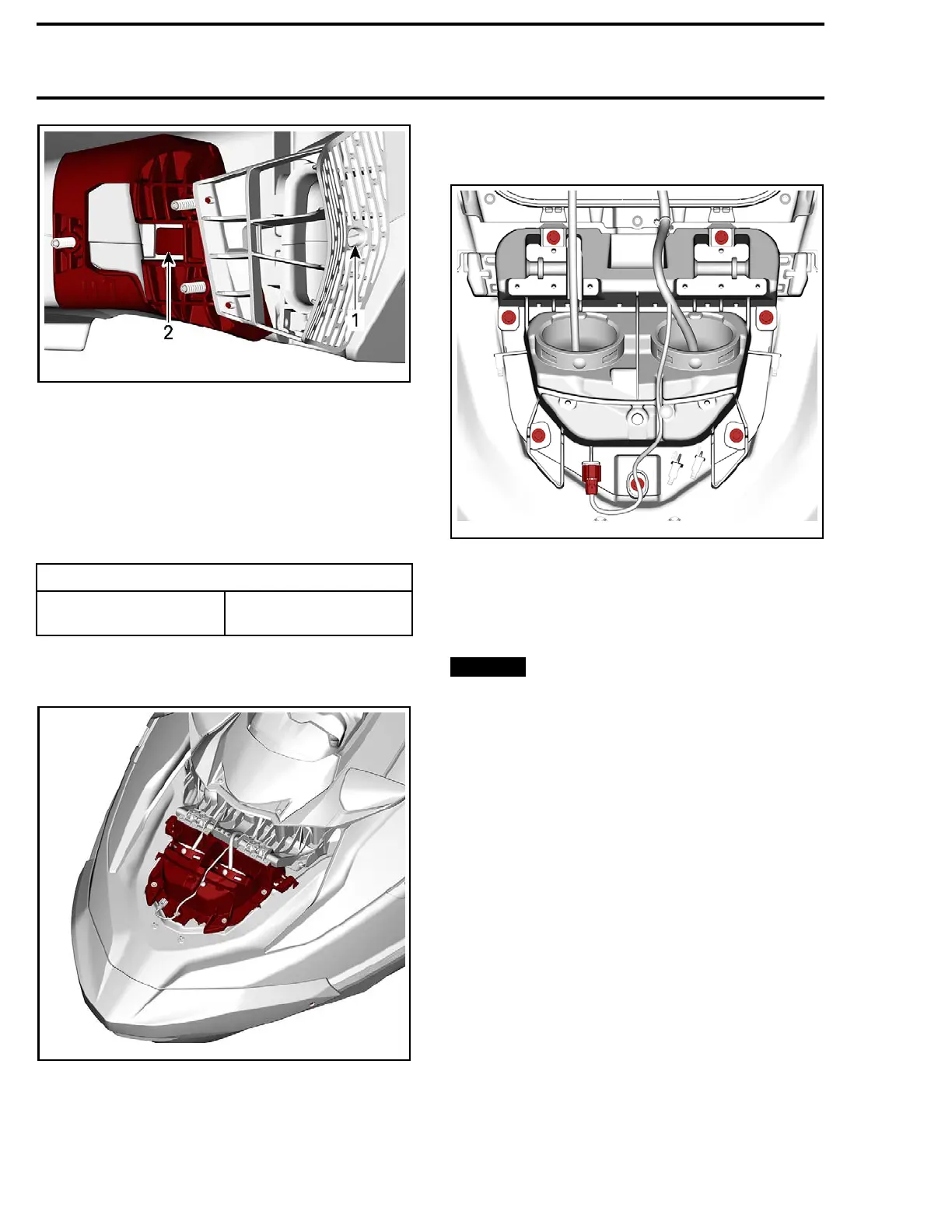
VIEWED FROM UNDERNEATH
1. Hole
2. Tab to be released.
Slide speaker unit out toward the rear.
Installin
gtheSoundSystem
The installation is the reverse of the removal pro-
cedure. However, pay attention to the following.
Tighten screws to specification.
TIGHTENING TORQUE
Speaker re
taining screw
5.5 N•m ± 0.5 N•m
(49 lbf•in ±4lbf•in)
VENTILATION
21910
0893-032-733
Removing the Ventilation Adaptor
Remove:
– Hood
– Storage cover.
Remove retaining screws and disconnect electri-
cal connector.
219100893
-032-734
Pull ventilation adaptor out.
Installing the Ventilation Adaptor
The installation is the reverse of the removal pro-
cedure. However, pay attention to the following.
NOTICE
Make sure both ventilation tubes
are positioned underneath the storage com-
partment and not on each side.
Perform the
STORAGE COVER ALIGNMENT
be-
fore tightening the ventilation adaptor.
STORAGE COMPARTMENT
Removing the Storage Compartment
Remove:
– Hood
– Both center covers
– Both front covers.
Disconnect lower gas shock attachment.
Open front storage cover and secure it to maintain
it open.
Remove the following fasteners.
230 219100963-021



 To Next Page
 Loading...