64 57 498 D3543
D3543.201.01.05.02 08.2016
193
Sirona Dental Systems GmbH 4Operation
Operating Instructions INTEGO 4.14Configuration of the treatment center (setup)
båÖäáëÜ
4.14.1.2
Setting the time and date
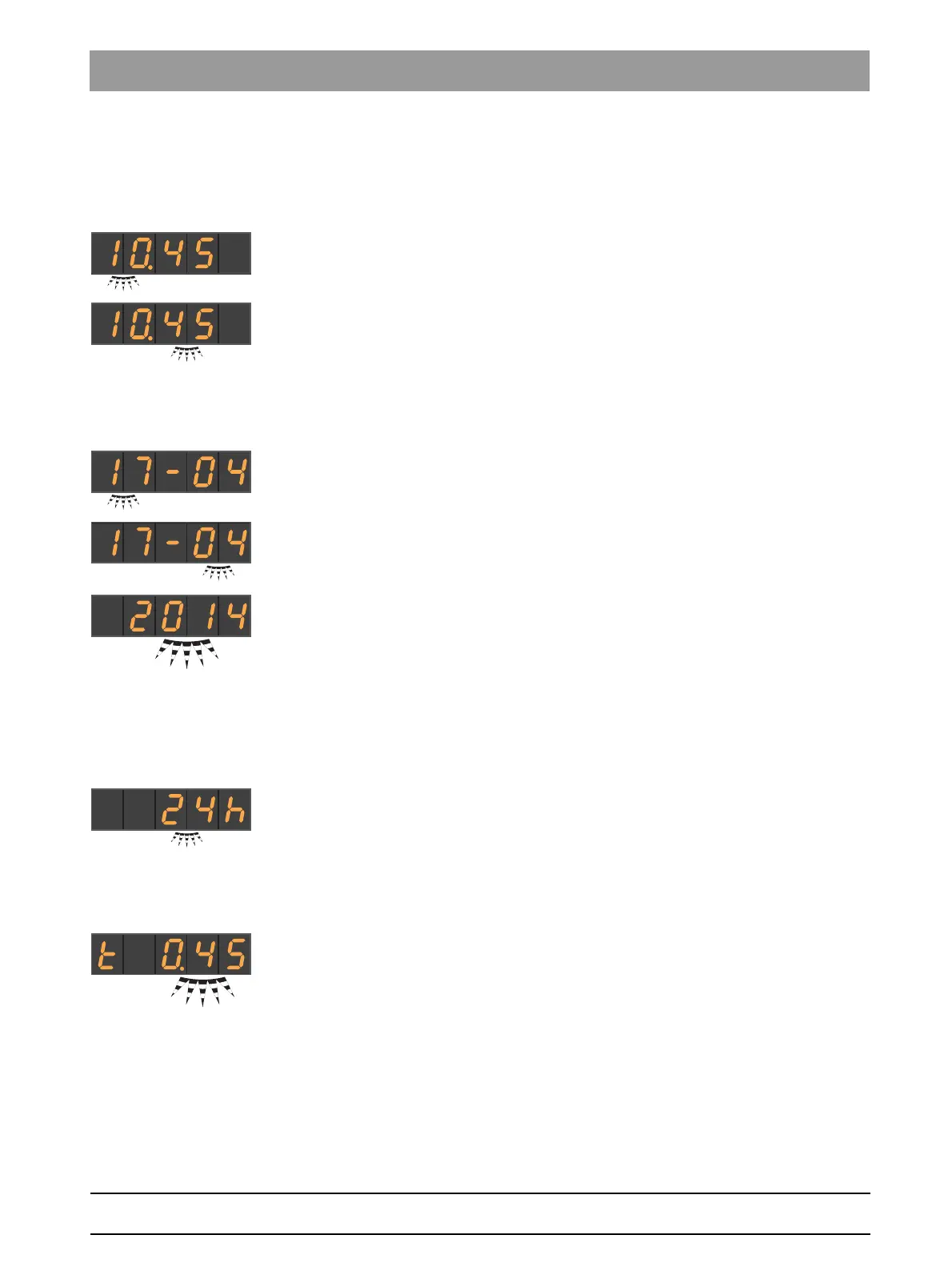
Setting the time
Time is shown in the format hour.minute.
✔ The
hour
setting focus flashes.
1. Use favorite keys 1 and 3 to set the hour.
2. Press the favorite key
2 / Setup
.
The
Minute
setting focus flashes.
3. Use favorite keys 1 and 3 to set the minutes.
4. Confirm with the
2 / Setup
favorite key.
Setting the date
The date is displayed in the format day-month-year.
✔ The
day
setting focus flashes.
1. Use favorite keys 1 and 3 to set the day.
2. Press the favorite key
2 / Setup
.
The
month
setting focus flashes.
3. Repeat this procedure for the month and year.
4. Confirm with the
2 / Setup
favorite key.
Switching 12/24 hour display
The 12-hour display is switched only in the standard operating context of
the EasyPad display. It will continue to use the 24-hour system in the
Setup
operating context.
✔ The setting focus
12/24 hour display
flashes.
1. Use favorite keys 1 and 3 to select the hour display.
2. Confirm with the
2 / Setup
favorite key.
4.14.1.3
Presetting the timer
The maximum time setting is 9 minutes and 30 seconds.
✔ The
timer function
setting focus is displayed.
1. Use favorite buttons 1 and 3 to set the required time.
Increments:
From 0.05 to 1.00 = 5 s steps
From 1.00 to 3.00 = 10 s steps
From 3.00 to 9.30 = 30 s steps
2. Confirm with the
2 / Setup
favorite key.
If the time or speed/intensity is shown on the EasyPad display, the timer
can be started by pressing the
Fn
button on the dentist or assistant
element. Press again to stop the timer and reset the countdown. It can
then be restarted.



 To Next Page