64 57 498 D3543
D3543.201.01.05.02 08.2016
199
Sirona Dental Systems GmbH 4Operation
Operating Instructions INTEGO 4.14Configuration of the treatment center (setup)
båÖäáëÜ
4.14.2.3
Configuring control options
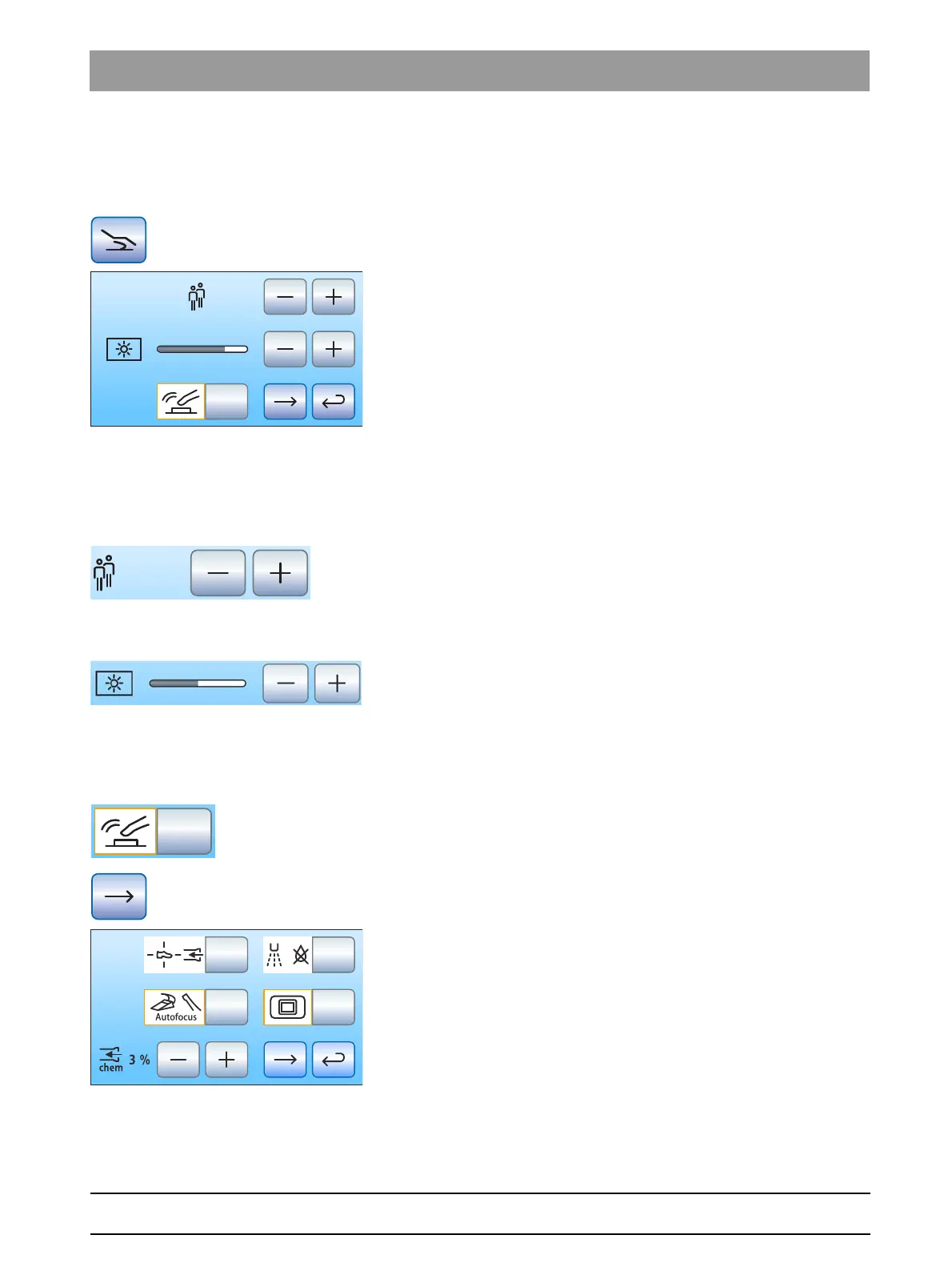
Operation of the entire treatment center operation can be configured in
this dialog.
➢ Touch the
Control options
key in the setup program.
The sub-dialog opens.
4.14.2.3.1 Preselecting the number of user profiles
If fewer user profiles are required, their number can be limited so that only
the specified users can be selected after the treatment center is switched
on.
➢ Use the – and + keys to set the number of user profiles.
If the number of user profiles is limited to one, the
User profiles
key is
hidden in the start dialog.
4.14.2.3.2 Adjusting the touchscreen brightness
➢ Use the – and + keys to set the brightness of the touchscreen.
4.14.2.3.3 Switching the key sound on/off
The program can be set to issue an acoustic signal that sounds when the
operator touches a key on the touchscreen or a fixed key.
➢ Touch the
Key tone
key.
If the key is highlighted orange, the key tone is activated.
➢ Change to the next setup dialog page.



 To Next Page