187
5.20 Major Component Installation
If you replace any of the following components: BAV controller, display board,
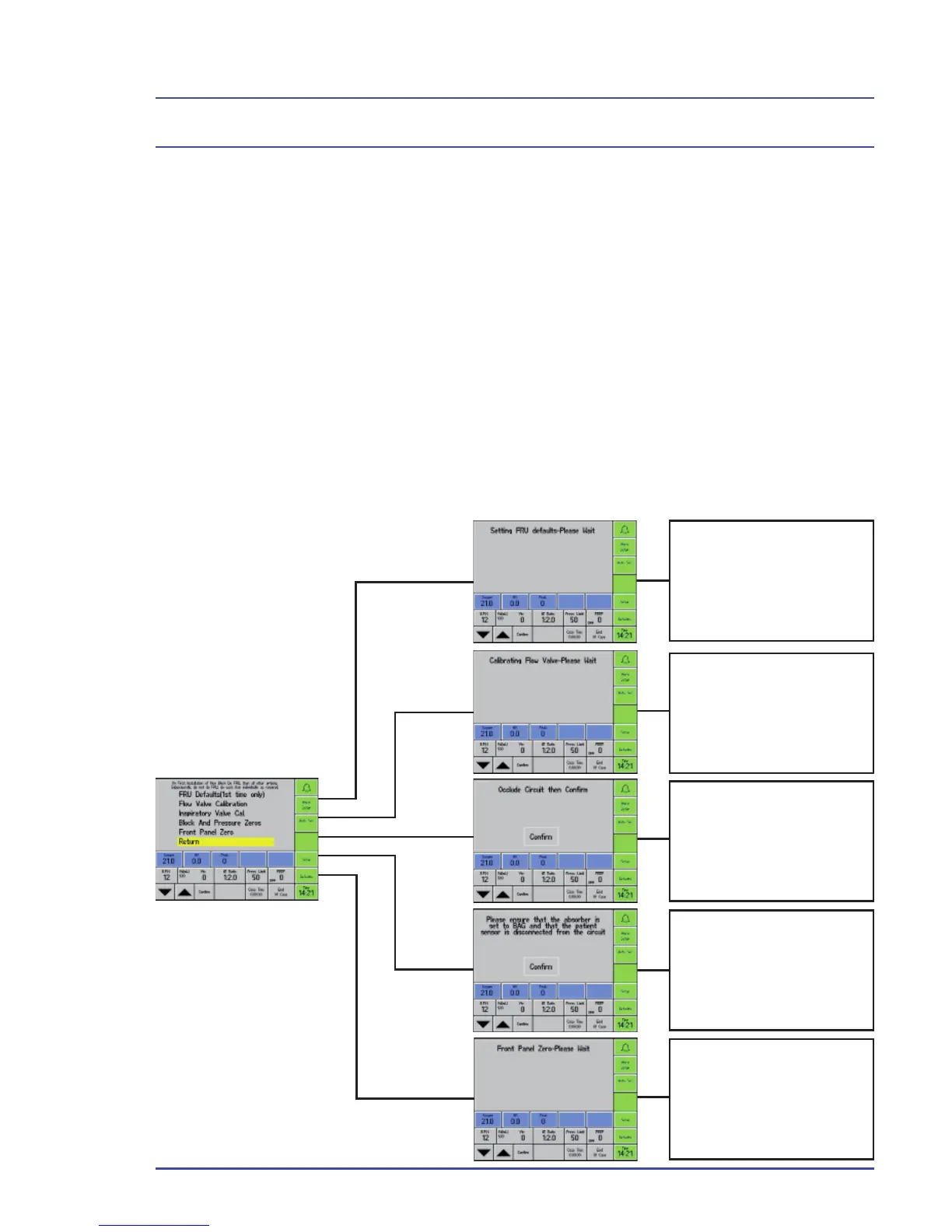
inspiratory blocks or fl ow valves, you must complete the following on-screen
installation routine.
To access the on-screen installation;
1. Select the Setup button.
2. Select the Confi guration option.
3. Select Service Mode.
4. Enter the password ‘CALBK’ by turning the TrakWheel to highlight each
letter, then press the TrakWheel to select that letter.
Follow the on-screen instructions.
This installs the pressure
transducer zero’s and
gain’s. This is required
when the inspiratory
block replaces the BAV
controller or display.
This calculates the min
and max fl ow through the
fl ow valves. This only
needs to be performed
when the fl ow valves are
replaced.
This calibrates the
inspiratory valve.
This is required when
the inspiratory valves
or inspiratory block
are replaced.
This will give the zero
point to the processor for
fl ow and pressure. This
needs to be preformed
when inspiratory block,
BAV controller or display
are changed.
This will zero the fl ow and
pressure on the display.
This is required when the
inspiratory block or front
panel are replaced.
Detailed Repair Procedures



 To Next Page