201
5.29.2 To use VentFlash
1. Connect the PC to the ventilator using the programming cable (12600015).
2. Turn on the ventilator.
3. Open VentFlash.
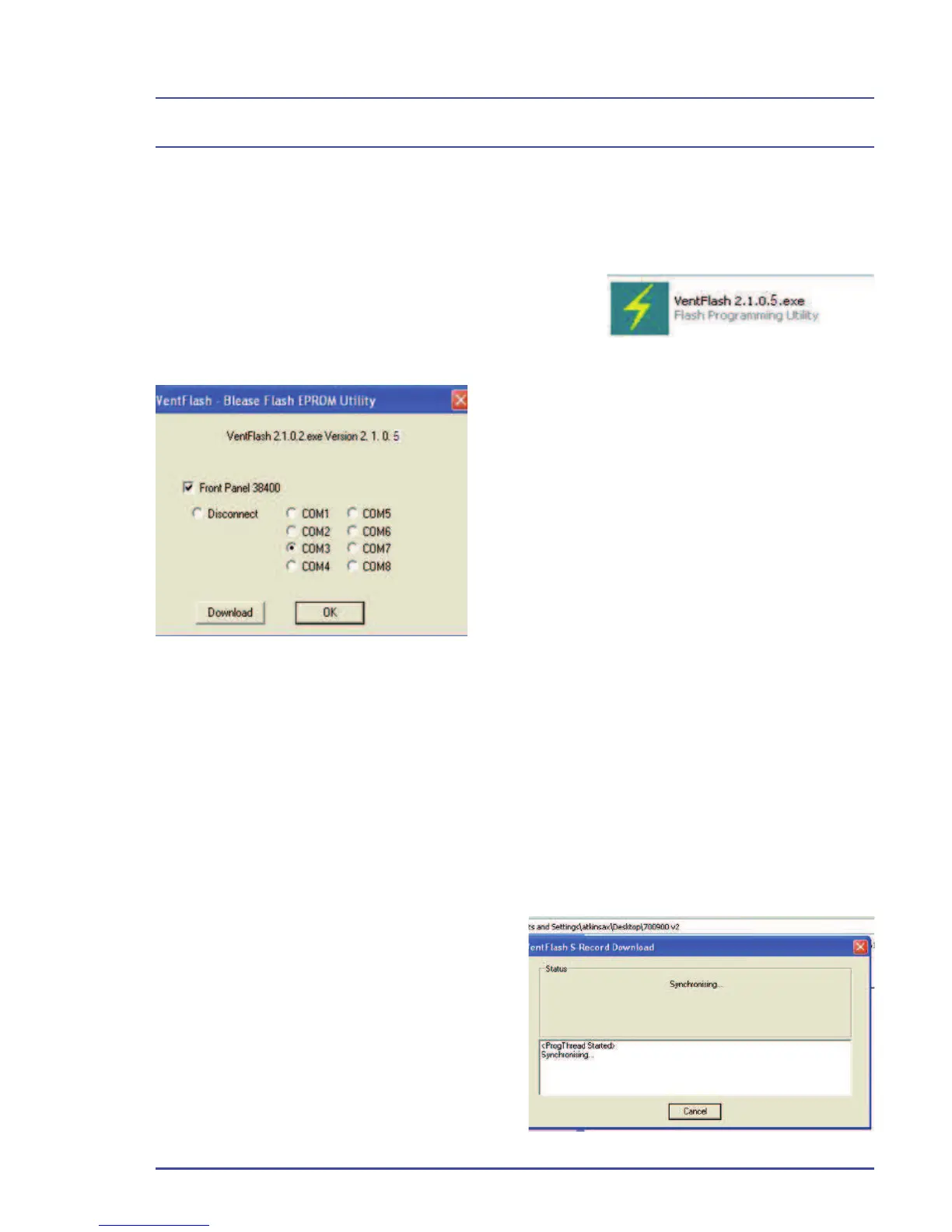
The screen (Figure 146) will be displayed:
Front panel 38400 will be checked.
This is the band rate for programming the
front panel. (It only needs to be unchecked
for early 8500 ventilator.)
VentFlash should automatically detect the
com port in use. Should it not automatically
detect, click on the com port you are using.
4. Select download.
Figure 146 - VentFlash Screen
5. Go to the directory that the new fi les are stored in.
6. Select and open the fi le, BAV 040_700900_v9_Xx_____ABS
This screen (Figure 147) will be displayed on the P.C. and a comms error will be
displayed on the ventilator screen.
When completed, the ventilator will reboot and the VentFlash screen will be
displayed.
7. Click download and select FP700900_10_ox_combined.a20
The ventilator screen will display programming.
Figure 147 - VentFlash Sync Screen
When programming is completed, the
ventilator will reboot.
8. Select OK on the VentFlash
screen to fi nish.
Detailed Repair Procedures



 To Next Page