88
System Checks
41. Decrease the oxygen lower limit to 18% and the higher limit to 19%. Verify
that the Oxygen High alarm is displayed on the ventilator.
42. Disconnect the O
2
sensor, then verify that the O
2
Sensor Error alarm is
displayed on the ventilator.
43. Disconnect the 700/900 ventilator AC power cord. Verify that the Mains
Fail alarm is displayed on the ventilator and that the green LED light turns
red.
44. Disconnect the AC power cord. Verify that the mains fail alarm is
displayed, the battery icon is displayed on the ventilator and that the
green LED light turns red.
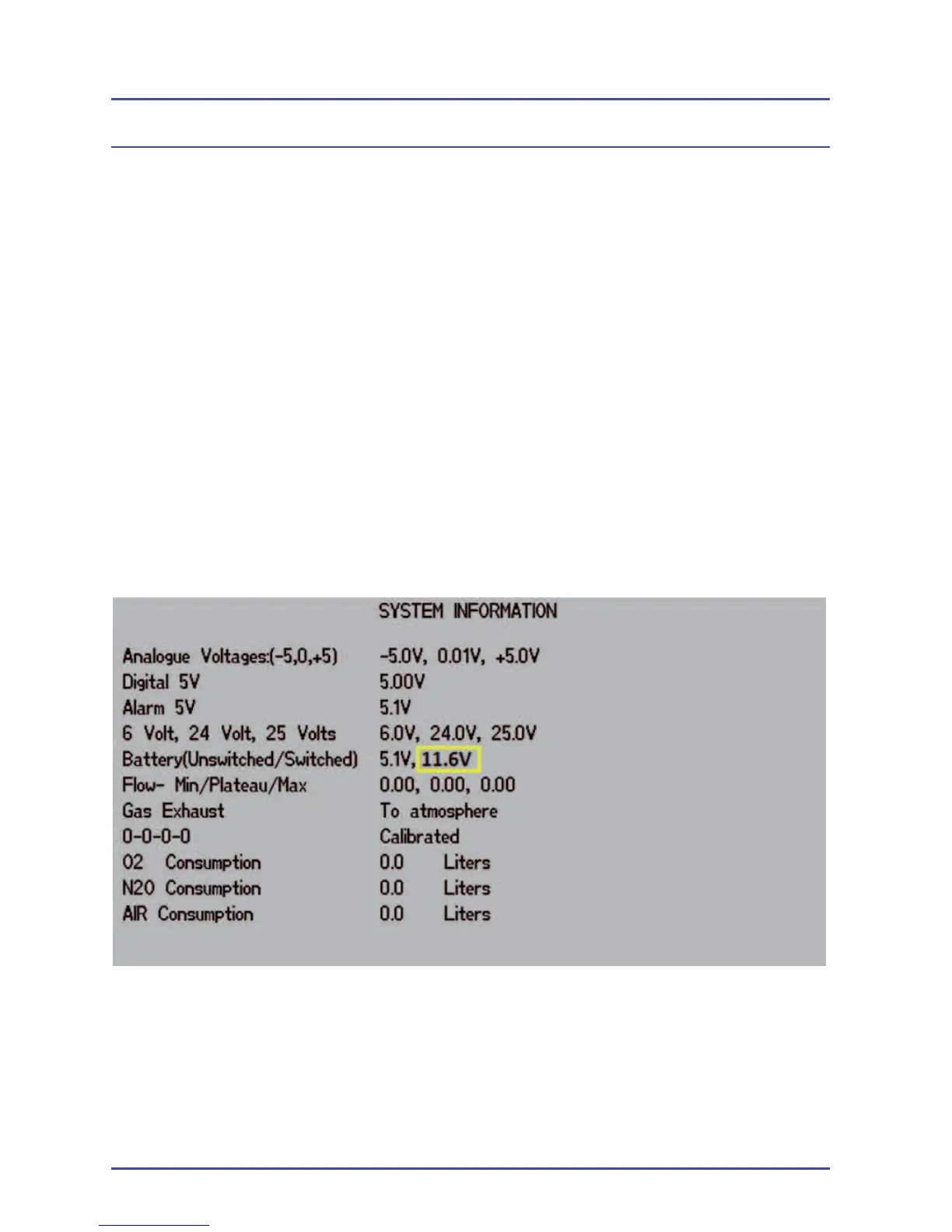
45. Press Setup > Confi guration > System Information. Display the second
System Information screen and verify that the second battery voltage
(Switched) is greater than 11V. If not greater than 11V, ensure the unit
has had the battery continually charging for a minimum of 8hrs before
verifying. If the voltage is still low after 8 hours of continuous charge,
replace the battery.
46. Slightly dismount the absorber. Verify that the Absorber Not Fitted alarm is
displayed on the ventilator.
47. Remount the absorber.
System Information Screen #2, Battery (Unswitched/Switched)
Reading is greater Than 11 V



 To Next Page