Vista 5 M3 Digital Mixing System
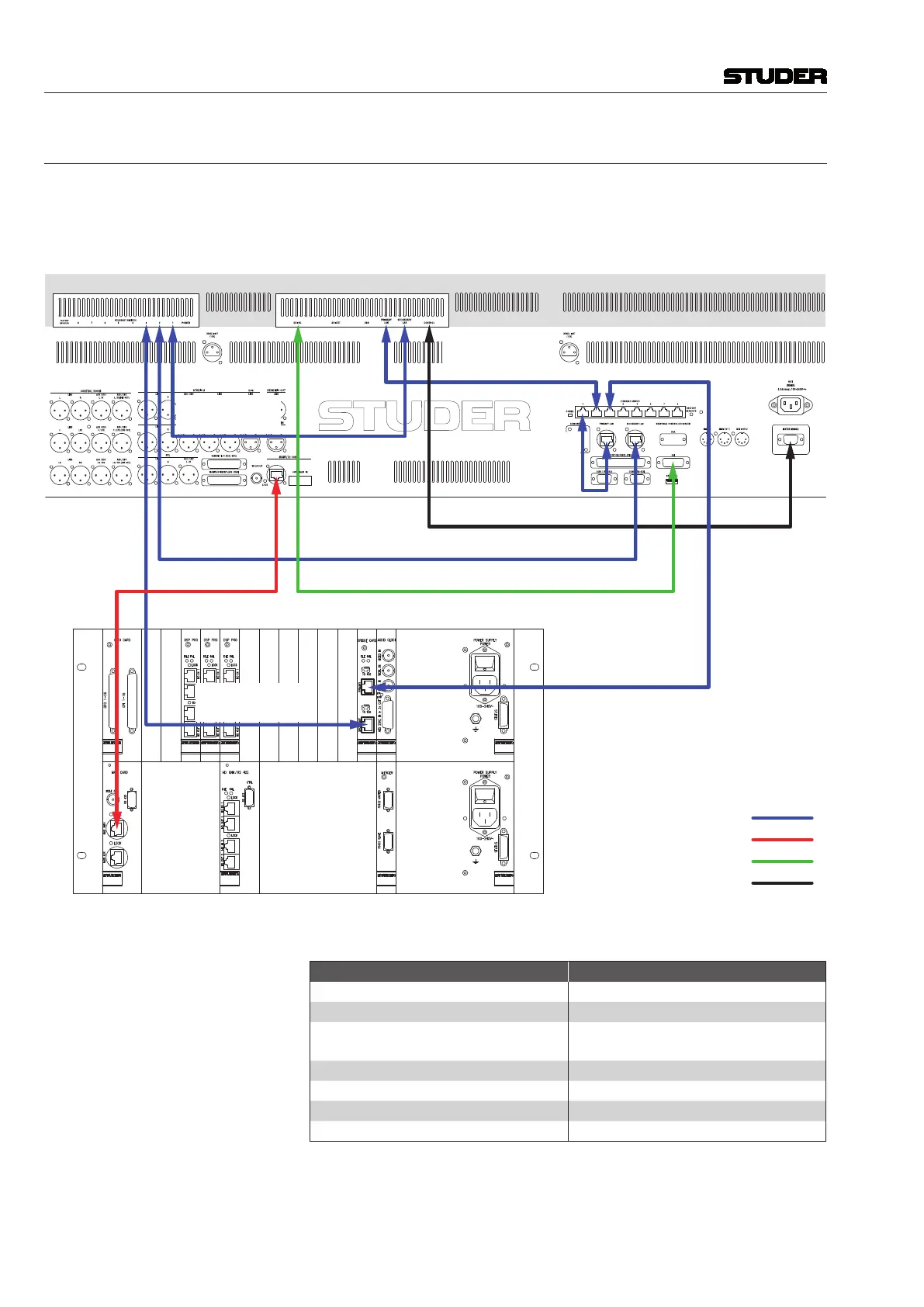
2 Meterbridge Installation
Document generated: 07.10.13
Electrical: DSP Core with Single Bridge Card
1. Wirethesystemaccordingtothediagrambelow.
2. Connectthemainscableattachedtothemeterbridgetothemainsoutletat
theconsole’srearside.
Meterbridge PC,
Primary LAN –
Desk Switch (1 m)
Meterbridge Switch
– Meterbridge PC,
Secondary LAN (0.6 m)
Desk Switch –
Core Bridge Card,
Primary (Control)
Meterbridge Switch –
Core Bridge Card,
Secondary (Control)
Desk PC, Secondary LAN – Meterbridge Switch (1 m)
Cat5 Ethernet Connection
Cat5 MADI Connection
DVI Connection
Power-On Connection
SCore Live Frame with Single Bridge Card
VISTA 5 M3 Desk with Meterbridge Option, Rear Side
GC DVI Signal – Meterbridge (1.8 m)
Cat5 MADI Connection
Desk – Core (Monitoring)
Power-On Link, Desk –
Meterbridge PC (0.7 m)
Desk PC,
Primary LAN
– Desk PC,
(0.3 m)
IP Addresses
Device IP Address
Desk PC, Primary LAN 192.168.1.128
Desk PC, Secondary LAN 192.168.2.128
(Desk PC, Auxiliary LAN
requires an optional network card)
(DHCP or as required)
Meter Bridge PC, Primary LAN 192.168.1.129
Meter Bridge PC, Secondary LAN 192.168.2.129
Bridge Card, Primary 192.168.1.60
Bridge Card, Secondary 192.168.2.60



 To Next Page