Warning Alarm
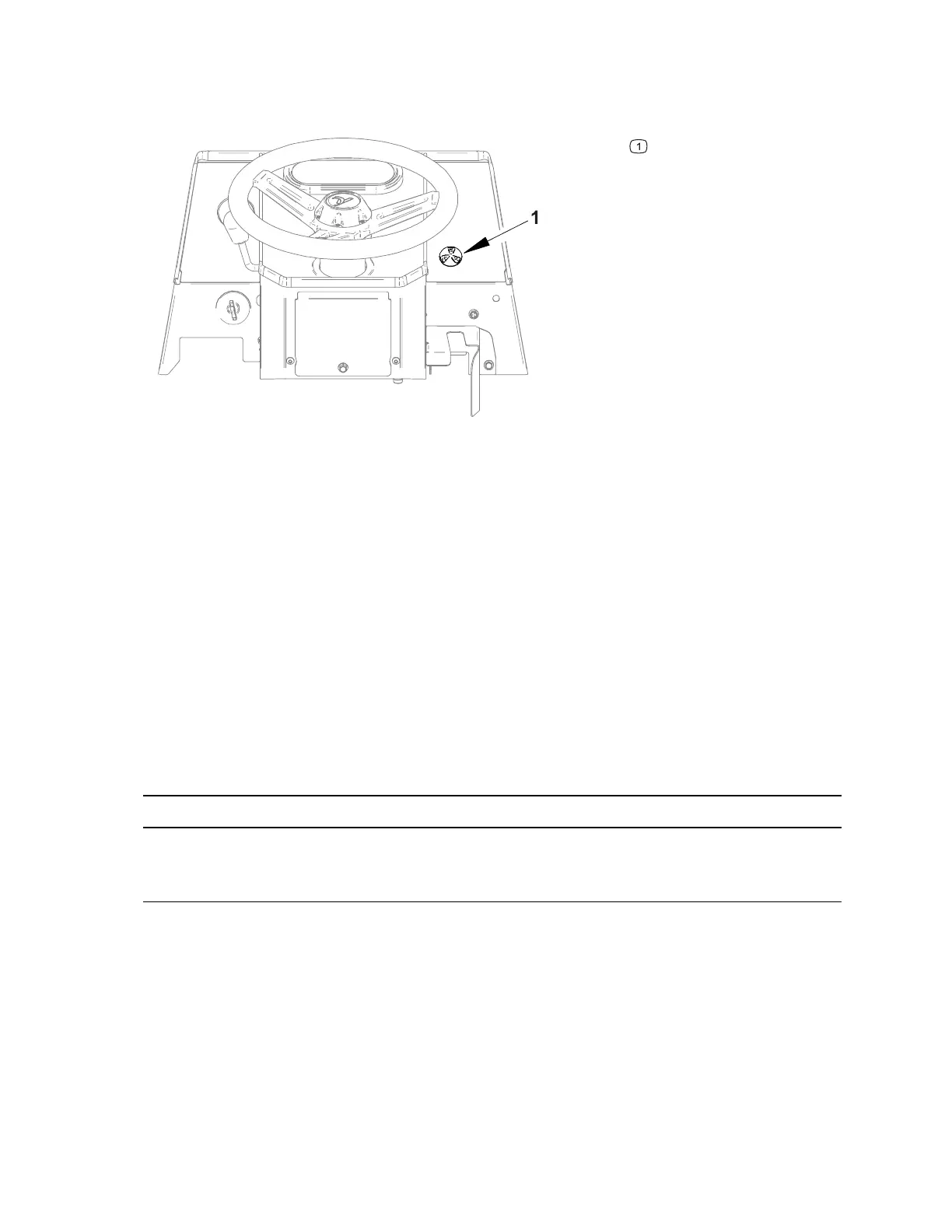
Figure 54
G425335
Warning alarm
The warning alarm sounds to notify the operator when a machine problem exists. A
ground signal is sent from the gauge when specific conditions exist. The alarm is
located to the right of the steering wheel mounted to the dash.
Testing the Warning Alarm
1. Park the machine on a level surface, lower any attachments to the ground,
engage the parking brake, and remove the key from the ignition.
2. Switch the main circuit breaker to the O
FF position, to de-energize the electrical
system.
3. Raise the hood and locate the warning alarm on the backside of the dash.
4. Disconnect the harness wires from the back of the alarm.
IMPORTANT
Make sure to observe polarity on the alarm terminals when testing. Damage to
the alarm may result from an improper connection.
5. Connect a 12 VDC power supply to the alarm (+) terminal and a ground to the (-)
terminal. The alarm should sound.
6. Replace the alarm if necessary.
7. If the alarm tests correctly and a circuit problem still exists, check the wire
harnesses; refer to 9 Appendix A, page 9–1.
8. Connect the harness wires to the alarm and close the hood.
9. Switch the main circuit breaker to the O
N position, to energize the electrical
system.
Electrical System: Warning Alarm Page 6–42 4520P
09.40003Rev 00



 To Next Page