Removing and Installing the Engine Covers
(continued)
3. Remove the mounting bolts .
4. Remove the engine cover(s)
from the machine.
5. To install the engine cover, position the cover aligning the mounting holes.
6. Install the mounting bolts
.
7. Switch the main circuit breaker to the O
N position, to energize the electrical
system.
Removing and Installing the Hydraulic Pump Cover
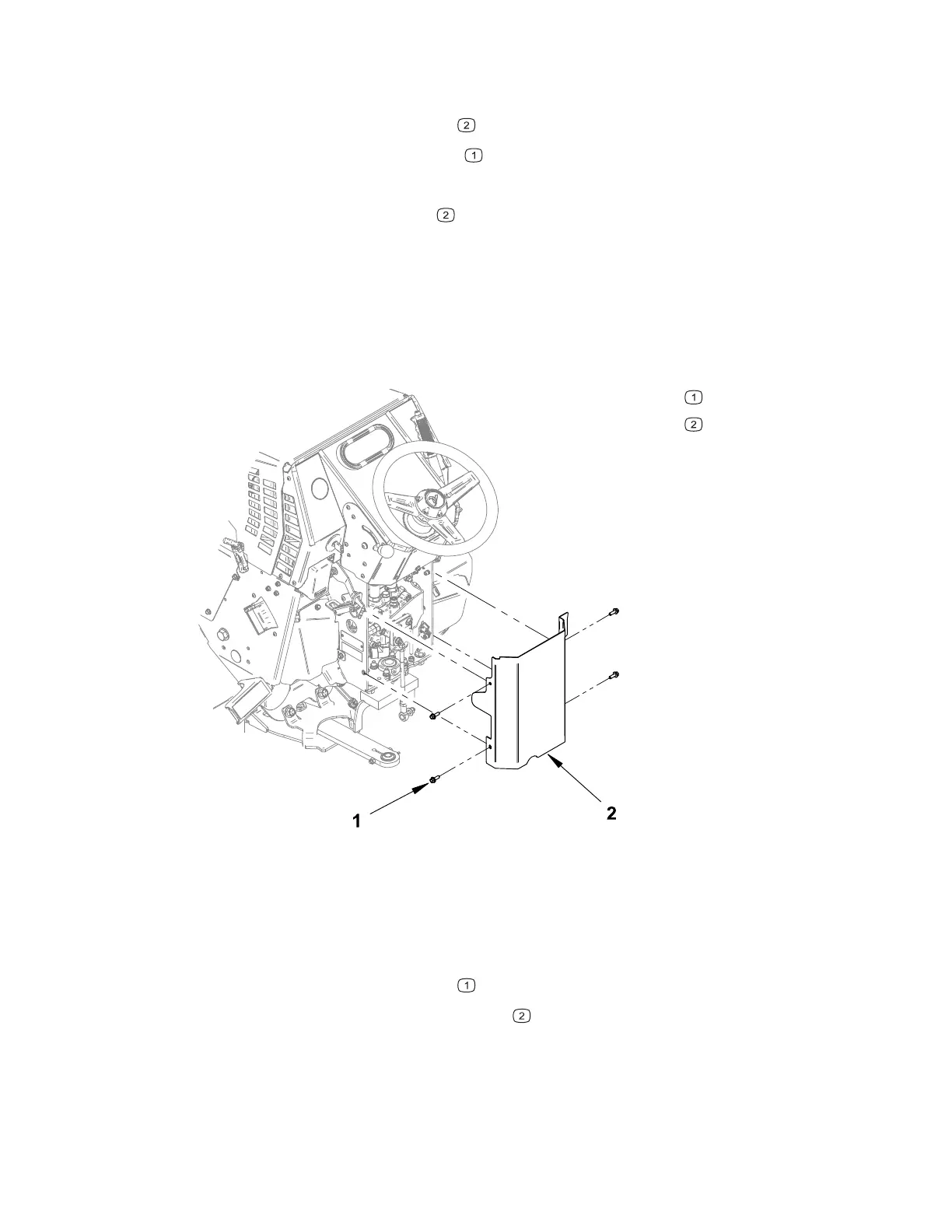
Figure 80
G429838
Mounting bolt
Pump cover
1. Park the machine on a level surface, lower any attachments to the ground,
engage the parking brake, and remove the key from the ignition.
2. Switch the main circuit breaker to the O
FF position, to de-energize the electrical
system.
3. Remove the mounting bolts
.
4. Remove the hydraulic pump cover
.
5. To install the hydraulic pump cover, position the cover against the front frame
aligning the mounting holes.
6. Install the mounting bolts.
4520P Page 7–15 Chassis: Service and Repairs
09.40003Rev 00



 To Next Page