Removing and Installing the Left Rear Seat Box Panel
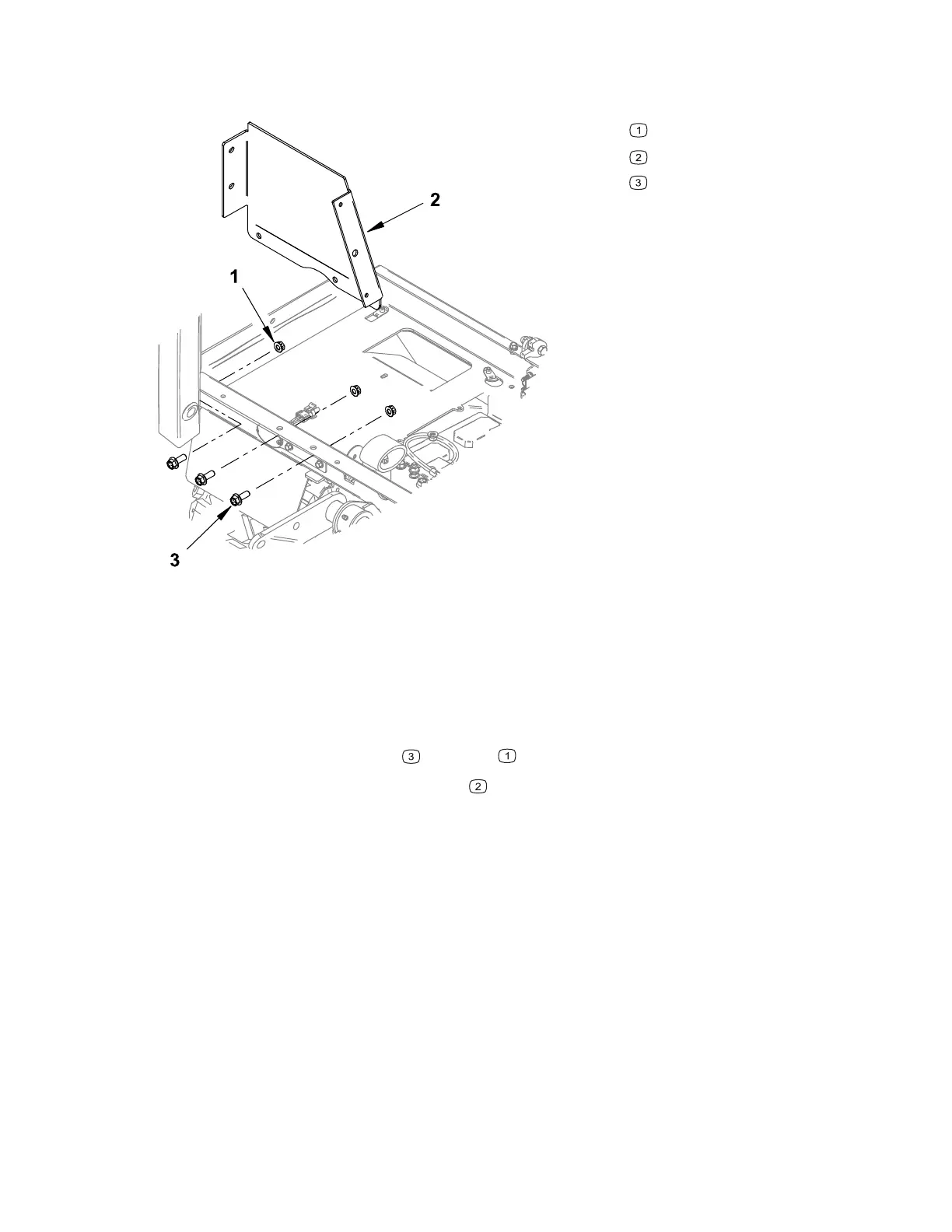
Figure 93
G430657
Nut
Left rear seat box panel
Mounting bolt
1. Park the machine on a level surface, lower any attachments to the ground,
engage the parking brake, and remove the key from the ignition.
2. Switch the main circuit breaker to the O
FF position, to de-energize the electrical
system.
3. Remove the fuel tank; refer to Removing and Installing the Fuel Tank, page 4–10.
4. Remove the mounting bolts
and nuts .
5. Remove the left rear seat box panel
.
6. To install the left rear seat box panel, position the panel on the seat box frame
aligning the mounting holes.
7. Install the mounting bolts.
8. Install the fuel tank.
9. Switch the main circuit breaker to the O
N position, to energize the electrical
system.
Chassis: Service and Repairs Page 7–28 4520P
09.40003Rev 00



 To Next Page