Hydraulic Fluid Temperature Switches
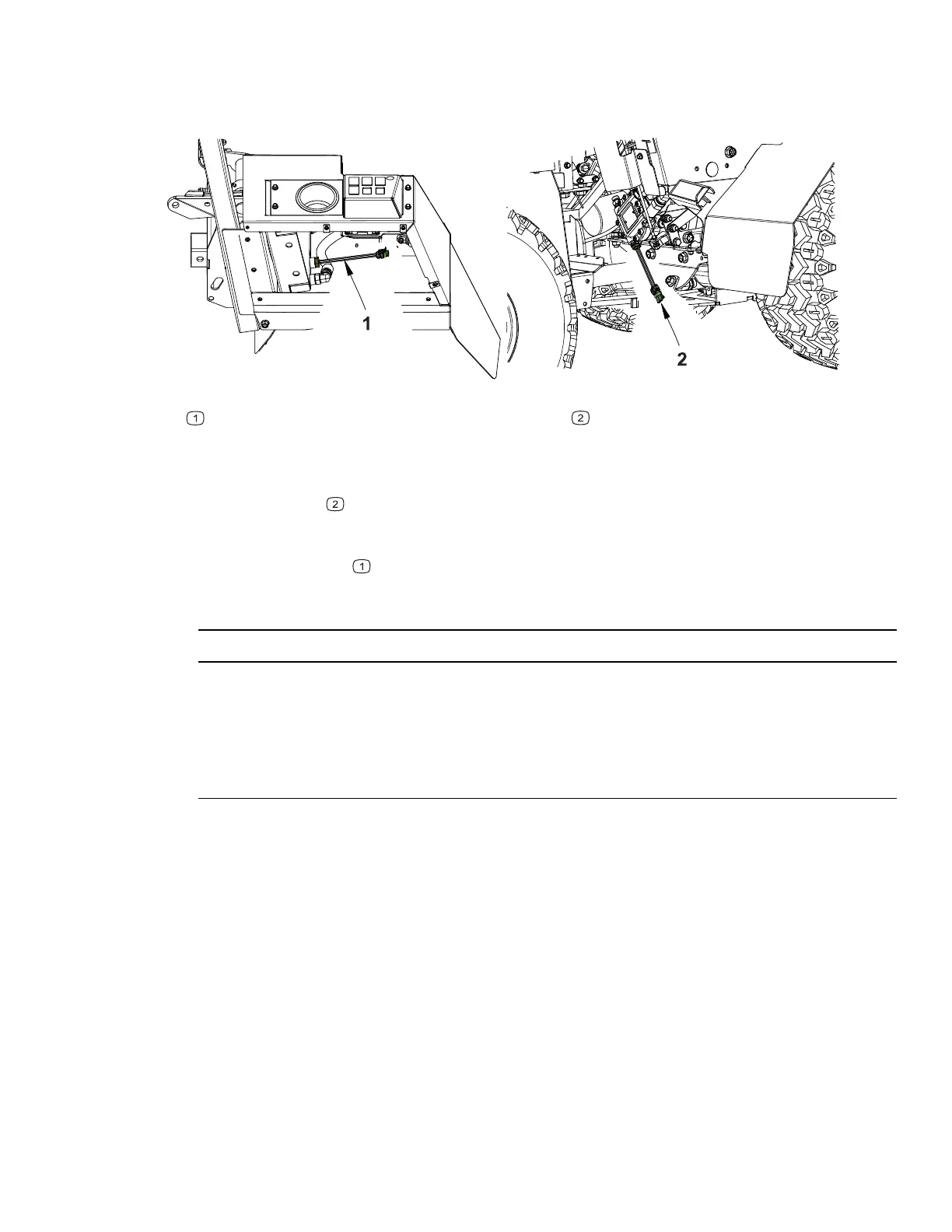
Figure 55
G423281
Temperature switch 170°F
Temperature switch –06 SAE ORB
The 4520 is equipped with two hydraulic fluid temperature switches to monitor and
control the hydraulic fluid temperature. One temperature switch is in the front
hydraulic motor
. This switch will activate the high hydraulic temperature indicator
light in the information cluster gauge as well as an audible alarm when the hydraulic
oil temperature reaches 245°F (118°C). Another temperature switch is in the
hydraulic oil cooler
. This switch will activate the hydraulic oil cooler fan when the
hydraulic oil temperature reaches 170°F (76°C).
IMPORTANT
If the audible alarm can be heard and/or the high hydraulic temperature
indicator light is illuminated immediately park the power unit and move the
throttle to the slow idle position. Check the hydraulic cooler fan to ensure it is
operating properly. Allow the hydraulic system to cool before investigating or
troubleshooting the problem. Refer to 3 Troubleshooting, page 3–1.
Testing the Front Motor Hydraulic Fluid Temperature
Switch
1. Park the machine on a level surface, lower any attachments to the ground,
engage the parking brake, and remove the key from the ignition.
2. Switch the main circuit breaker to the O
FF position, to de-energize the electrical
system.
3. Place a drain pan under the front hydraulic motor to catch any hydraulic oil.
4. Locate the temperature switch and disconnect the wire harness.
5. Thoroughly clean the hydraulic motor around the temperature switch.
6. Remove the temperature switch from the motor and discard the O-ring.
4520P Page 6–45 Electrical System: Hydraulic Fluid Temperature Switches
09.40003Rev 00



 To Next Page