Removing the Weight Transfer Assembly
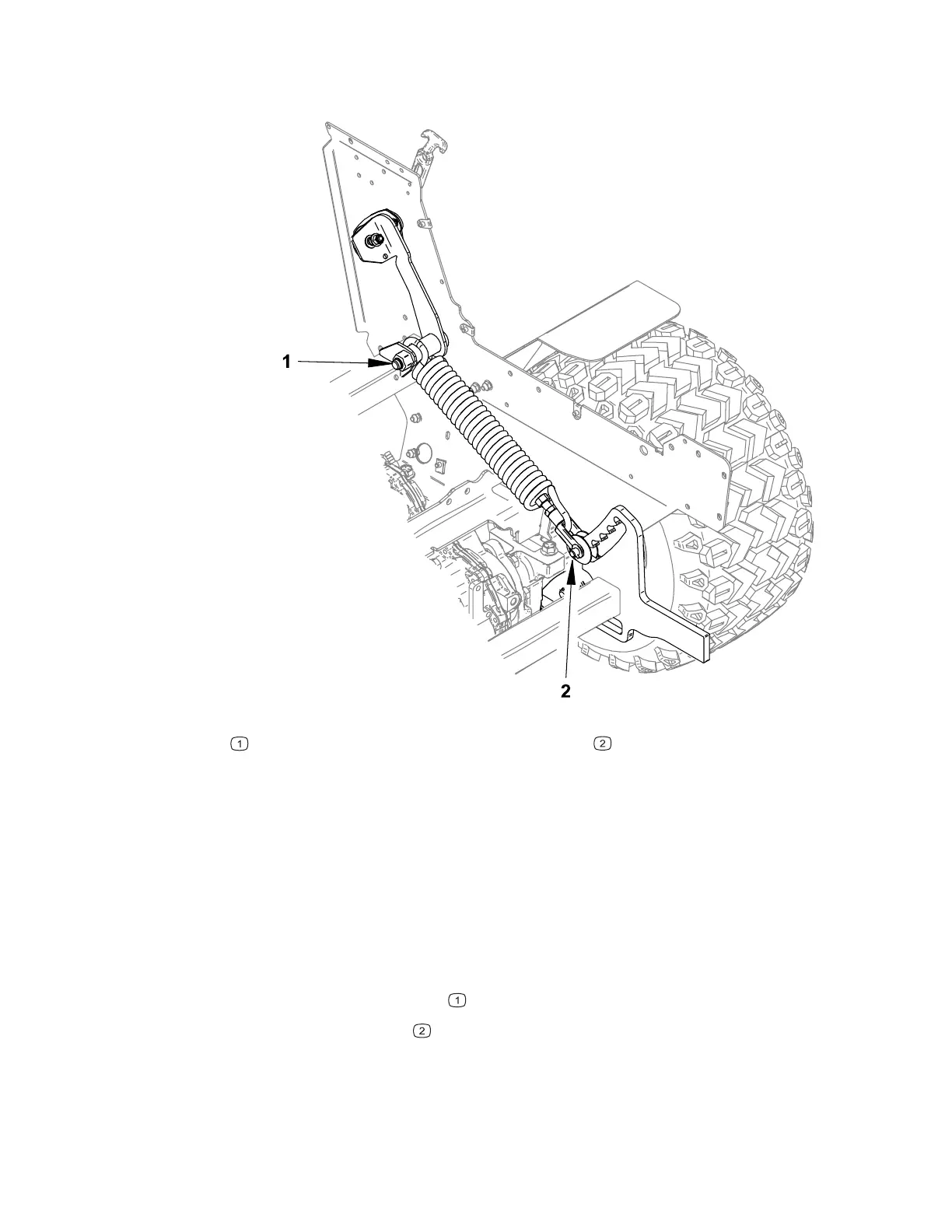
Figure 102
G443472
Mounting bolt
Clevis pin
1. Remove any attachments from the machine, park the machine on a level surface,
engage the parking brake, lift the front hitch to the fully up position, remove the
key from the ignition, and switch the main circuit breaker to the O
FF position.
2. Remove the air cleaner; refer to 4520P Removing and Installing the Air Cleaner
System, page 4–3.
3. Remove the left engine cover; refer to Removing and Installing the Engine
Covers, page 7–14.
4. Set the weight transfer adjustment lever to the number 4 position, loosen the
selector bracket mounting hardware.
5. Remove the mounting bolt
.
6. Remove the clevis pin
and washers.
7. Remove the weight transfer assembly from the machine.
4520P Page 7–37 Chassis: Service and Repairs
09.40003Rev 00



 To Next Page