Appendix D Moving a Robot or Motion Device With the MCP
Adept MV Controller User’s Guide, Rev. B 253
Robot States
World State
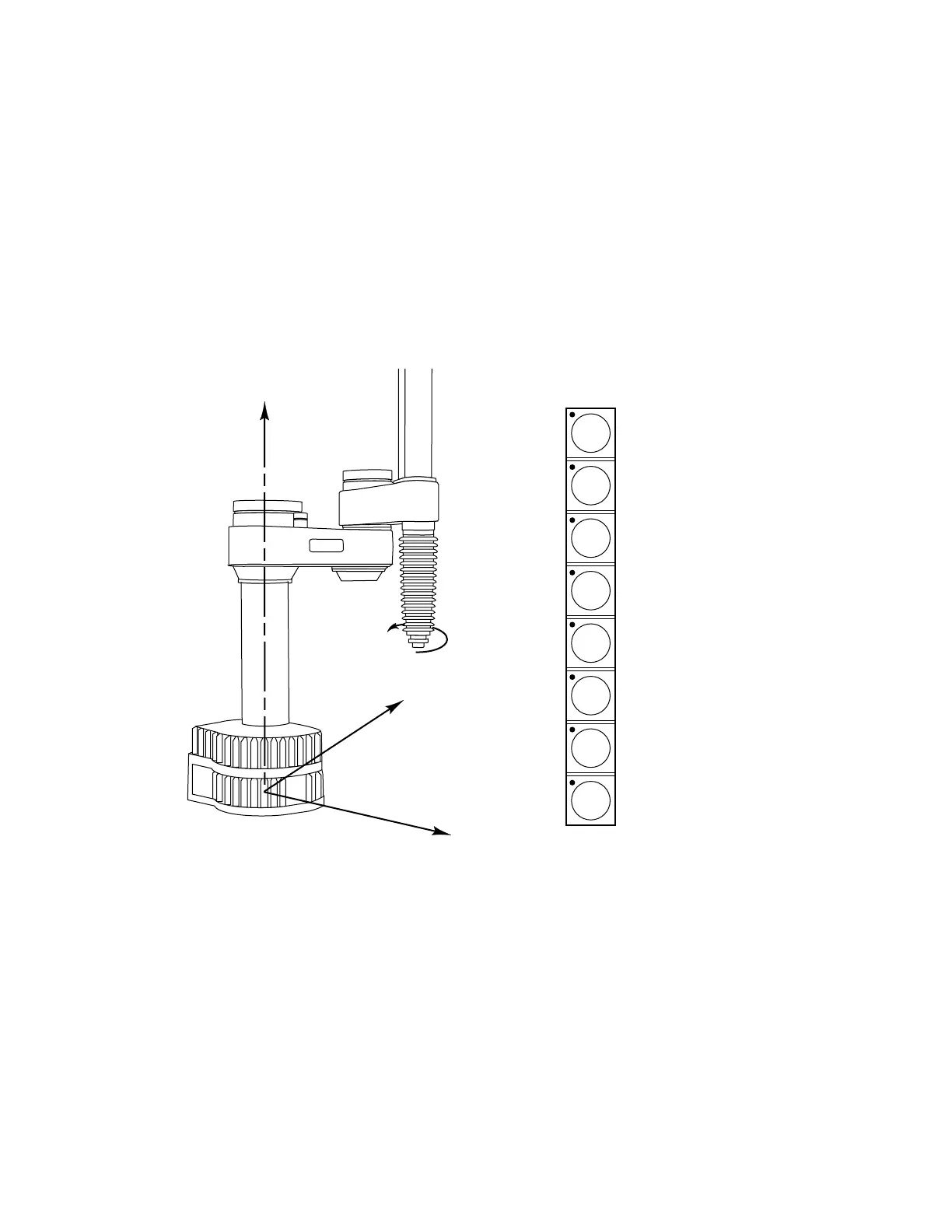
When world state is selected, movement in the X, Y, or Z direction is parallel to an
axis of the world coordinate system. Before the speed bars will move the robot, an
axis of motion must be selected from the manual control buttons. The world
coordinate system for a SCARA robot is shown in Figure D-13. If X1 is selected,
pressing the “+” speed bar will move the robot tool flange in the positive X
direction. Pressing the “–” speed bar will move the flange in the negative X
direction.
Figure D-13. WORLD State (Four-Axis SCARA)
The T
1
button cycles the gripper solenoids. Press anywhere on the “+” side of the
speed bar to open the gripper, on the “–” side to close the gripper.
T
1
RZ
6
RY
5
RX
4
Z
3
Y
2
X
1
X direction
Y direction
Z direction
Rotation
Gripper Activity
STEP
adept
+X
+Y
+RZ (CCW)
+Z
X direction
Y direction
Z direction
Rotation
Gripper activity
(CCW)
Artisan Technology Group - Quality Instrumentation ... Guaranteed | (888) 88-SOURCE | www.artisantg.com


 To Next Page