Operator’s Station 9960 Self-Propelled Peanut Combine
42 06/03/05 MAN091
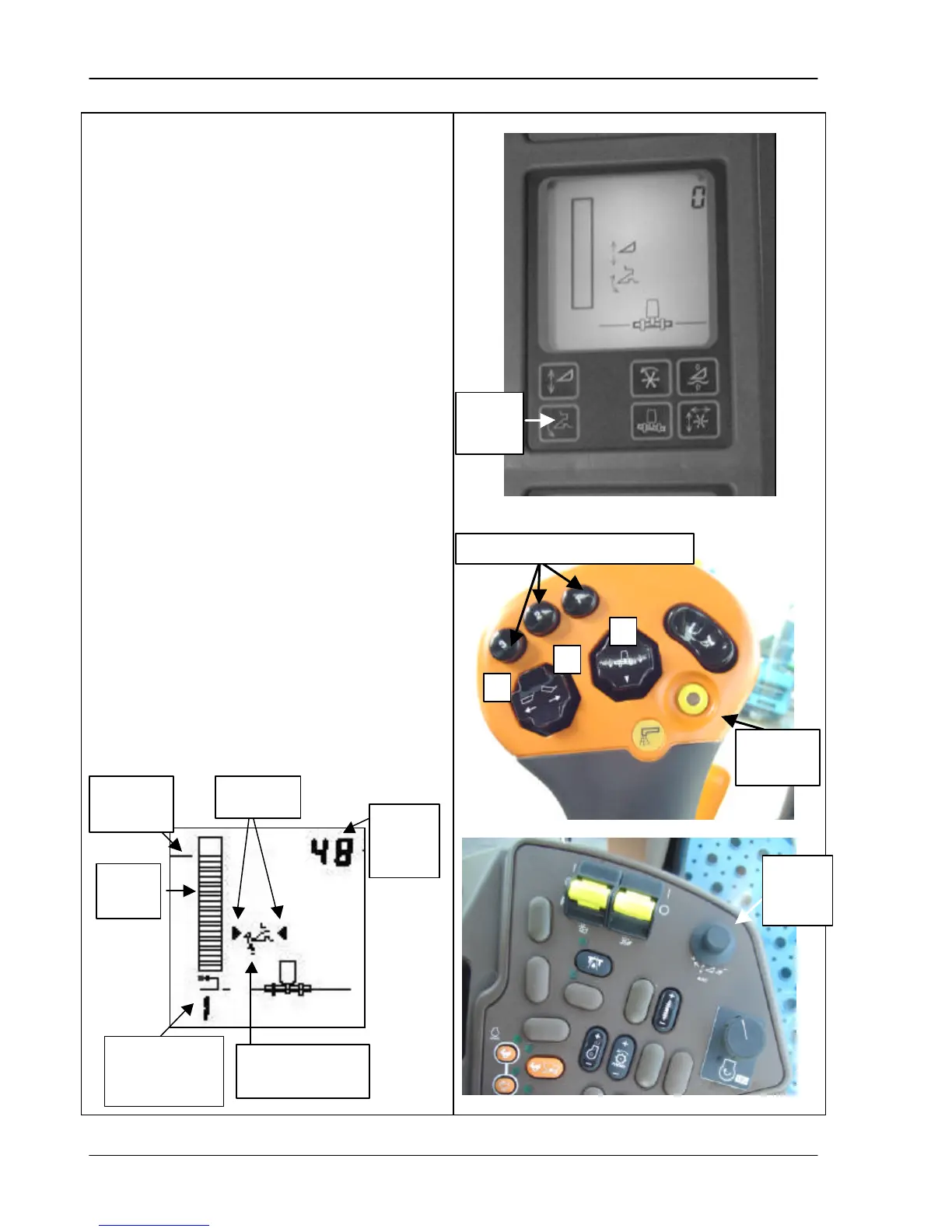
Using Header Height Resume
When you press the Header Height Control
button (top photo) on the AHC display to
enable the system, the display screen shows
the header height resume symbol (see
drawing below).
• To activate the system, press one of the
activation buttons on the multi-function
handle (middle photo). The number of the
selected button displays along with
indicator arrows to show the system is
active.
• To change the height set point of any of
the buttons, press the button then turn the
height control dial until you achieve the
desired height (bottom photo). The bar
graph and relative number display the
height.
• To disable height resume and manually
adjust the height, press the header lift
switch in the handle (middle photo).
• To reactivate the system, press any of the
header height activation buttons (middle
photo).
• To turn off the height resume system,
press the header height resume switch on
the display unit of the corner post (top
photo).
height
resume
height
number
point
graph
activation
button pushed
resume symbol
Header height activation buttons
control
dial
switch



 To Next Page