Uni-Probe LB 490
BERTHOLD TECHNOLOGIES GmbH & Co. KG
3 – 353
Volume 3 4 Calibration
3
Enter the value for the upper calibration point and confirm the
entry with
ENTER.
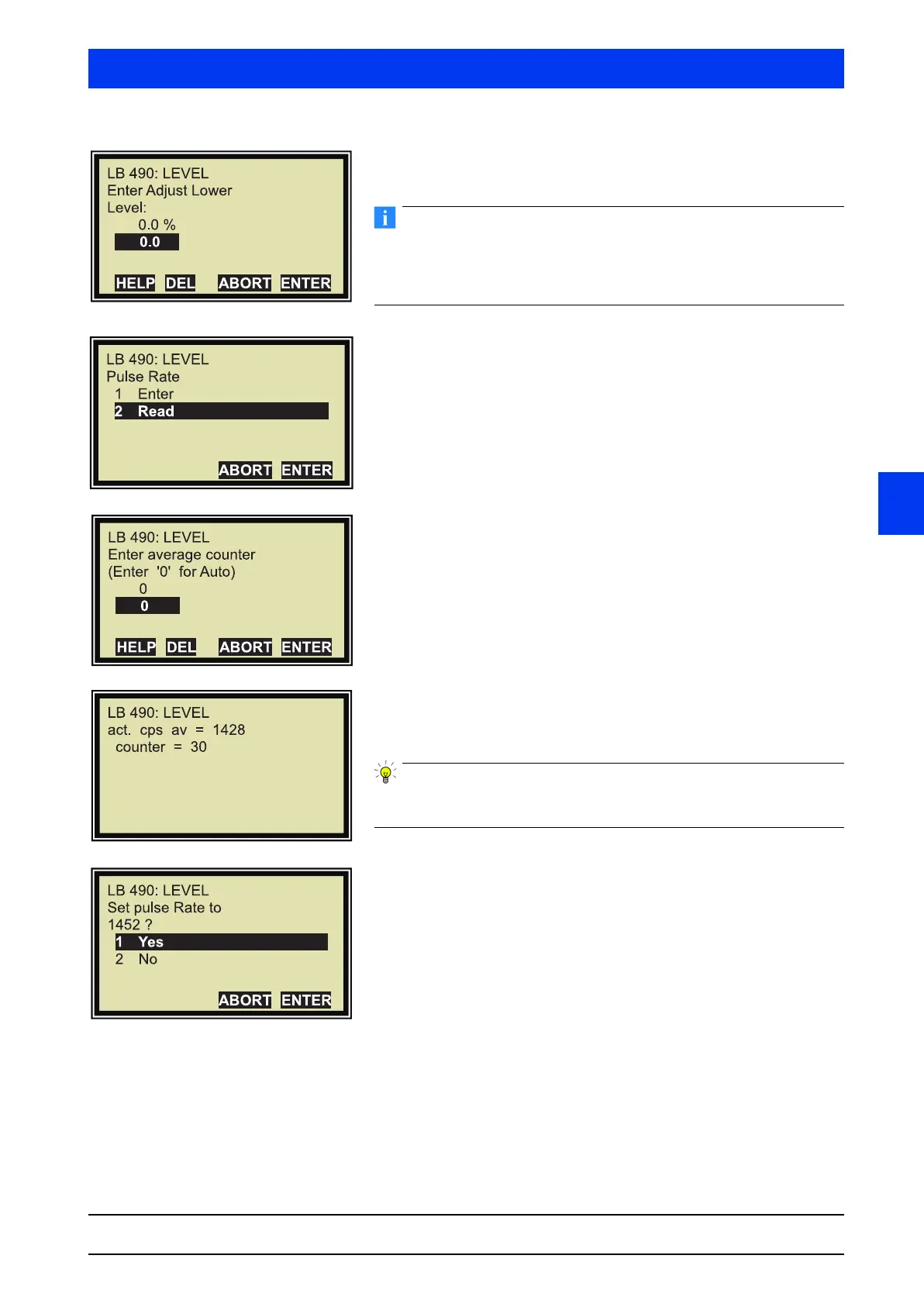
Typically, the lower calibration point is recorded at 0% level. If the
tank cannot be emptied, you may also enter levels above 0%.
Please note: The higher the value is above 0%, the less accurate
will be the reading at 0% after calibration.
Select
READ.
–For rod detectors you have to determine the background by
reading-in (
READ) the count rate.
–For point detectors you may enter a count rate of approxi-
mately 40 pulses via
ENTER. We recommend, however,
reading in the background for point detectors as well to
determine the actual background.
Start reading-in the count rate with
ENTER.
The count rate reading-in process has started. If the process
has been started with 0, it will take 30s until the count rate is
read in.
For more information on reading in the count rate please refer to
Volume 3, section 6.6.
Select
YES.


 To Next Page
 Loading...

