7
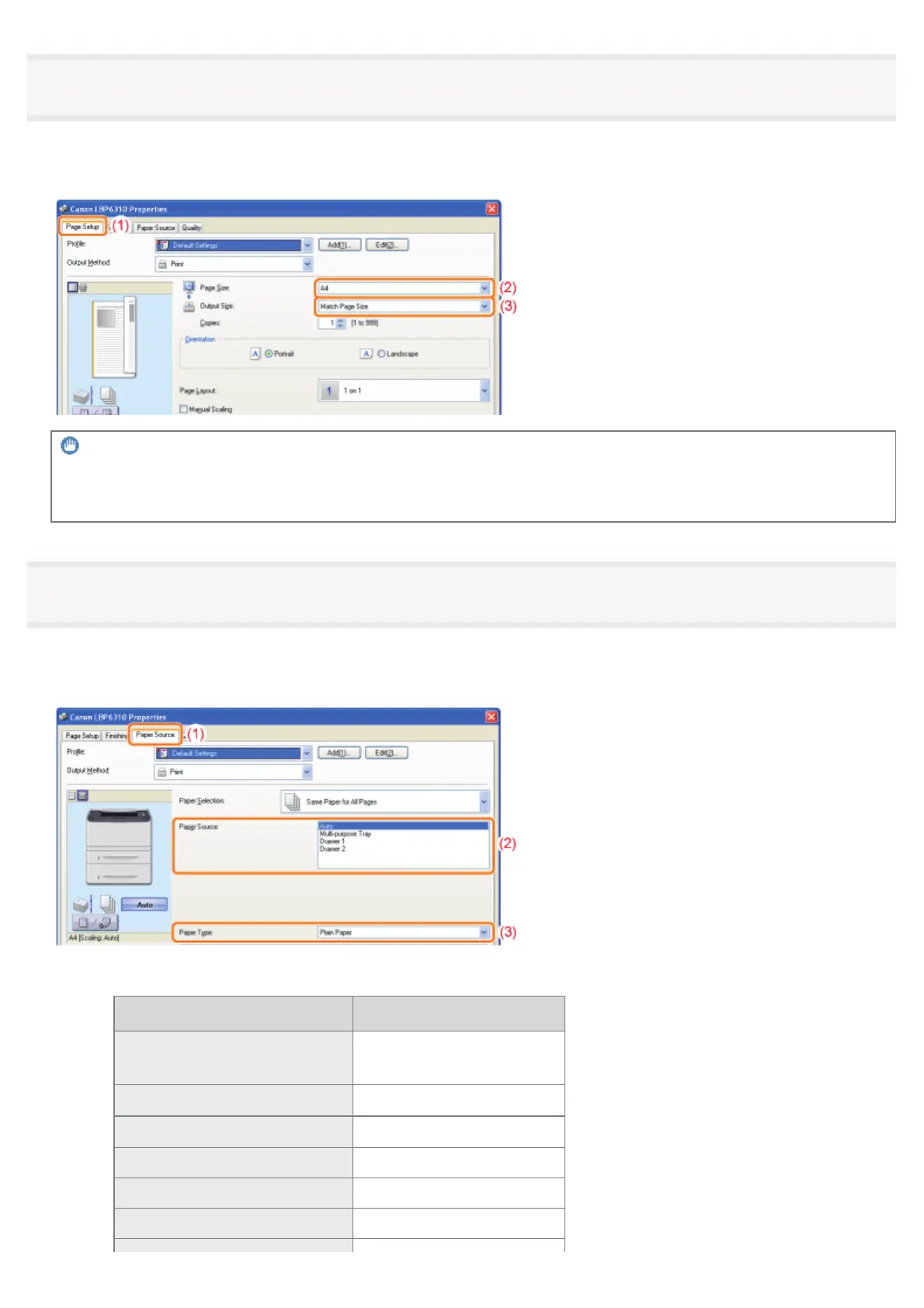
Specify the settings for [Page Size] and [Output Size].
(1) Display the [Page Setup] sheet.
(2) Select the page size of the document created by an application.
(3) Select if the size of the paper to be printed is different from that of the data.
IMPORTANT
If the [Page Size] setting and [Output Size] setting are different
The print is automatically reduced or enlarged to fit on the page.
8
Specify the settings for [Paper Source] and [Paper Type].
(1) Display the [Paper Source] sheet.
(2) Set the paper source you want to use.
(3)
Select the type of the paper loaded in the paper source.
*
*
Specify the setting according to the paper type as follows.
Paper Type Setting for [Paper Type]
Plain paper (60 to 90 g/m
2
)
[Plain Paper] (Default)
[Plain Paper L]
**
Heavy paper (91 to 150 g/m
2
)
[Heavy Paper 1]
Heavy paper (151 to 163 g/m
2
)
[Heavy Paper 2]
Transparency [Transparency]
Label [Label]
Index Card [Envelope]
㻝㻡㻟㻌㻛㻌㻠㻡㻞














 To Next Page