CDM-625A Advanced Satellite Modem MN-CDM625A
Ethernet-based Remote Product Management Revision 4
7–11
7.5.3 HTTP Interface – Menu Tree
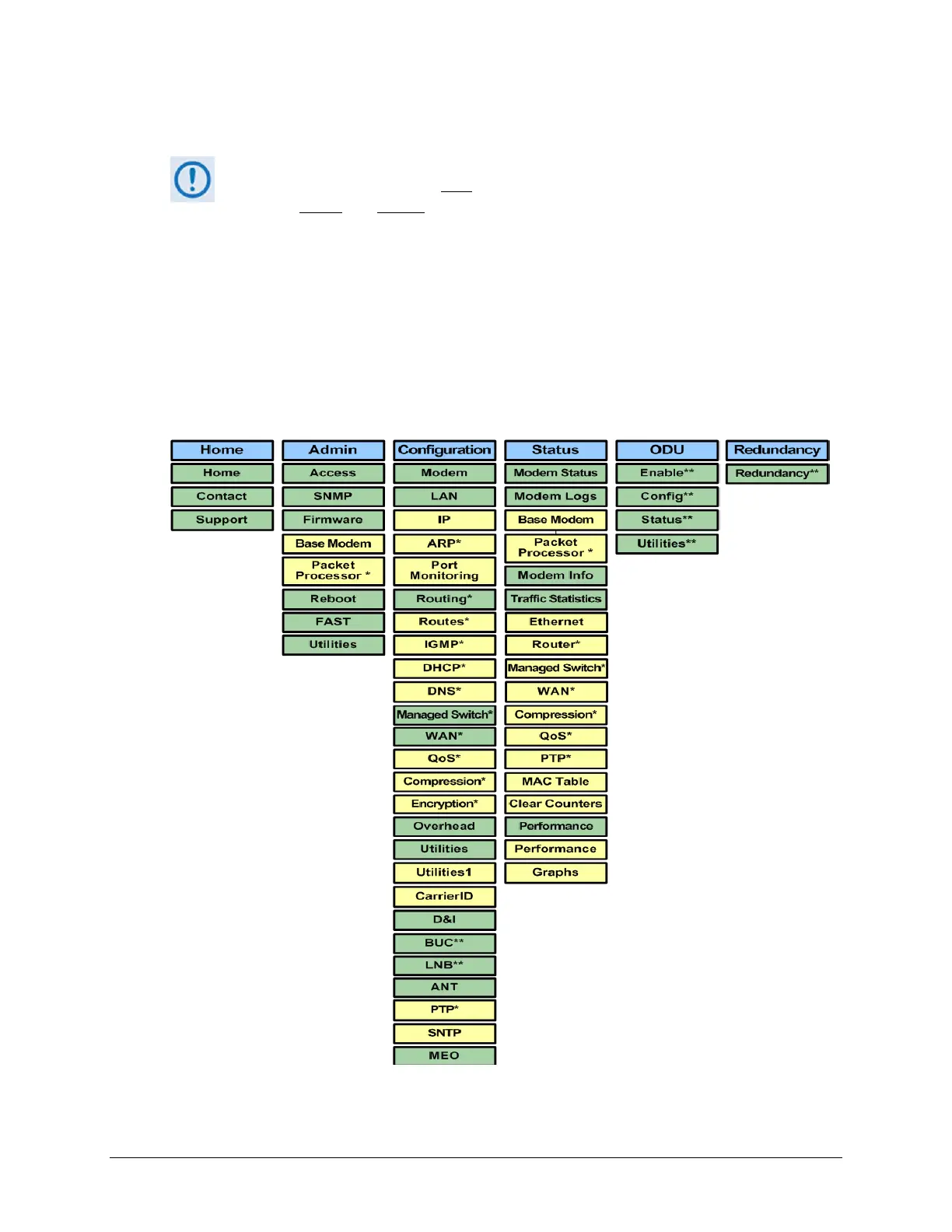
The CDM-625A HTTP Interface pages in this diagram that are marked with an asterisk
(*) are selectable/operational only
when you activate the optional FAST feature, or
when you install
and enable the optional IP Packet Processor card and log in with
Admin access privileges. See Sect.
7.5.3.1 for detailed information about this
conditional access.
Any page marked with double asterisks (**) is functional only when an auxiliary
product such as a BUC or LNB is installed.
The menu tree diagram (Figure 7-2) lists the features available through the CDM-625A HTTP (Web
Server) Interface. This interface features six navigation tabs (shown in blue). Primary page tabs
(green) and nested page tabs (yellow) provide access to individual Web pages. Click any
navigation tab to continue.
Figure 7-2. CDM-625A HTTP (Web Server) Interface Menu Tree (FW Ver. 1.4.1)



 To Next Page