CDM-625A Advanced Satellite Modem MN-CDM625A
Installation Revision 4
2–4
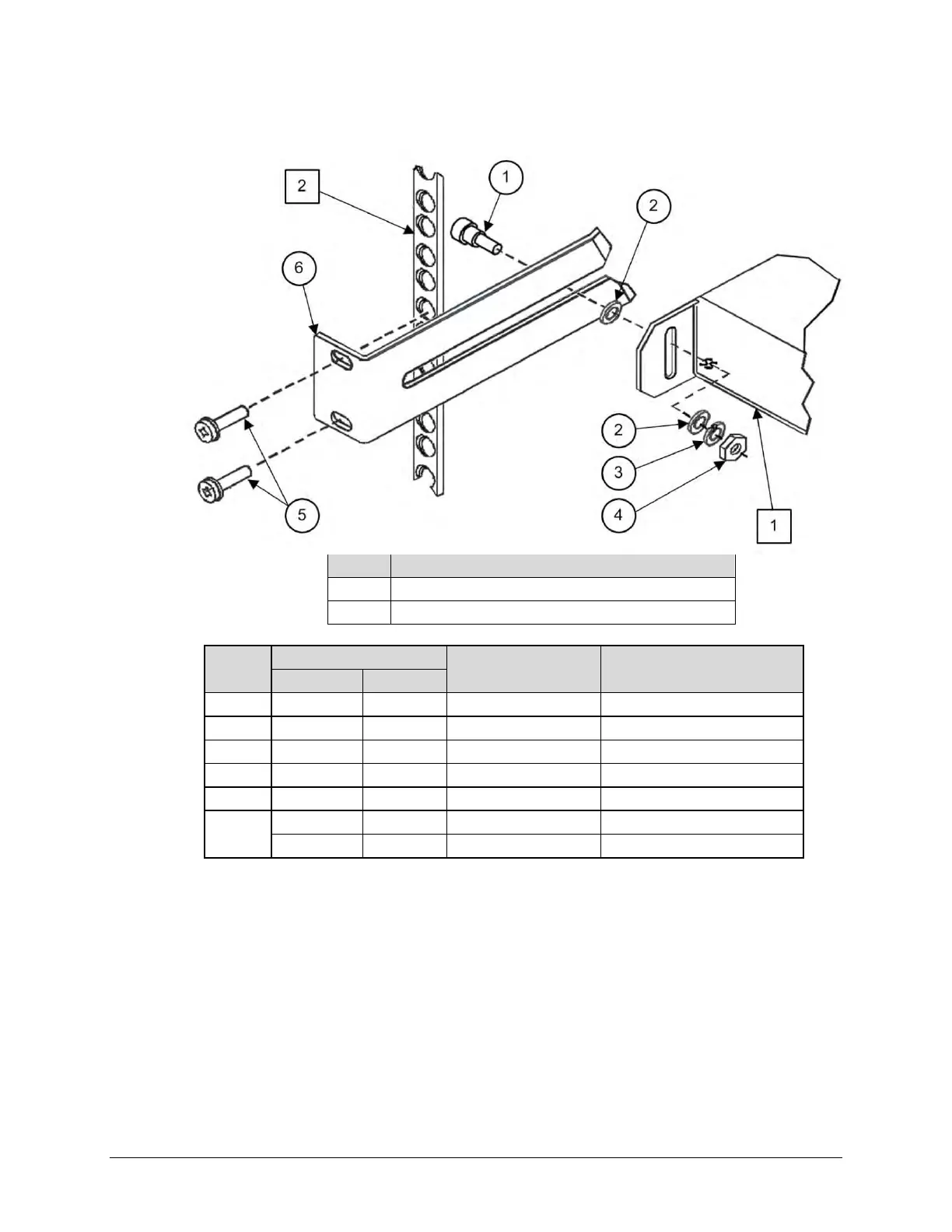
2.2.1 Install the Optional Rear-Mounting Support Brackets Kits
Feature Description
1 Back of modem
2 Rack Enclosure Threaded Rear Mounting Rail (typical)
Item
Kit / Quantity
CEFD P/N Description
KT/6228-2 KT/6228-3
1 2 2 HW/10-32SHLDR Shoulder Screw, #10
2 4 4 HW/10-32FLT Flat Washer, #10
3 2 2 HW/10-32SPLIT Lock Washer, #10
4 2 2 HW/10-32HEXNUT Hex Nut, #10
5 4 4 HW/10-32x1/2RK Bolt, #10, Rear Support Bracket
6
2 – FP/6138-2 Bracket, Rear Support – 4”
– 2 FP/6138-3 Bracket, Rear Support – 10”
Figure 2-3. Install the Optional Rear-Mounting Support Brackets Kit
Tools needed to install the optional KT/6228 (4”) or KT/6228 (10”) Rear-Mounting Support
Brackets Kit:
• A medium Phillips screwdriver
• A 5/32-inch SAE Allen Wrench
• An adjustable Crescent wrench.



 To Next Page