CDM-625A Advanced Satellite Modem MN-CDM625A
Telnet Command Line Interface (CLI) Operation Revision 4
9–11
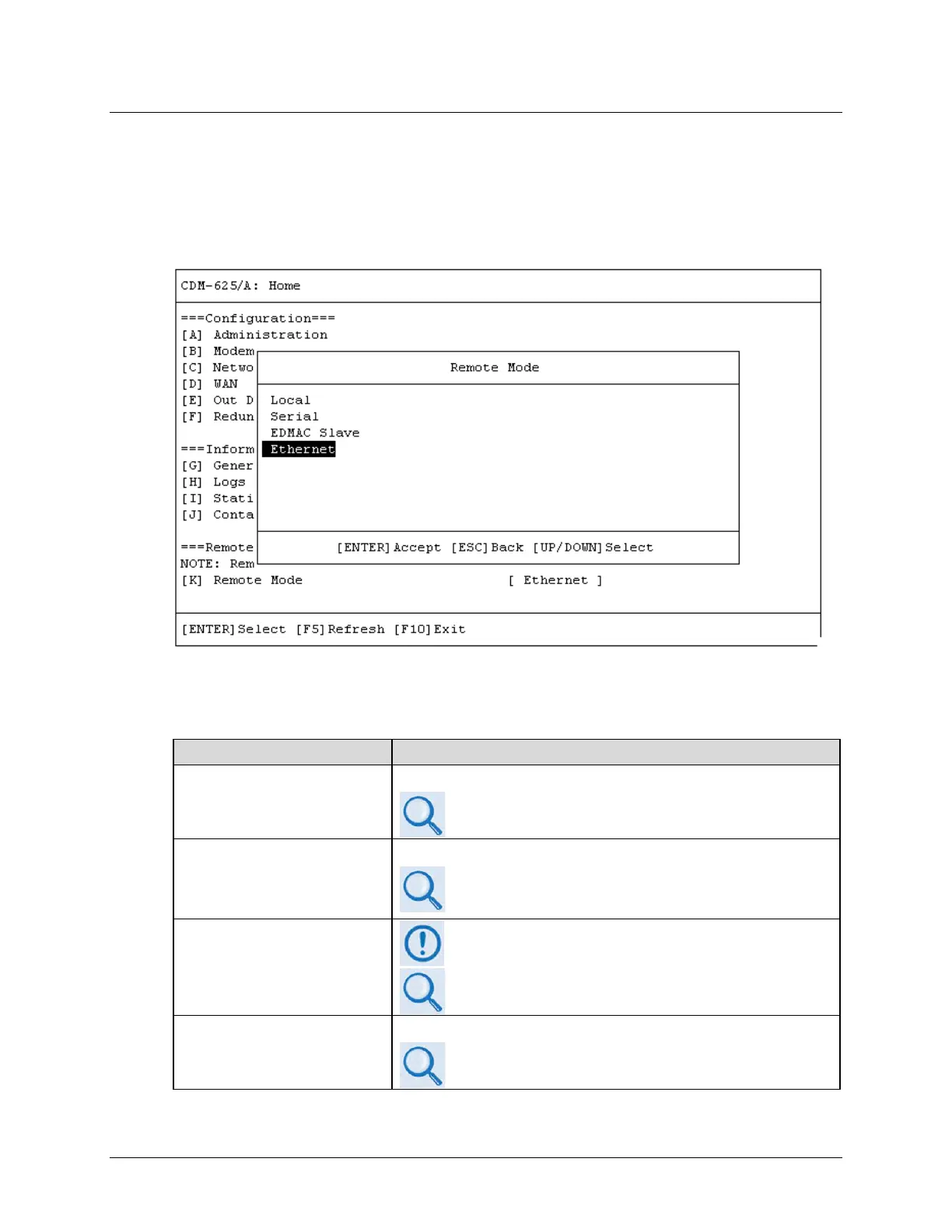
9.3.1.1 Home > Remote Access Mode
In order to proceed with the operations described through the remaining chapter, you must be
sure to set Remote Access Mode to [Ethernet] in order for configuration changes to be saved
into memory.
First, from the Home menu, press [K] to open the Remote Access Mode dialog window:
Then, use the ↑↓ arrow keys to select the Remote Mode as Ethernet, and press [ENTER] to
accept the selection. Finally, press [F8] to save to memory. Note the following:
Remote Access Mode Selection
Local
Configuration using Front Panel only
Chapter 6. FRONT PANEL OPERATION
Serial
Configuration using Serial Port
•
Sect. 6.2.1.12 CONFIG: REMOTE (Remote Control)
• Chapter 8. SERIAL-BASED REMOTE PRODUCT
EDMAC Slave
EDMAC mode cannot be set here – the CLI displays “EDMAC
Slave” when the modem is in EDMAC Slave Mode
Appendix H. EDMAC CHANNEL
Ethernet
Configuration using SNMP / Telnet CLI / Web Server Interface
Chapter 7. ETHERNET-BASED REMOTE PRODUCT
MANAGEMENT



 To Next Page