CDM-625A Advanced Satellite Modem MN-CDM625A
Telnet Command Line Interface (CLI) Operation Revision 4
9–24
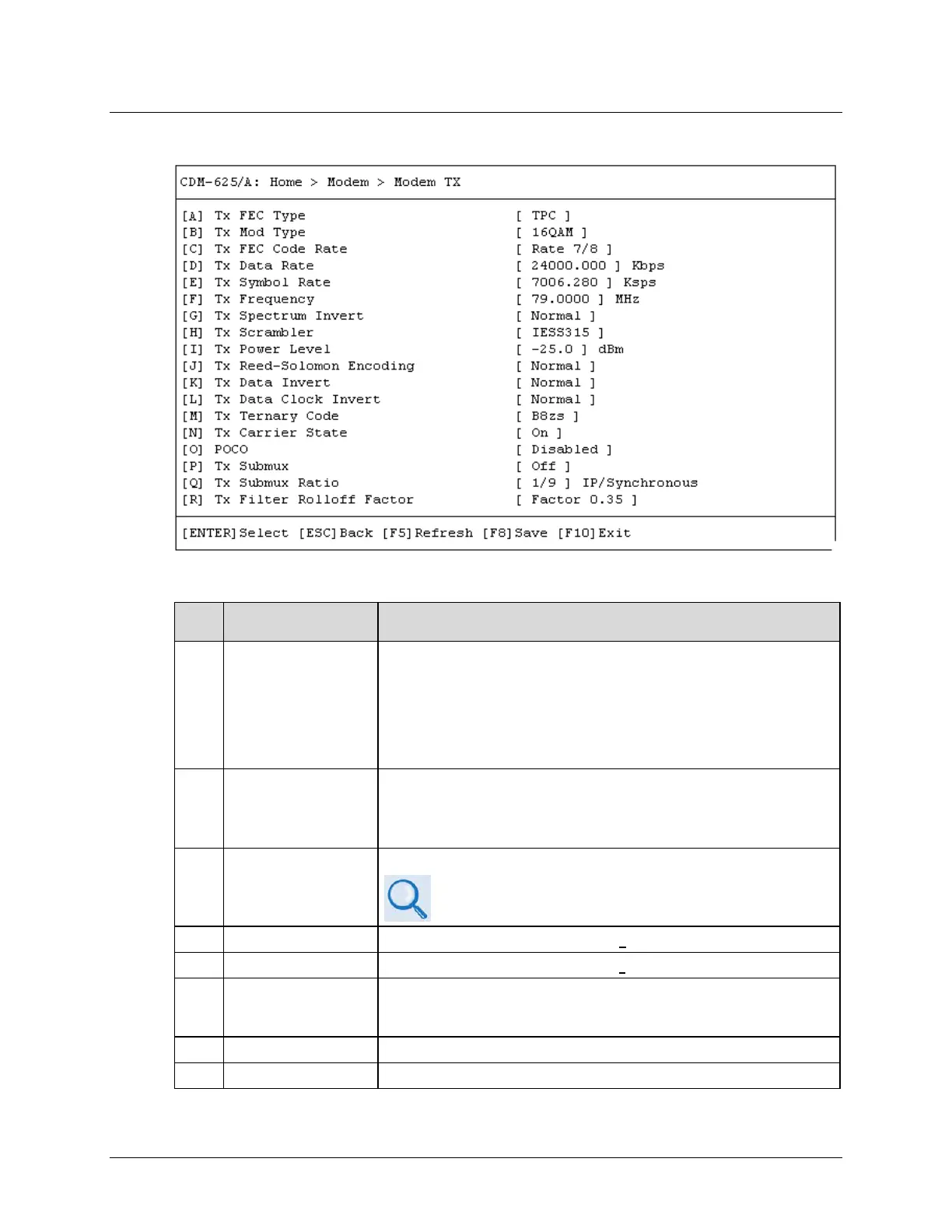
9.3.3.2 Home > Modem > Modem TX
Open the Modem TX page from the Modem submenu. This page contains the following options:
Dialog Window Option Entry
A
Use the ↑↓ arrow keys to select:
•
•
•
•
•
•
•
•
•
•
•
•
•
•
B Tx Mod Type
Use the ↑↓ arrow keys to select:
•
•
•
•
•
•
•
•
•
C Tx FEC Code Rate
Use the ↑↓ arrow keys to select the Tx FEC Code Rate.
See the table provided in Sect. 6.2.1.3.5 CONFIG: Tx
(Chapter 6. FRONT PANEL OPERATION) for the list of available
D Tx Data Rate Enter a value from 18.000 to 25000.000 Kbps
Tx Symbol Rate Enter a value from
to
Ksps
F Tx Frequency
Enter a value as follows:
• Range 1 – From 50.0000 to 180.0000 MHz
•
Range 2 – From 950.0000 to 2250.0000 MHz
G Tx Spectrum Invert Use the ↑↓ arrow keys to select Normal or Inverted
Tx Scrambler Use the
arrow keys to select
,
, or



 To Next Page