13. Route Planning
13-18
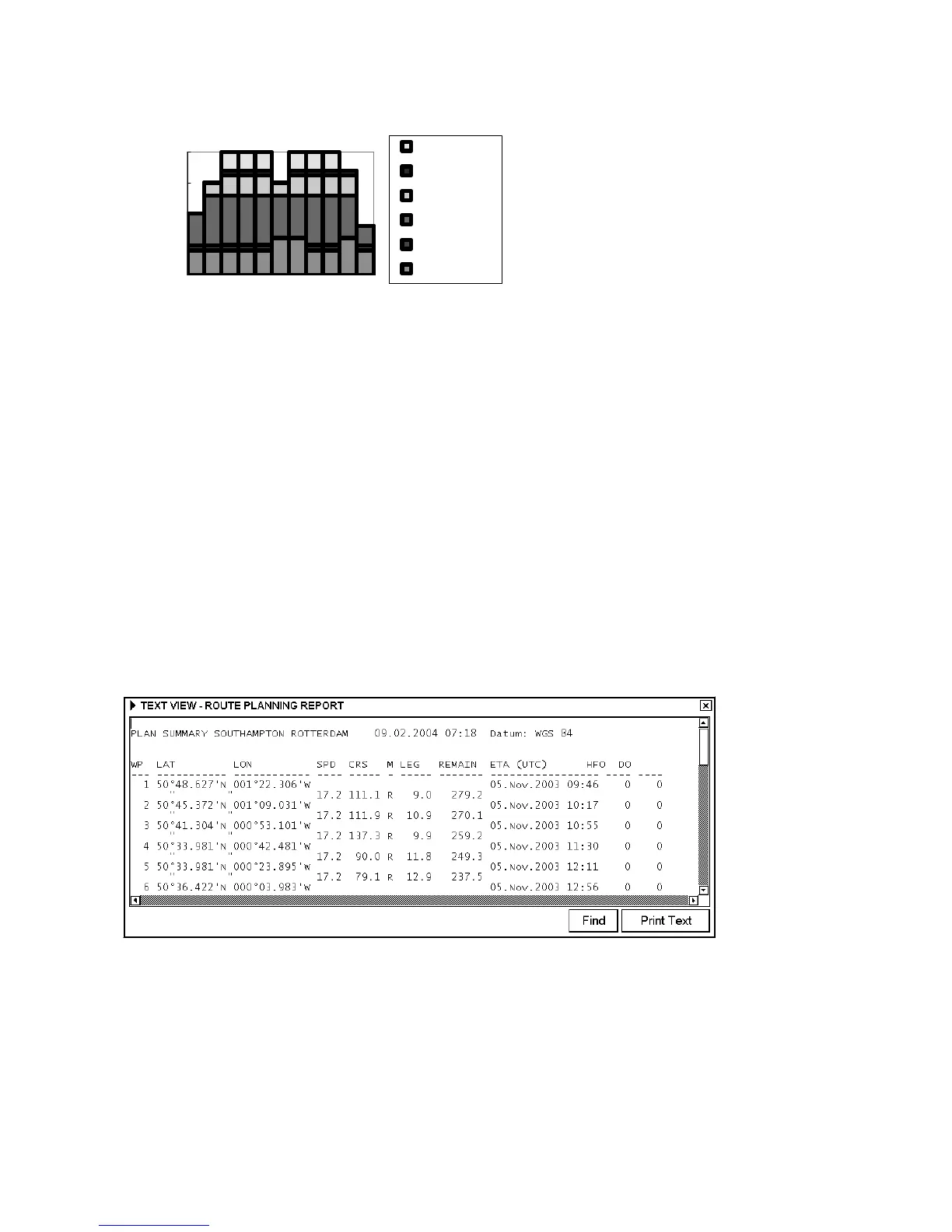
An Example of speed profile
0
5
10
15
20
1234567891011
Waypoint
Speed [Kn]
max speed
max_speed
timetable
profit
cost
min speed
13.7 WP Table Report
This report is generated when you choose Report from the Plan Route menu. To display the report viewer, choose
Route-Plan from the status bar, put the cursor on the triangle in the Plan Route dialog box, choose Report then push
the scrollwheel. To close the report viewer, click X in the right corner of the report viewer. The report may be
printed by clicking the Print Text button.
WP report consists information of:
- Position of waypoints
- Planned speeds - Estimated times of arrival (ETA)
- Planned courses - Planned fuel consumption
- Distances between waypoints. Distance is not directly
calculated from LAT and LON values of WP's location,
but the distance is shorter distance compensated for
planned radius for each waypoint.
-Total distance of route. Distance is not directly
calculated from LAT and LON values of WP's location,
but the distance is shorter distance compensated for
planned radius for each waypoint.
Changing font used in report
If you want to change the size of the font for the report:
1. Place the cursor on the triangle in the report window.
2. Choose desired option from the list then push the scrollwheel.


 To Next Page