28. Steering with FURUNO Autopilot FAP-2000
28-43
28.13 Using the Predictor
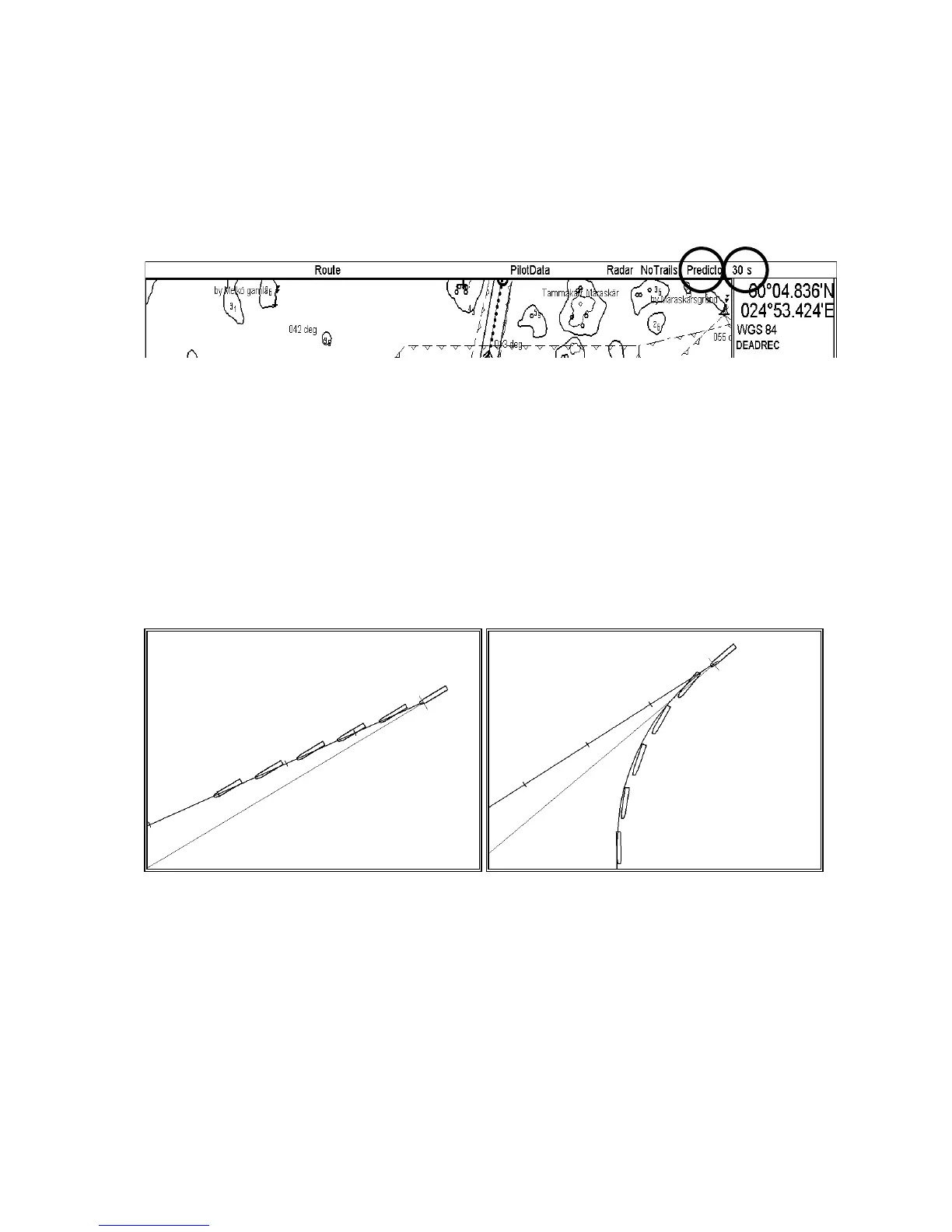
The Predictor is a tool for estimating your ship’s future positions and behavior, and it is available on the status bar.
Place the cursor on the text "Predictor" then use left mouse button to toggle the predictor ON/OFF. The current
setting is shown in the mouse functions area. To set the time for the predictor, put the cursor on the time indication
next to Predictor, spin the scrollwheel to choose a time then push the scrollwheel. The time from current position to
the last of the predicted position may be chosen by the between 30 and 180 seconds, in 30 second intervals. The on-
screen Predictor graphic consists of five pieces of your ships drawn in true scale to successive future positions.
UChart
North Up TM
ECDIS only
The predictor is calculated using current:
• Docking speed components:
• Transversal bow speed
• Transversal stern speed
• Longitudinal center speed
• Rate of turn
These components are assumed to be stable during the prediction period.
The predictor can be used in every steering-state, even when steering without the Autopilot FAP-2000.
Predictor shows drift Predictor in a turn



 To Next Page