21. AIS Target Functions
21-11
21.6.2 Creating a new safety message
You can create a safety message on the ECDIS for transmission by the AIS transponder. This can be done as
follows:
Set Std Display
SAFETY MESSAGE
MESSAGE
Filter
All
Name
S17052004-103836
Status: Unsent
Vessel
Call Sign:
MMSI:
12345
Addressed to MMSI
Safety Message
Don't care of Channel
Enable changes
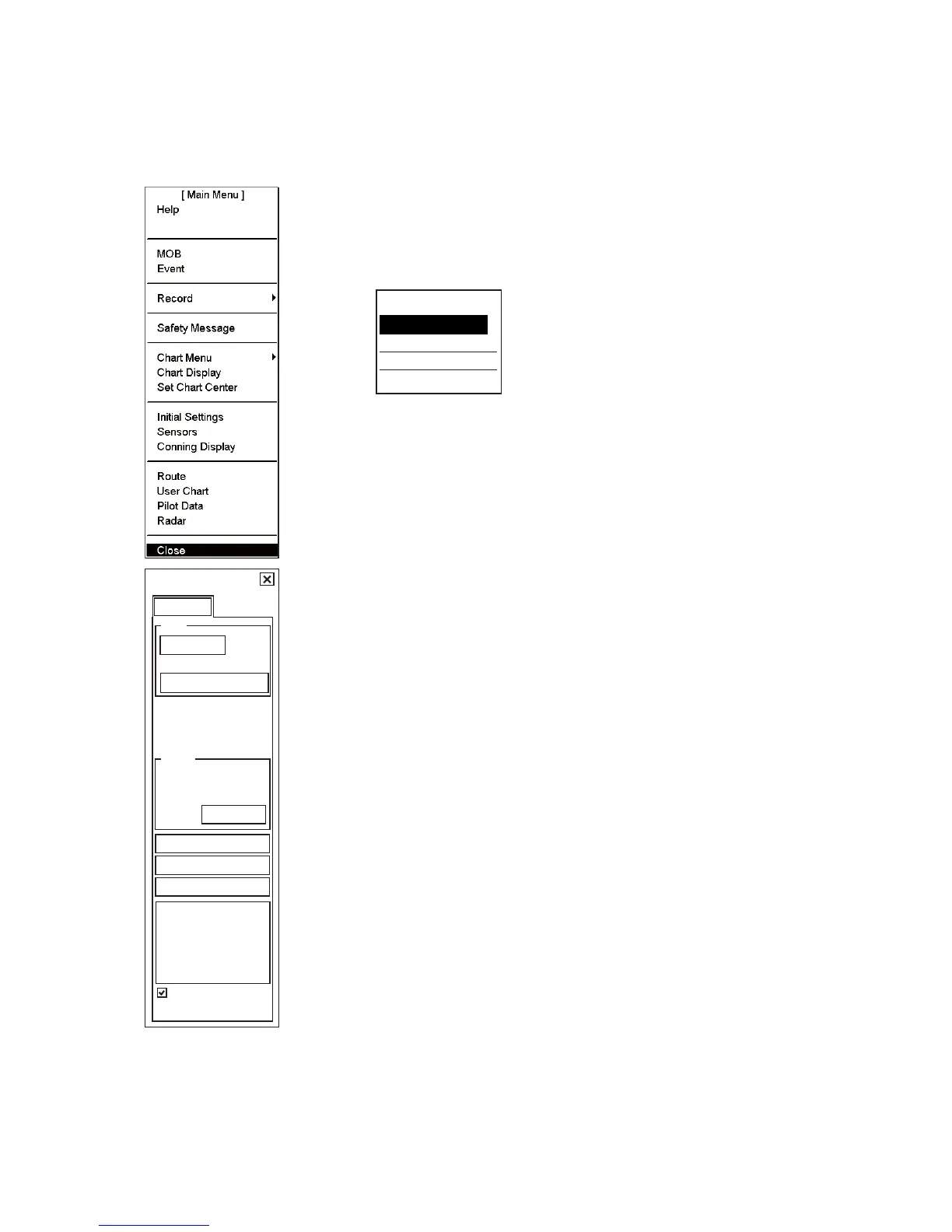
1. Display Menu/Info/Chart Menu in the mouse functions area then push the
left mouse button to open the Main menu.
2. Choose Safety Message from the menu then push the scrollwheel.
3. The Safety message dialog box appears. Place the cursor on the triangle in
the dialog box to show the submenu.
Create Message
Delete Message
Send Message
Close
[Safety Message]
4. Choose Create Message from the menu and push the scrollwheel.
5. Check Enable changes.
6. Place the cursor in the Address box. Spin the scrollwheel to choose
Addressed to or Broadcast to All as appropriate then push the scrollwheel.
Choose Broadcast to All to send to all nearby AIS transponder-equipped
ships. To send to a specific vessel, enter MMSI of ship, in the MMSI input
box.
7. Use the Msg Type box to choose message type; Safety Message for safety
message, Binary Message for routine message.
8. At the Channel box, choose channel over which to broadcast your message.
Four choices are available.
9. Enter the text of your message in the box below Channel. The number of
characters that may be entered depends on message type.
Safety message broadcast: 161 characters
Binary message broadcast: 156 characters
Safety message addressed to MMSI: 156 characters
Binary message addressed to MMSI: 151 characters
10. To send the message, put the cursor on the triangle to show the sub menu,
choose Send Message then push the scrollwheel.
11. If message is sent successfully, status is changed from Unsent to Sent.


 To Next Page