15. User Chart Control
15-21
15.9 Backing up User Charts to a Floppy Disk
You may make backups of user charts. This feature is also useful for carrying user charts to other planning or
navigation station. For further details, see section 17.5 Backing up a File to a Floppy Disk.
15.10 Restoring User Charts from a Floppy Disk
This procedure can be used to read backup copies of any User Chart file if some data is lost during Pilot data
modifying. The other usage is to read User Chart files originating from other planning or navigation station. For
further details, see section 17.6 Restoring a File from a Floppy Disk.
15.11 Reports
You may generate a report for each chart object (point, line, area, symbol and tidal) as follows:
1. Choose UserChart from the status bar then click the Plan button to show the Plan User Chart dialog box.
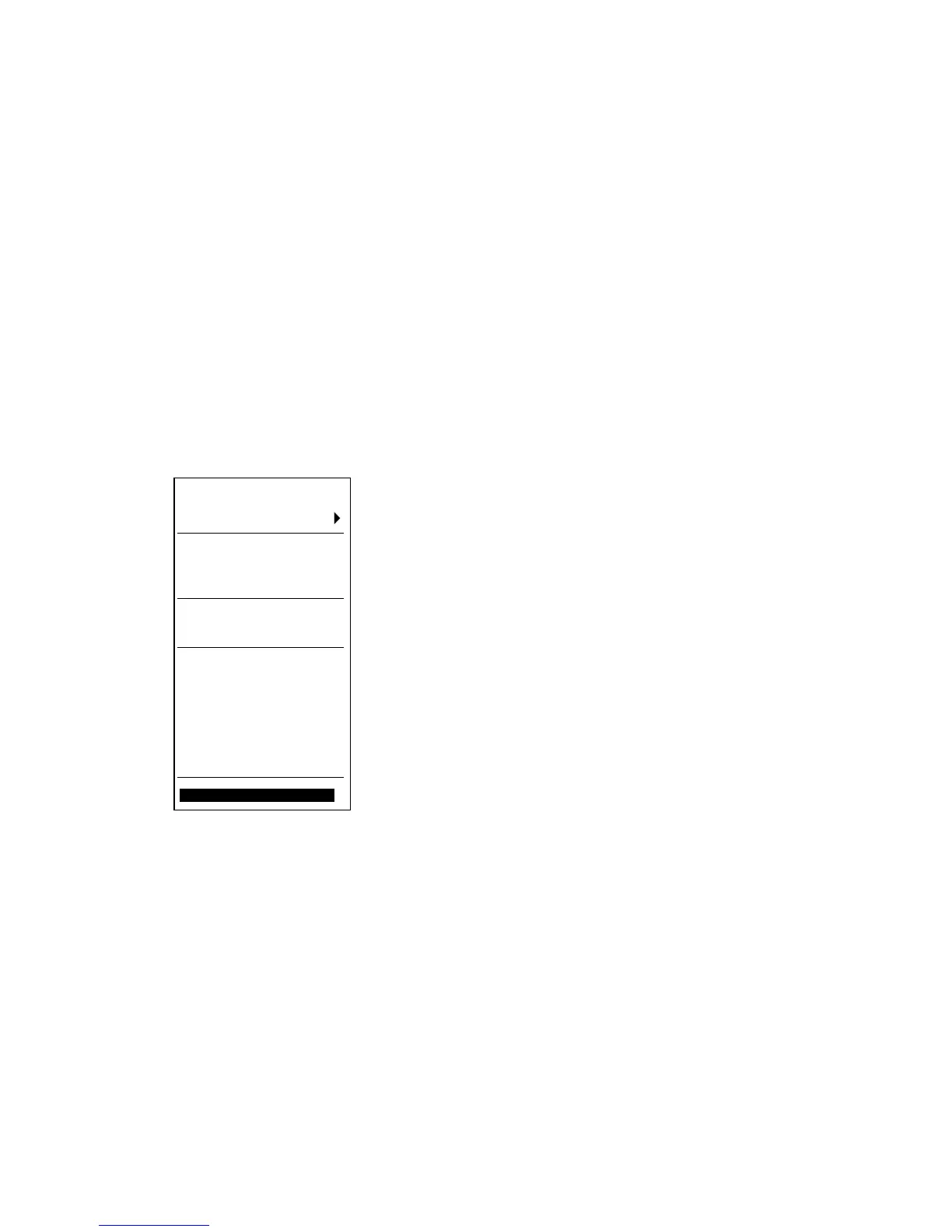
2. Place the cursor on the triangle in the dialog box to show the User Plan menu.
[User Chart]
Go Monitor mode
Select
Unselect
Create
Backup and Restore
Combine
Point report
Line report
Area report
Symbols report
Tidal report
Full report
Report for radar
Close
3. Choose desired report from the report group then push the scrollwheel.
4. To print the report, click the Print Text button.
See the next page for sample reports.


 To Next Page