Appendix 4: C-MAP CM-93/3 Charts
AP-35
A4.6.2 Add license manually
If you receive license as a "License string," you can enter this string manually into ECDIS, using the service
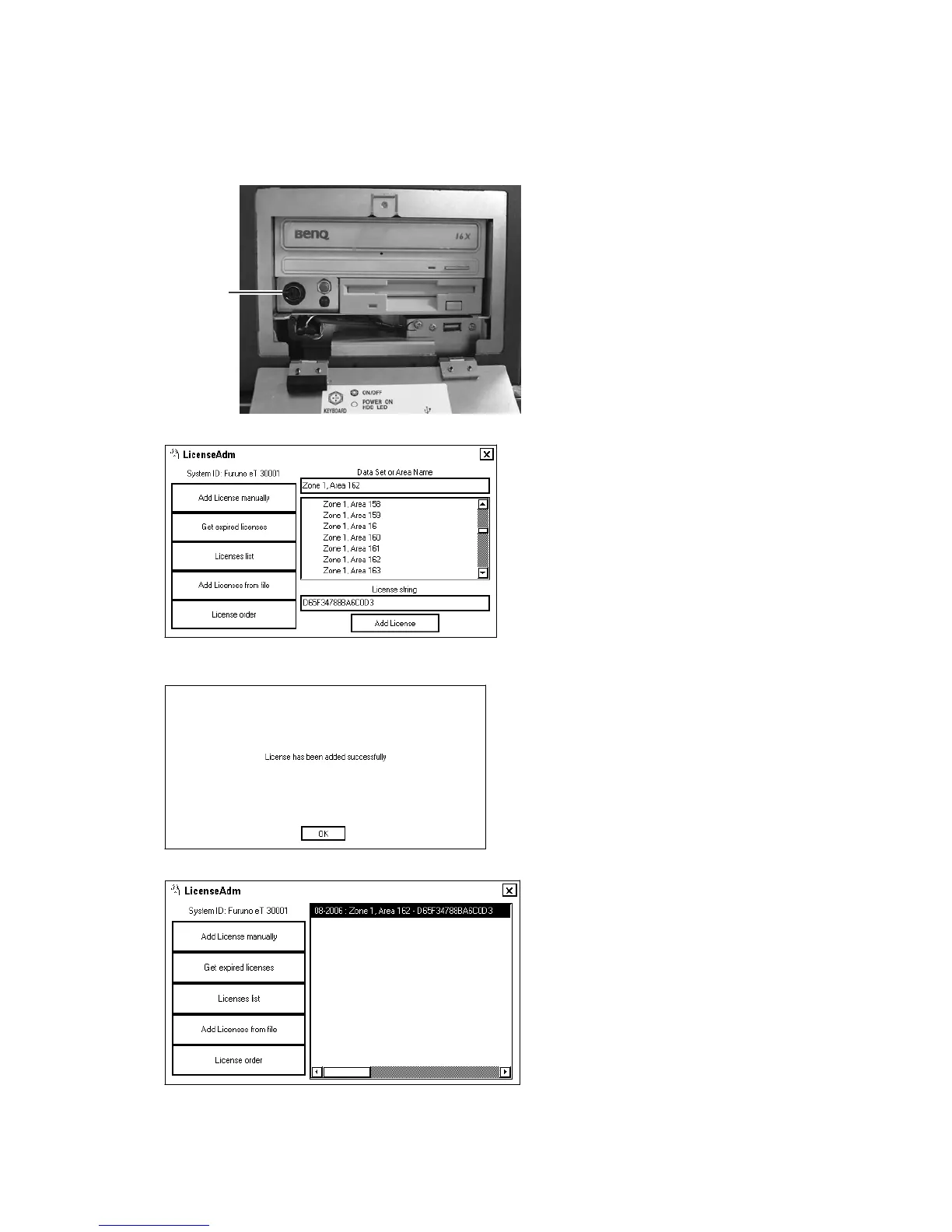
keyboard. To connect the keyboard, turn off the power, open the lid on the processor unit, connect the keyboard to
the location shown below then turn the power on again.
KEYBOARD
connector
1. Menu -> Chart Menu -> C-MAP Ed3 -> Licenses.
2. From the service keyboard, enter string received from C-MAP in the "License string" field then click the Add
License button.
3. Click the License list button to see entered licenses.
4. Close the "LicenseAdm" dialog box by clicking the X sign in upper right corner.
5. Turn off the power, disconnect the service keyboard then turn on the power again.


 To Next Page