23. Recording Functions
23-2
23.3 Voyage Records
23.3.1 Details log
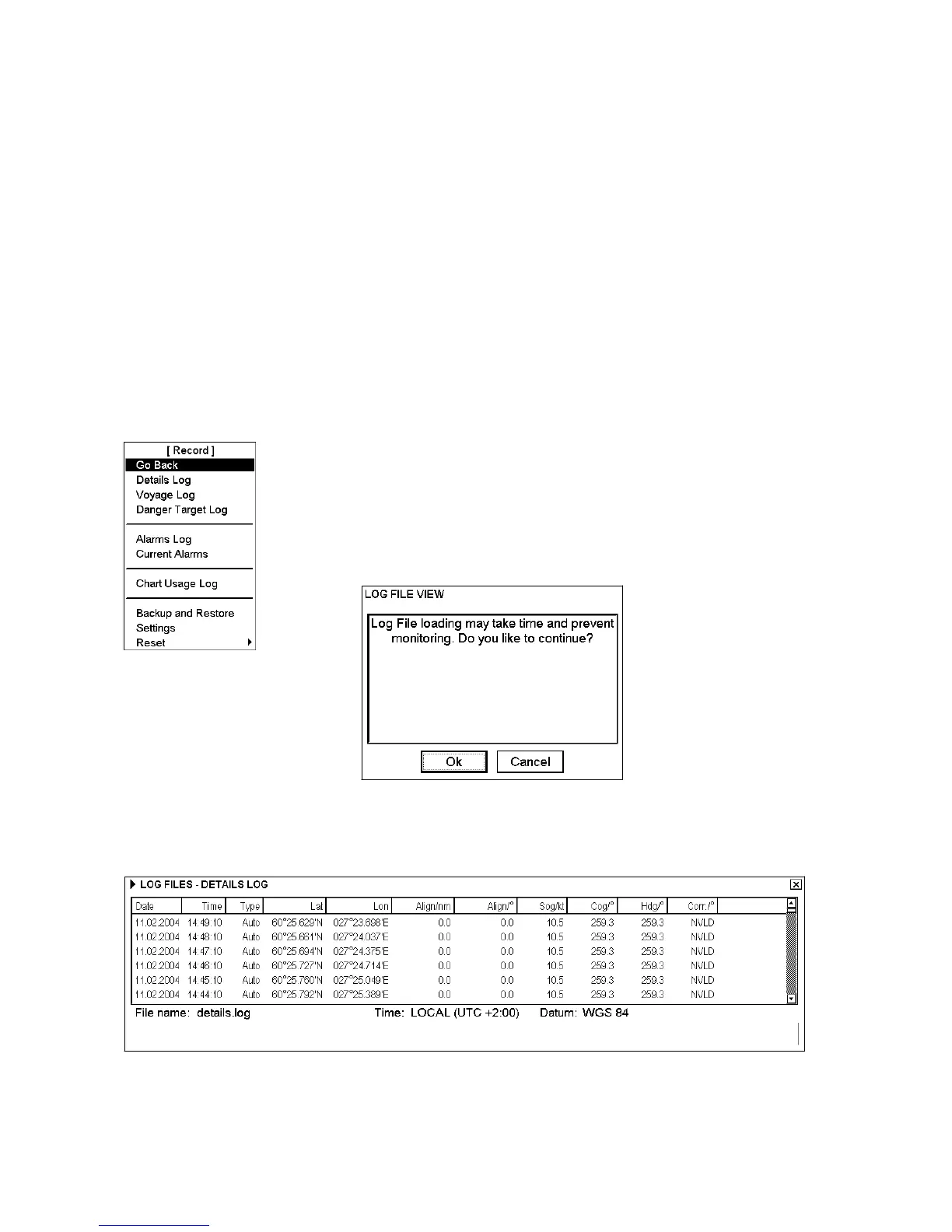
The details log contains voyage information of the last 12 hours. Various information is recorded in the details log
once per minute.
• Date and time
• Position of your ship as output by chosen navigator.
• Alignment (range, bearing) values, if used.
• Speed over ground and course over ground.
• Heading.
• Gyro correction value, if used.
Viewing the details log
To open the details log, do as follows:
1. Spin the scrollwheel to show Menu/Info/Chart Menu in the mouse functions
area then push the left mouse button.
2. Choose Record from the menu then push the scrollwheel.
3. Choose Details Log from the menu then push the scrollwheel.
4. The following window appears. Confirm that you want to open the log by
clicking the OK button. Otherwise click the Cancel button.
The system will start viewing program of log.
You may print the entire log or a desired part. To change print font size, put the
cursor on the triangle and choose desired font size. To print the log, click the
Print Log button. To print whole log, select Print All from the menu.
Note: For how to make a user chart from this log, see section 23.3.8 Making a user chart from the log (past track).



 To Next Page