Appendix 5: C-MAP CM-93/2 Charts
AP-62
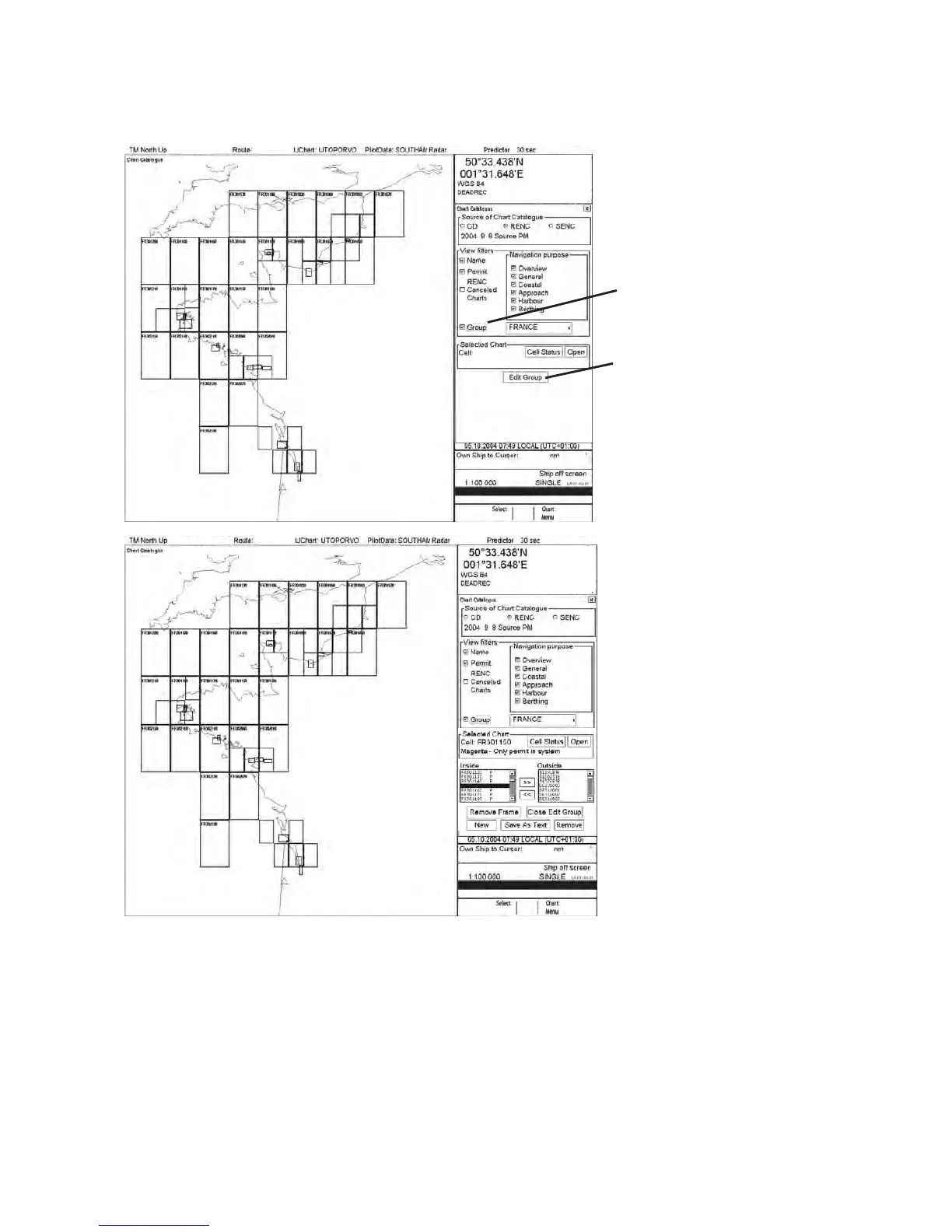
Removing S57 chart cells from a group
You can remove chart cells from a defined group as follows:
HDG 070.0°
SPD
(CALC)
1.8
Kt
SB
(POSN)
1.7
Kt
COG
(POSN)
045.1°
SOG
(POSN)
2.0
Kt
ECDIS only
Select “Group” to activate a
Group selecion. Select desired
group
Press “Edit Group”
HDG 070.0°
SPD
(CALC)
1.8
Kt
SB
(POSN)
1.7
Kt
COG
(POSN)
045.1°
SOG
(POSN)
2.0
Kt
ECDIS only
Use “Remove Frame” button, if you
like to use Graphical gatalogue or
pick individual cell using left
mouse button “Select” and then click
“>>“ button.


 To Next Page