243
Program description - Trim memory | Helicopter models
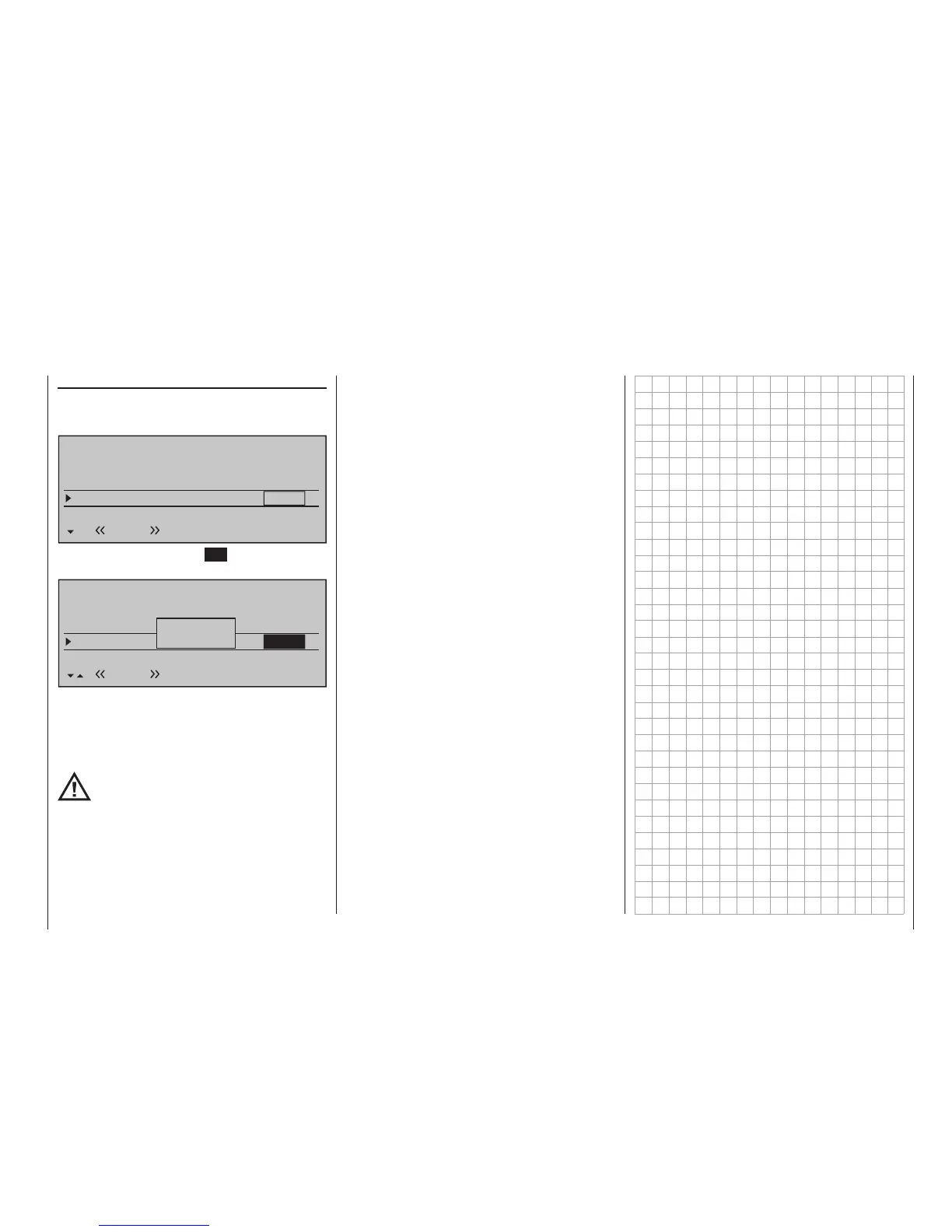
Erasing stored trim positions
Use the selection keys on the left or right touch pad
to move to the line where a trim value is to be erased
from trim memory, e. g.:
TRIM MEMORY
Roll
Roll ax.
+5%
0%
Pitch/thr
0%
Tail rot.
Trim Pos.
-7%
0%
0%
+3%
0%
SET
Normal
Now briefly tap on the centre SET key of the right
touch pad to activate the value field.
TRIM MEMORY
Aileron
Elevator
+5%
+3%
Channel 1
0%
Rudder
Trim Pos.
–7%
0%
0%
0%
SET
Normal
+3%
Please
press trim
As previously described, the message "Please press
trim" will appear briefly. After his message has disap-
peared, simultaneously tap on the or selec-
tion keys of the right touch pad (CLEAR) to reset the
value field again back to "0 %".
However, if you do not erase a trim memo-
ry before storing a new value, the new
value will be added to the stored value
However, if you do not erase a trim memory before
storing a new value, the new value will be added to the
stored value.
Although this an "elegant" way to effectively offset ser-
vo throw beyond the normal trim range of about ±30 %,
do keep in mind that excessive offsets for servo travel
can lead to anomalies including one-sided restriction.
It is then prudent to check control linkages and make
corrections as necessary.









 To Next Page