iZ Technology Corporation
USING VARI-SPEED WITH DIGITAL I/O
If using ADAT, TDIF, AES/EBU and MADI digital audio interfaces in a setup there are some limitations
when using the VARI-SPEED feature. Since RADAR modifies its sample clock frequency to produce
pitch changes with VARI-SPEED it is not possible to use this feature when slaved to another device’s
sample clock. If RADAR is made the clock master however, any devices slaved to the system should alter
their clock rates accordingly.
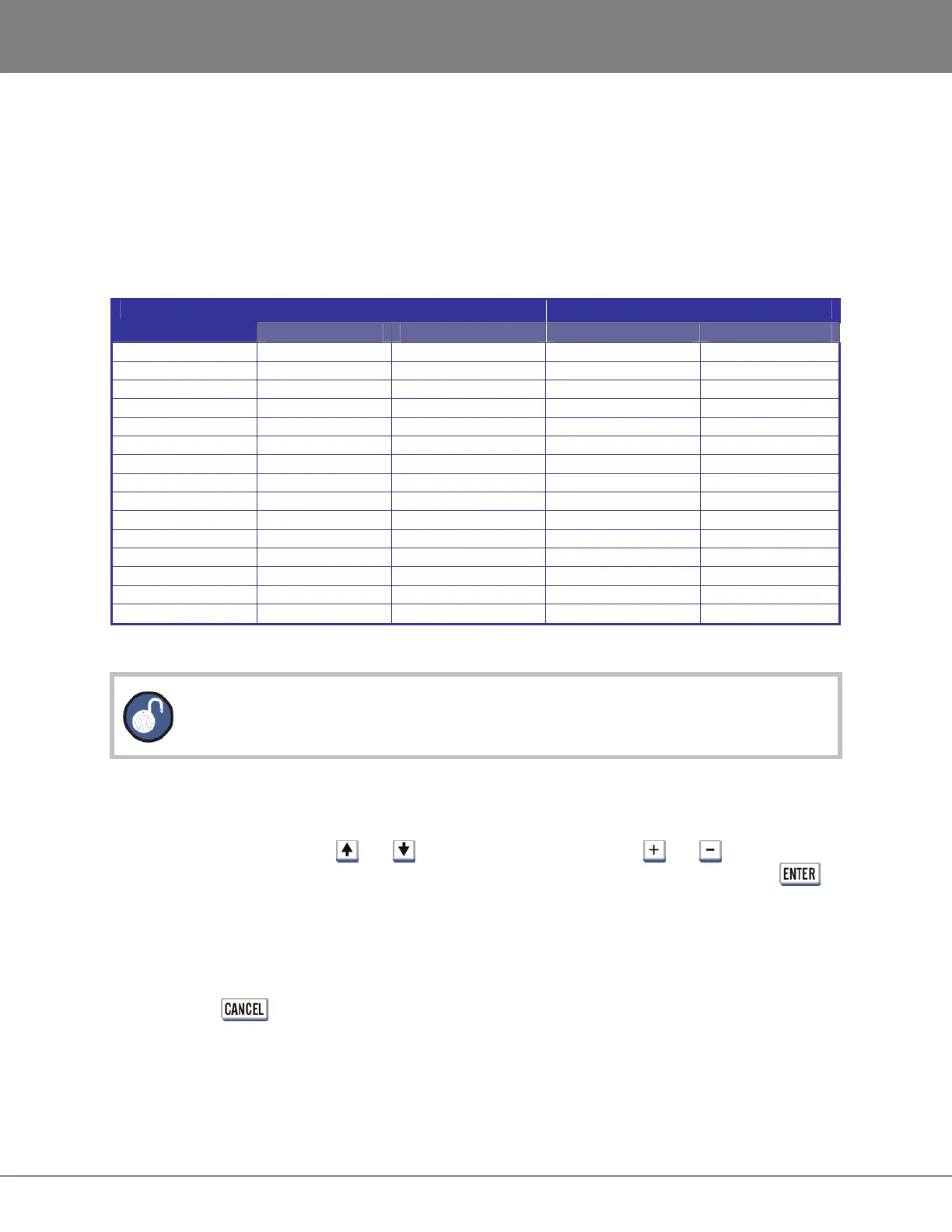
The following table shows the cent changes of audio at specific sample rates:
PLUS MINUS SAMPLE RATE
% CENTS % CENTS
192 +6.25% 105 cents -50.00% 1199 cents
191.808 +6.35% 107 cents -49.91% 1197 cents
176.4 +15.64% 252 cents -45.57% 1052 cents
176.224 +15.76% 253 cents -45.50% 1051 cents
128 +59.37% 807 cents -25.00% 497 cents
96 +6.25% 105 cents -50.00% 1199 cents
95.904 +6.35% 107 cents -49.91% 1197 cents
88.2 +15.64% 252 cents -45.57% 1052 cents
88.112 +15.76% 253 cents -45.50% 1051 cents
64 +59.37% 807 cents -25.00% 497 cents
48 +6.25% 105 cents -50.00% 1199 cents
47.952 +6.35% 107 cents -49.91% 1197 cents
44.1 +15.64% 252 cents -45.57% 1052 cents
44.056 +15.76% 253 cents -45.50% 1051 cents
32 +59.37% 807 cents -25.00% 497 cents
Please note that this key is somewhat different due to its double keystroke operation.
• With VARI-SPEED off, the first press displays the VARI-SPEED dialogue for entering a value.
Immediate changes to the pitch of playback audio can be made from this dialogue using either the
Jog/Shuttle Wheel or the and keys. The numeric keys and the and keys can also
be used to enter a value but the change will not be reflected in the playback audio until the
key is pressed.
• The second keystroke returns the RADAR to ready mode with VARI-SPEED engaged.
• With VARI-SPEED on, once again the first press displays the VARI-SPEED dialogue for entering
or changing a value. At this point the RADAR can return to ready mode with VARI-SPEED on
using the key or terminate VARI-SPEED operation by pressing the VARI-SPEED key once
again.



 To Next Page