iZ Technology Corporation
THE CLIPBOARD
The clipboard is a temporary storage area for digital audio that is used extensively in the editing process.
Material on the clipboard does not take up extra disk space and it is retained after the system is
shutdown. New selections placed on the clipboard will replace any previously stored material.
Audio can be placed on the clipboard using the CUT, COPY or IMPORT editing commands. Once stored
in the clipboard, audio can be auditioned, reversed and pasted in place or to a new location.
To audition the contents of the clipboard:
• After defining a track-region and using CUT or COPY, press + (LISTEN) on the Session
Controller or use the , the and keys and the key to select LISTEN from the
EDIT MENU. The clipboard material will be played back and displayed in the RADARView display.
EDITING CROSSFADES
When punch-ins, punch-outs and edits are performed on RADAR small crossfade files are created to
prevent clicks and pops from occurring at the punch/edit boundaries. The default setting is 5 milliseconds
for recording and editing crossfades, but this value can be changed. The maximum crossfade time for
recording and editing crossfades is 9 seconds and 999 milliseconds.
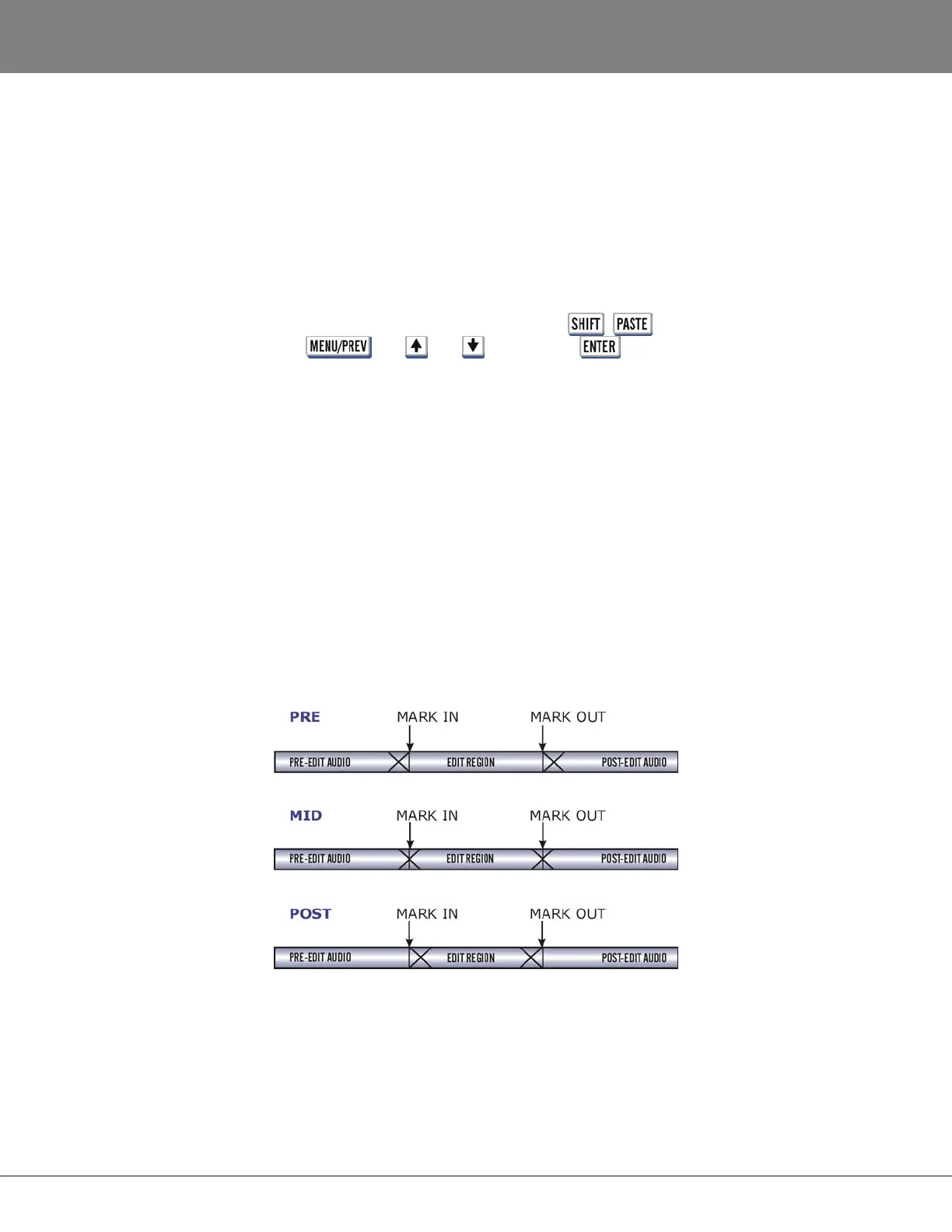
In addition to the crossfade time settings there is a menu for setting the crossfade type. There are three
options for crossfade type: PRE, MID or POST. These options set the location of the crossfade point
relative to the edit boundary. The default setting is MID . With this setting the crossfade straddles edit
boundaries and affects audio equally on both sides. The PRE and POST settings position the crossfade
before or after edit boundaries. Only MOVE, ERASE and SLIDE are affected by the CROSSFADE TYPE
setting. These options were created to allow edits to be more accurate in relation to the mark points.
Example: Sometimes when doing an erase with the crossfade set to MID, the mark in point would have a
tiny slice of audio waveform after it, which represented the last half of the MID crossfade. This can now
be avoided by setting an erase edit to PRE.



 To Next Page