2MN/2N1
1-2-14
Caution
To ease setup, the device was shipped
with the developer unit already replenished
with developer. Therefore, to prevent
developer from spilling during shipping, a
developer shutter is equipped with the
developer unit.
To disengage the shutter, use the following
procedure: Note that if the shutter is not
completely disengaged and retained in
place, the developer in the developer unit
may clog at the outlet causing a damage to
the developer unit.
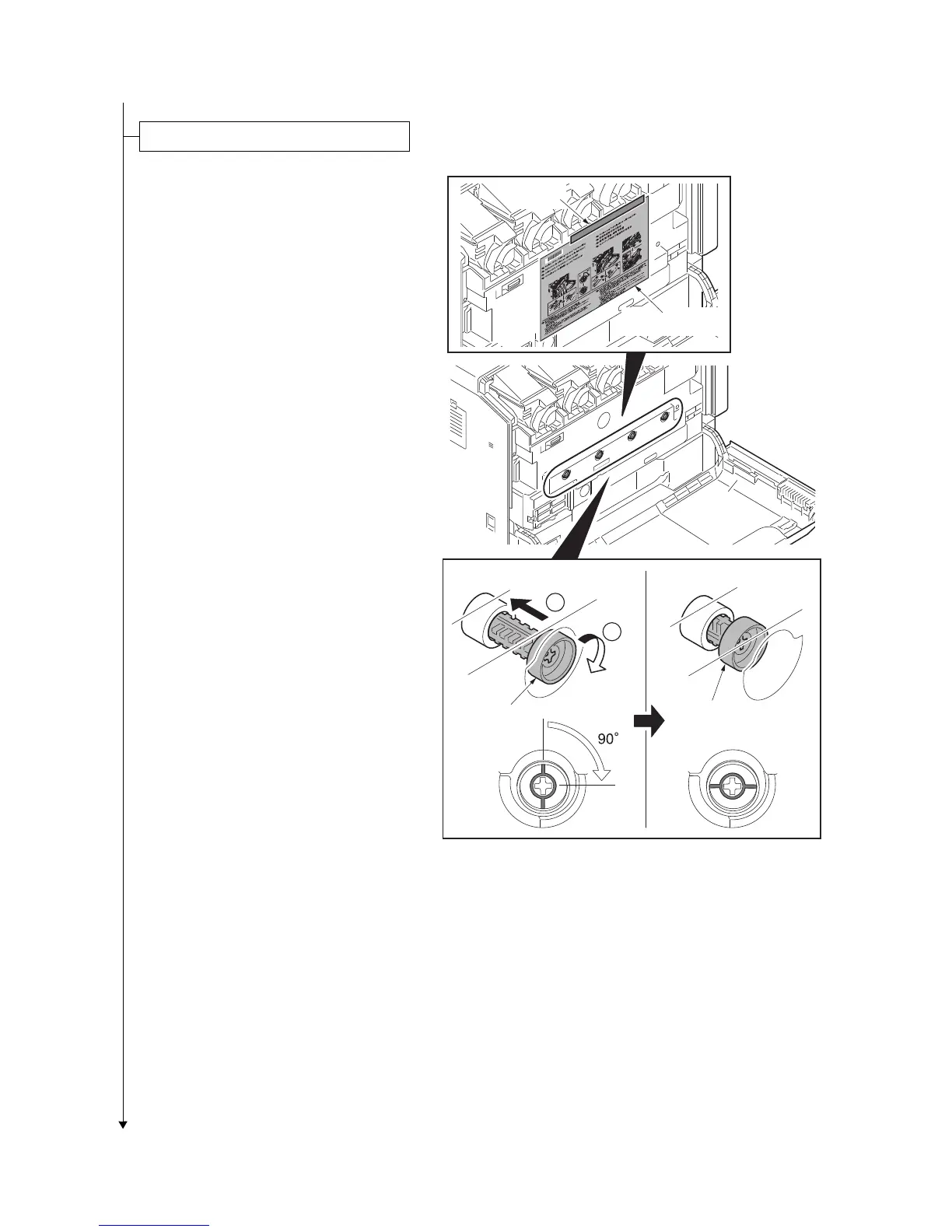
1. Remove the tape and then remove the
set up leaflet.
*: The setup leaflet must be affixed in posi-
tion before dispatching the machine.
2. Press the fixing pin in four positions and
rotate.
*: Fully insert the fixing pin keeping the line
vertical and rotate by 90 degrees clock-
wise. Make sure that the central line is
horizontal.
Figure 1-2-21
Unlocking the developer waste exit
Fixing pin
Fixing pin
1
2
[Locked] [Released]
Set up leaflet
Tape



 To Next Page
 Loading...






