2MN/2N1-1
1-2-43
1-2-6 Installing the duct unit (option)
Duct unit installation requires the following parts:
Supplied parts of duct unit (302LC94530):
*: This option unit cannot be installed together with the finisher.
Procedure
1. After confirming the data lamp is turned
off, perform shut-down on the operation
panel, turn power off, and unplug the
power receptacle(see page P.1-2-19).
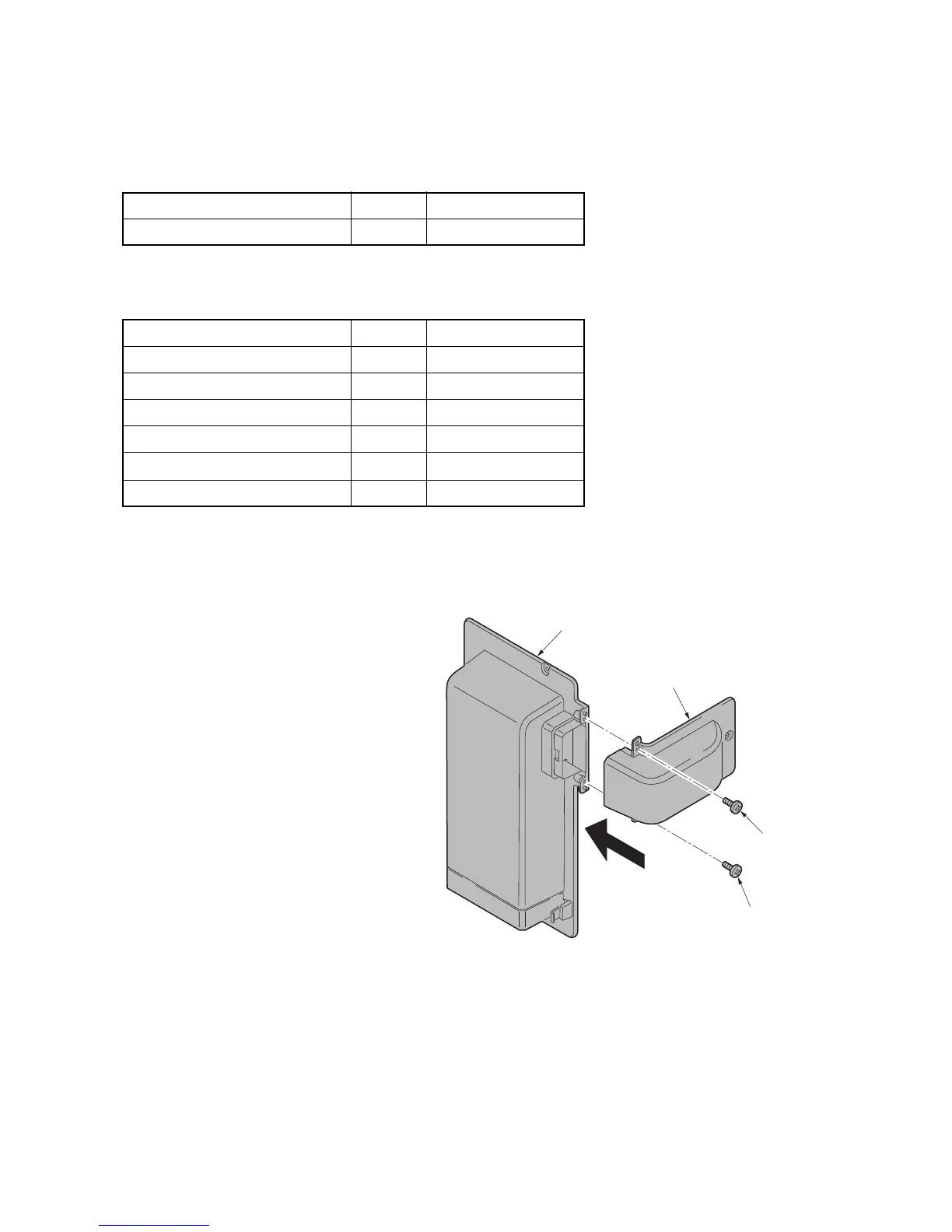
2. Fit duct B to duct A using two M3 x 8
tap-tight P screws.
Figure 1-2-62
Parts Quantity Part.No.
Duct unit 1 302LC94530
Parts Quantity Part.No.
Duct A 1 -
Duct B 1 -
Filter 2 -
M3 x 8 tap-tight P screw 2 7BB200308H
M3 x 8 tap-tight P screw (black)
1 7BB282308H
M3 x 8 tap-tight S screw (black) 2 7BB782308H
Duct A
Duct B
M3 x 8
tap-tight
P screw
M3 x 8
tap-tight
P screw



 To Next Page
 Loading...






