6-10 Run Modes Without Measurement History Model 831 Manual
Example
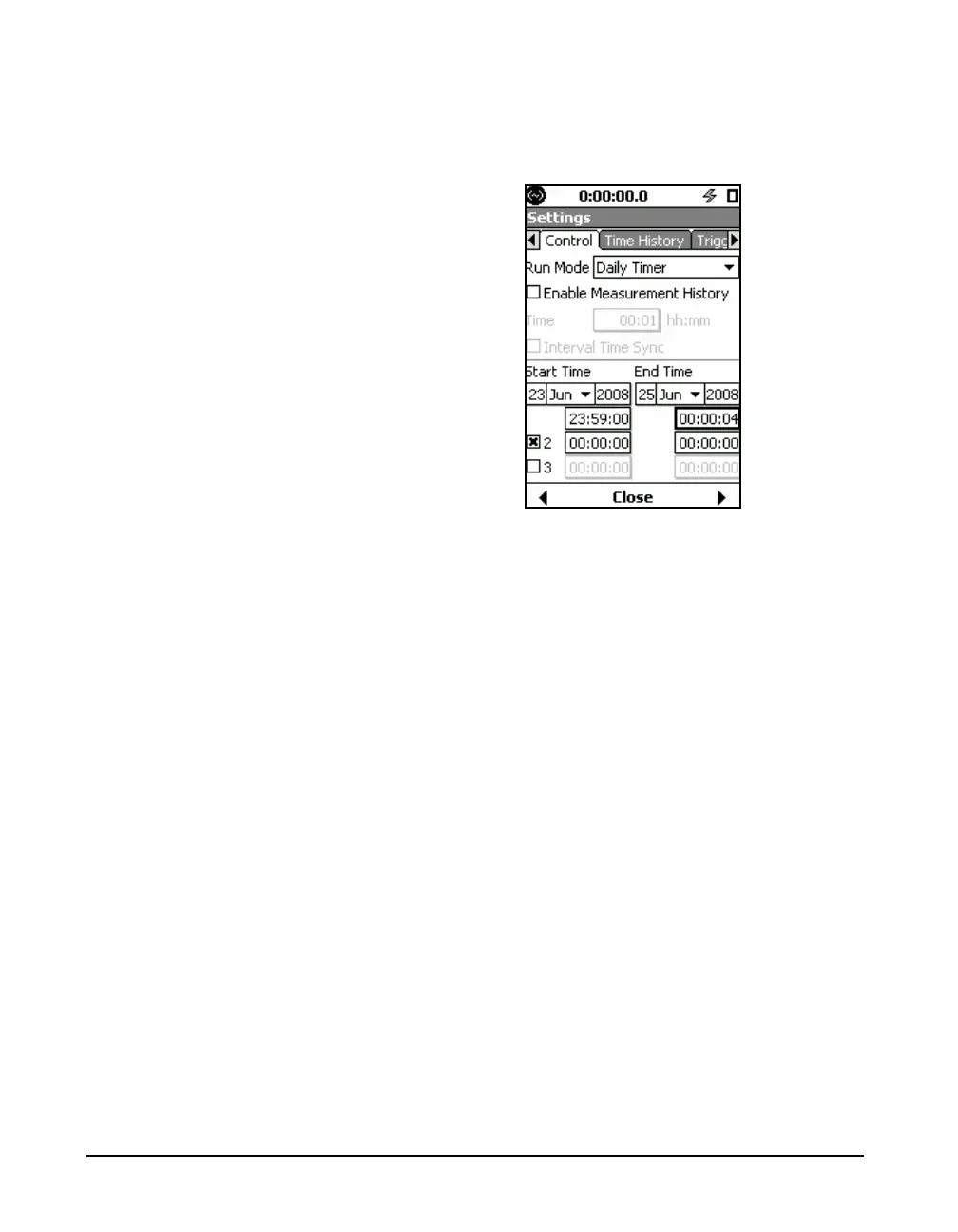
As an example, suppose we have begun a daily timer setup
as shown in FIGURE 6-8.
FIGURE 6-8 Daily Time Setup Example
The selected blocks should not overlap. For example, if the
End Time 1 is set to 00:00:04, then the Start Time 2 should
be greater than 00:00:05 and it should not be greater than
Start Time 1.
A measurement block can span over midnight. So, in the
example, these measurements would be recorded.
1. 23:59:00 pm 6/23/2008 to 00:00:04 on 06/24/2008
2. 23:59:00 pm 6/24/2008 to 00:00:04 on 06/25/2008
3. 23:59:00 pm 6/25/2008 to 00:00:04 on 06/26/2008
This means that even though our date selected range is
between 23rd and 25th, the stop time can be past the date
range. Hence, the selected date range controls only the time
of initiation of the measurement.
All the measurements made between the date ranges would
be part of a single file unless there has been a manual
intervention. irrespective of the way the auto-store
preference is set. It would behave as if it was set to None.
If a measurement is manually stopped in the middle of a
block, no measurement would be initiated until the next
valid start time.
If a measurement is manually started, the measurement
would stop automatically at the next valid stop time.



 To Next Page