Table 7-19 Monitor Screen Control Buttons
[Standby] This mode is used when the molding cycle is stopped
for a short time.
Standby remains active until the run button is pressed.
[Boost] This mode allows you to temporarily raise the
temperatures of selected zones for a set period. Boost values
are entered on the Setup screen on a zone by zone basis. Any
zones that are left at zero will not respond to a Boost request
but stay at their normal operating temperature. During a Boost
command, the Boost time set in the global conguration is the
main determining factor. If, on a slow responding manifold, you
set a high Boost temperature while the Boost time is set short,
then the zone is unlikely to reach your set Boost temperature
before the Boost time limit expires.
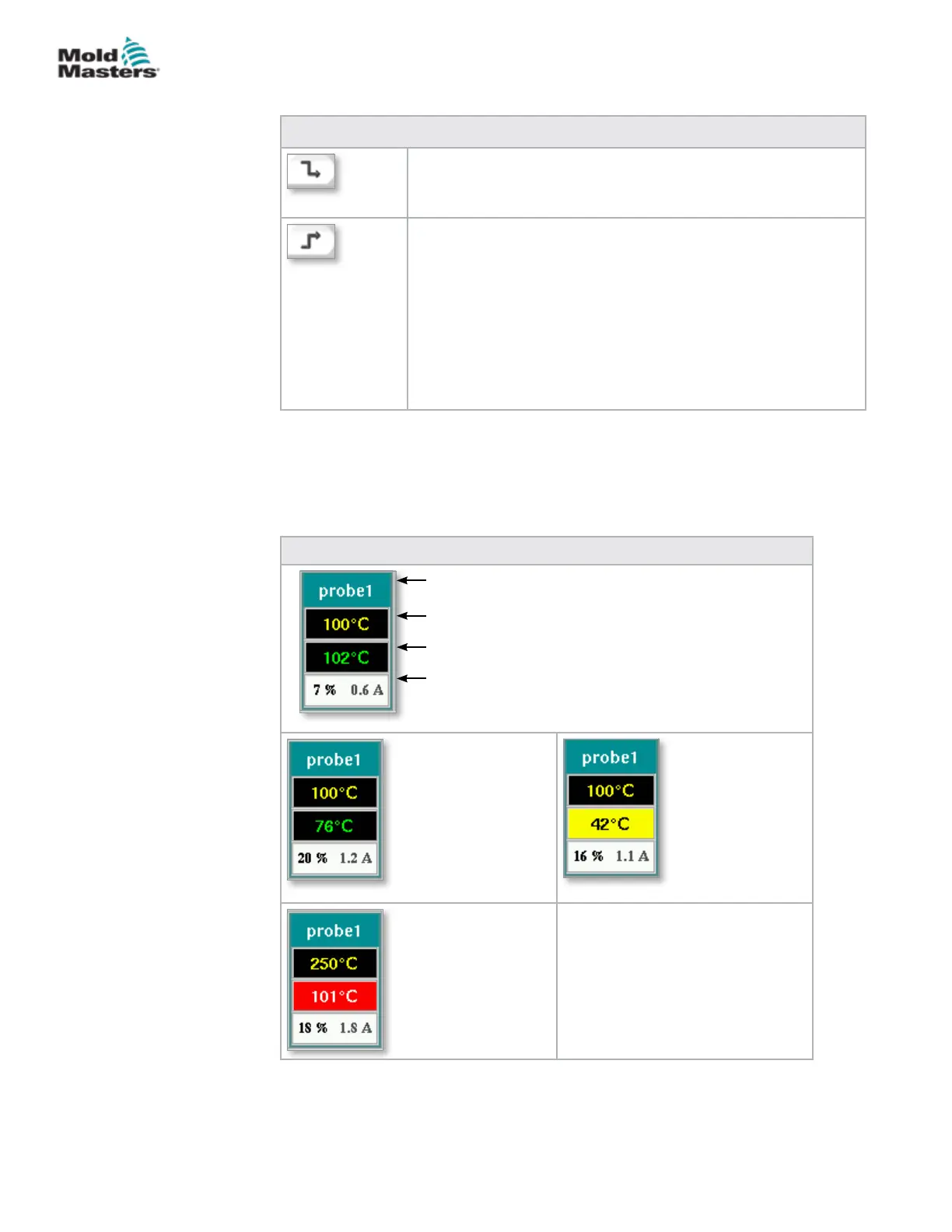
Table 7-20 Heat Zone Display
Green lettering
on a black
background:
Temperature
within range.
Black lettering on a
yellow background:
Temperature zone
is heating.
White lettering on
a red background:
Fatal error or
temperature
exceeds alarm
limits.
Heat Zone Display
Each heat zone is displayed as a control panel that carries ve pieces of
information. The window changes color to show normal and alarm states.
Zone Identier or Alias
Actual Zone Temperature
Temperature Set Point
Power Level / Current
Monitor Screen - continued
7-28
© 2020 Mold-Masters (2007) Limited. All Rights Reserved.
E-MULTI CONTROLLER HMI INTERFACE
E-Multi Controller User Manual



 To Next Page