7.5
Date Code 20120126 Instruction Manual SEL-2032 Communications Processor
Settings
Port Configuration (SET P) and Communication Settings
UNSOL_POW Enable unsolicited
messages on power-up (Y/N).
Set based on whether or not you want DNP3 unsolicited reporting
enabled on power-up. If your master supports the unsolicited
message enable function code, set this to No and let your master
enable it to reduce bus contention on power-up. Otherwise, set it to
Yes . See Section 9: Protocols for an explanation of the DNP3
protocol.
REP_ADDR Address of master to
Report to (0–65534 or 0000h–FFFEh).
Set this to the address of the master on your DNP3 network. This is
the address the SEL-2032 sends unsolicited responses to. See
Section 9: Protocols for an explanation of the DNP3 protocol.
NUM_EVENT Number of events
to transmit on (1–200).
Set this to the number of events you want to have accumulate
before the SEL-2032 sends the data in a DNP3 unsolicited response.
See Section 9: Protocols for an explanation of the DNP3 protocol.
AGE_TX Age of oldest event
to force transmit on (1.0–60.0 sec).
Set this to the maximum age you want your event data to get
to before sending it in a DNP3 unsolicited response, even if the
minimum number of events have not yet accumulated. See Section 9:
Protocols for an explanation of the DNP3 protocol.
CONFIRM_TO Time-out for Acknowledge
of Event Data (50–50000 msec)
Set this to the maximum time it should take your master to
issue a DNP3 application layer to confirm an unsolicited or event
data response. When sending DNP3 unsolicited responses or event
data, this is the delay time the SEL-2032 waits before considering the
data transmission unsuccessful. See Section 9: Protocols for an
explanation of the DNP3 protocol.
DNP_PAIR Enable use of DNP Trip/Close pairs
(Y/N).
Use this setting to force all control points bits to be available
as a single DNP3 index to allow “TRIP/CLOSE” operations on a
single point.
CLSO_VIEW Make control points
visible in Class 0 poll (Y/N).
Make all enabled CMD, SBO, BR and RB control points available in
a class 0 poll.
DNP_CMDNUM Number of CMD bits
available per port (0–8).
Number of CMD bits available to DNP3 for each port.
DNP_SBONUM Number of Set Before
Operate bits available per port (0–4).
Number of SBO bits available to DNP3 for each port.
DNP_BRNUM Number of breaker bits
available per port (0–16).
Number of breaker bits available to DNP3 for each port.
DNP_RBNUM Number of remote bit
pairs available per port (0–8).
Number of remote bit pairs available to DNP3 for each port.
FAST_OP Enable Fast Operate
commands on this port (Y/N).
Use this setting to enable (Y) or disable (N) fast operate support on
this master port. Fast Operate commands can be used to rapidly
change the various set and clear logic bits. See Section 9: Protocols
for more information on Fast Operate commands.
PORTID Port Identification String. Provides a convenient means to label or identify the connected
device. Auto-configuration automatically sets the Port ID to the relay
ID on SEL IED ports. Used by the WHO command to identify the
port. Maximum 40 characters.
MODEM Modem Control (Y/N). You set to Y (Yes) if using an external dial-up modem. This setting is
only available for master and other IED ports.
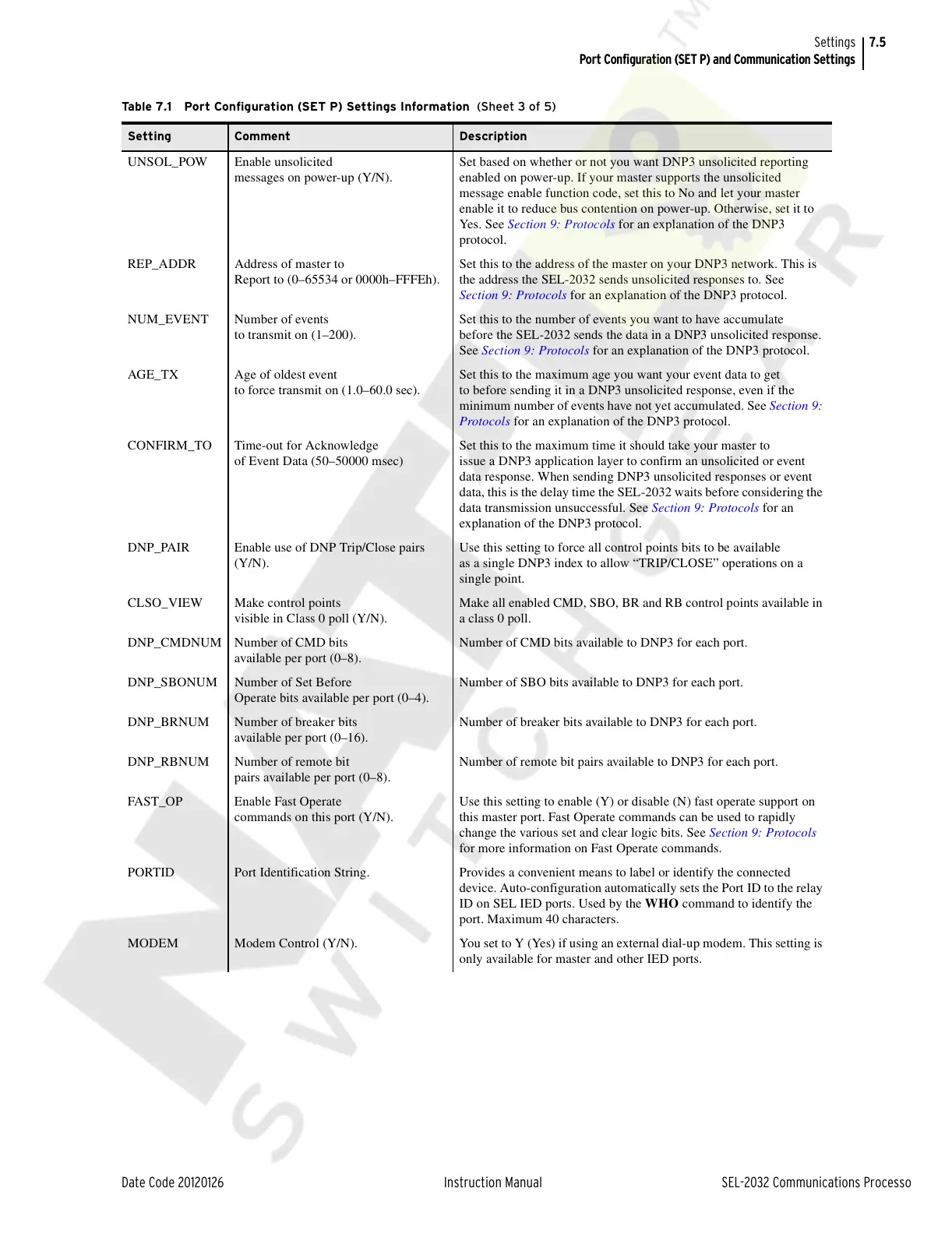
Table 7.1 Port Configuration (SET P) Settings Information (Sheet 3 of 5)
Setting Comment Description
Courtesy of NationalSwitchgear.com



 To Next Page