EN
5 - CONTROLS
THIS MANUAL IS PROPERTY OF SCM INDUSTRIA S.P.A - ANY TOTAL OR PARTIAL REPRODUCTION IS STRICTLY FORBIDDEN Cap. 5 Pag. 3/14
5.2 EMERGENCY BUTTONS
(ev_5-2_0.0)
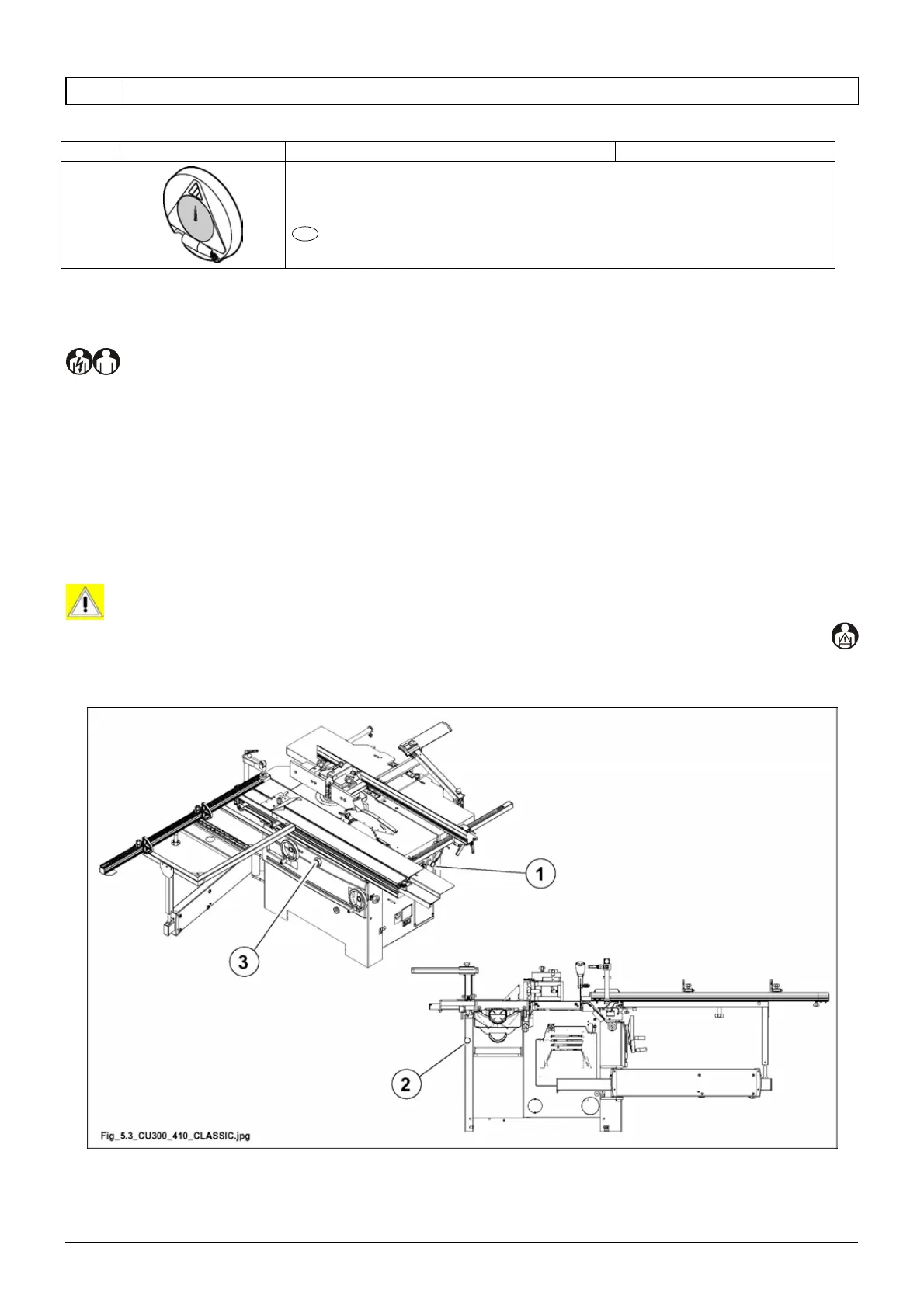
In case of danger if you press the emergency button, any function of the machine is locked.
Emergency buttons present on the machine are:
- on the electrical control panel (1 fig. 5.3).
- Surfacing table side (2 fig. 5.3).
- On the spindle side of the machine front (3 fig. 5.3).
Periodically press the emergency buttons to check whether they are efficient.
DANGER-WARNING:
any anomalies found during the control of these devices, must be reported promptly to the
manager, who will put the machine out of service and call the electrical, mechanical maintenance
personnel or the SCM Support Service.
Fig. 5.3
Ref. Image Description / Function Use and/or explanation
-
Numerical display for the vertical motion of the thicknessing table.
OPT


 To Next Page