3.
A notification window will confirm the status change.
4.
In the NTP Services panel, set the ON/OFF toggle switch to ON again.
Changes made will now take effect and NTP operation will be restored shortly after this oper
ation is performed.
2.15.4 Viewing NTP Clients
To view the NTP clients being served by NetClock:
1.
Navigate to MANAGEMENT> NETWORK: NTP Setup.
2.
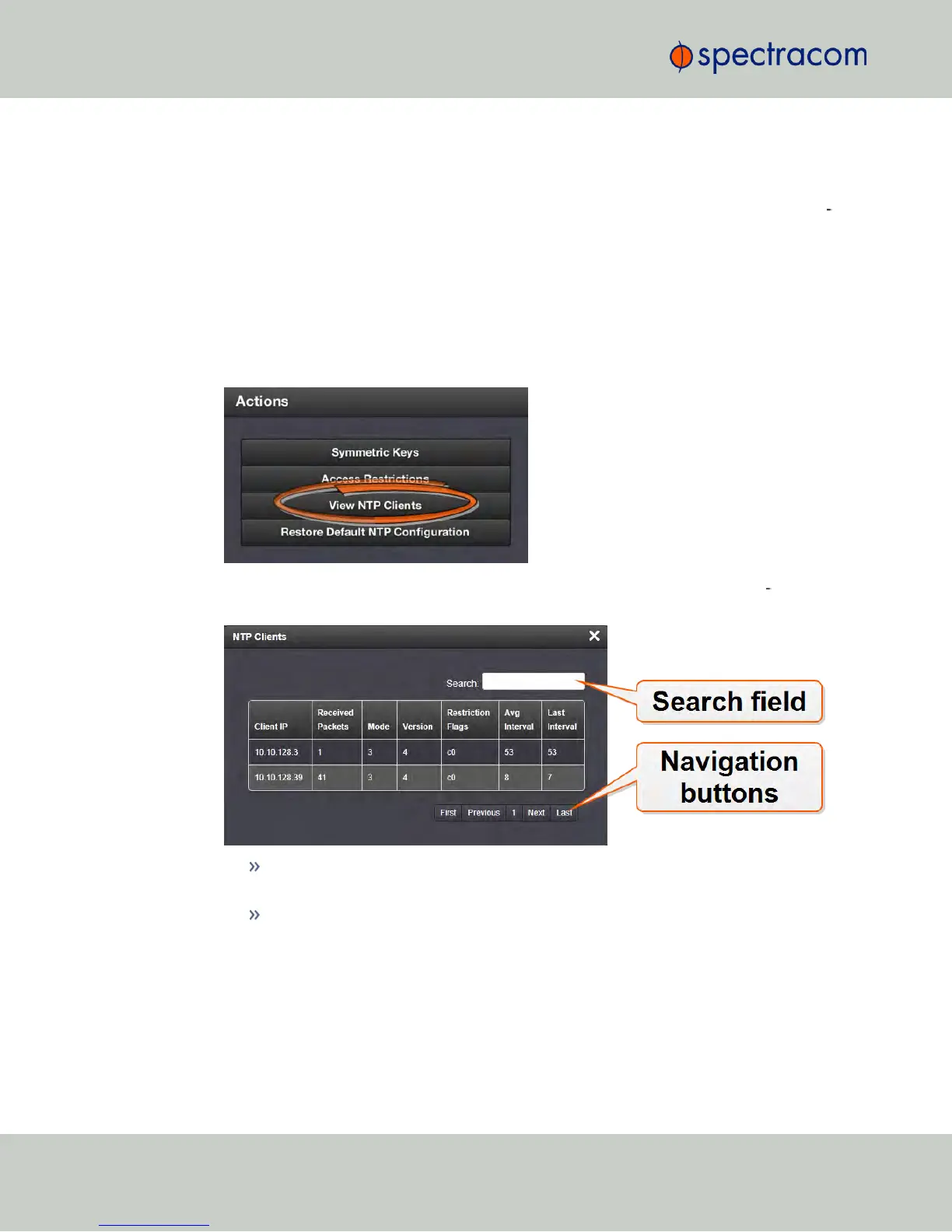
In the NTP Actions panel, click View NTP Clients:
3.
The NTP Clients window will display, showing a table of the clients that are syn
chronizing to NetClock via NTP:
You can search any of the fields for specific information in the Search field at the
top of the window.
A limit of 10 entries will appear on the screen at any one time. If you have more
than 10clients, you can move through the table using the First, Previous, Next
and Last navigation buttons at the bottom of the screen.
2.15.5 Restoring the Default NTP Configuration
The NetClock default NTP configuration can be restored at any time. It comprises basic settings
such as Stratum1 operation with no other servers or peers, no broadcasting and no access
100
CHAPTER 2 • NetClock User Reference Guide Rev. 16
2.15 Configuring NTP



 To Next Page