Local Clocks panel
You can create multiple different Local Clocks, as needed. The names of all Local Clocks that
have already been created are displayed in the Local Clocks panel.
See also "Local Clock(s), DST" on page157.
3.2 System Time
The time that NetClock maintains is referred to as the System Time. The SystemTime is used to
supply time to all of the available time-of-day outputs (such as the front panel LED display, NTP
time stamps, time stamps in the log entries, ASCII data outputs, etc.)
By default, the SystemTime is synchronized to NetClock’s input references (such as GNSS,
IRIG, ASCII data, NTP, PTP, etc.).
If a UTC-based time is not required, however, it is also possible to manually set the System Time
to a desired time/date, or to use the unit's battery backed time (Real Time Clock) as System
Time (with an external 1PPS reference).
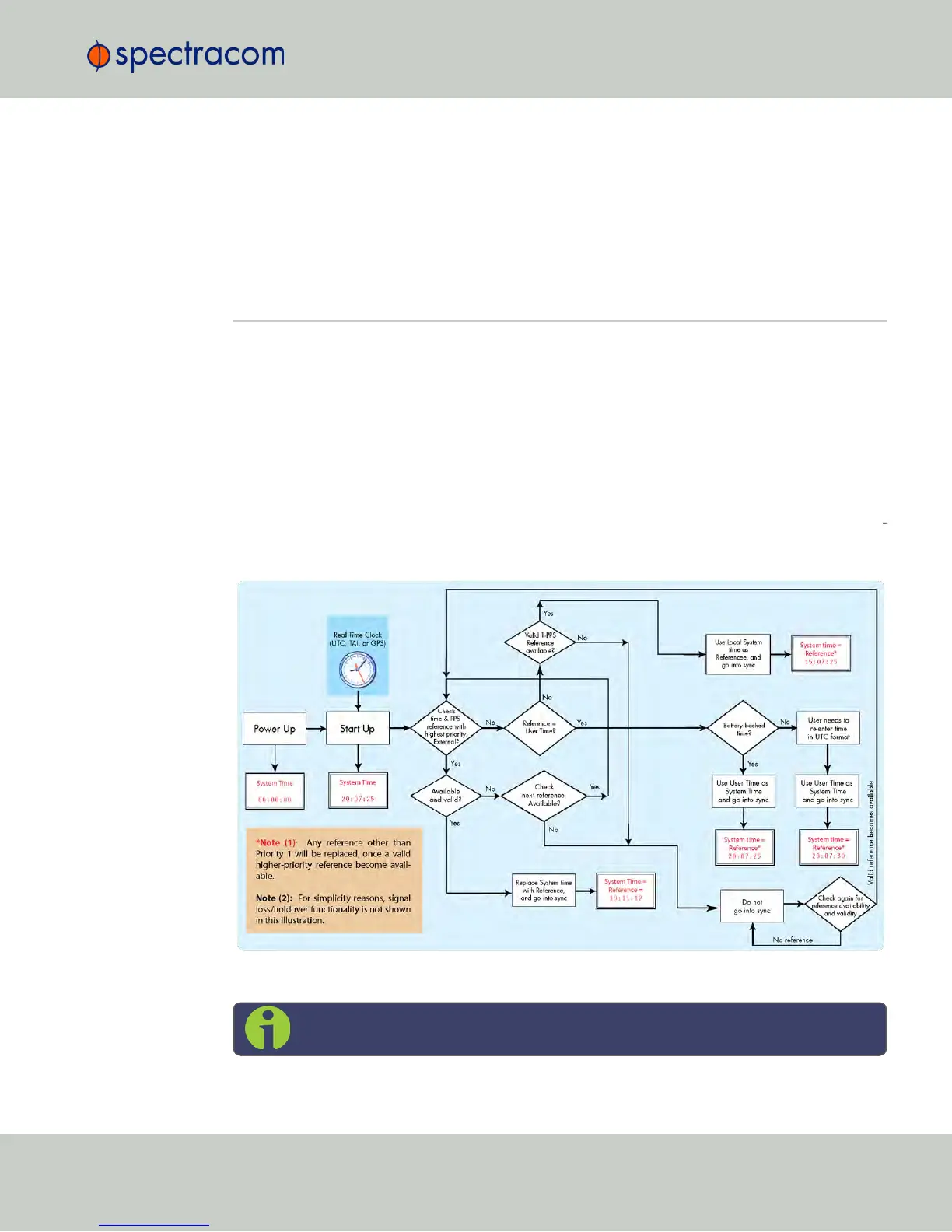
The flow chart below illustrates how NetClock obtains the highest available and valid ref
erence, depending on whether an external source is chosen as reference, or an internal (User
[x], or Local System).
Figure 3-1: How the System Time is derived
Note: User hand-set times can only be set in UTC (not Local time).
3.2 System Time
CHAPTER 3 • NetClock User Reference Guide Rev. 16
147



 To Next Page