1.
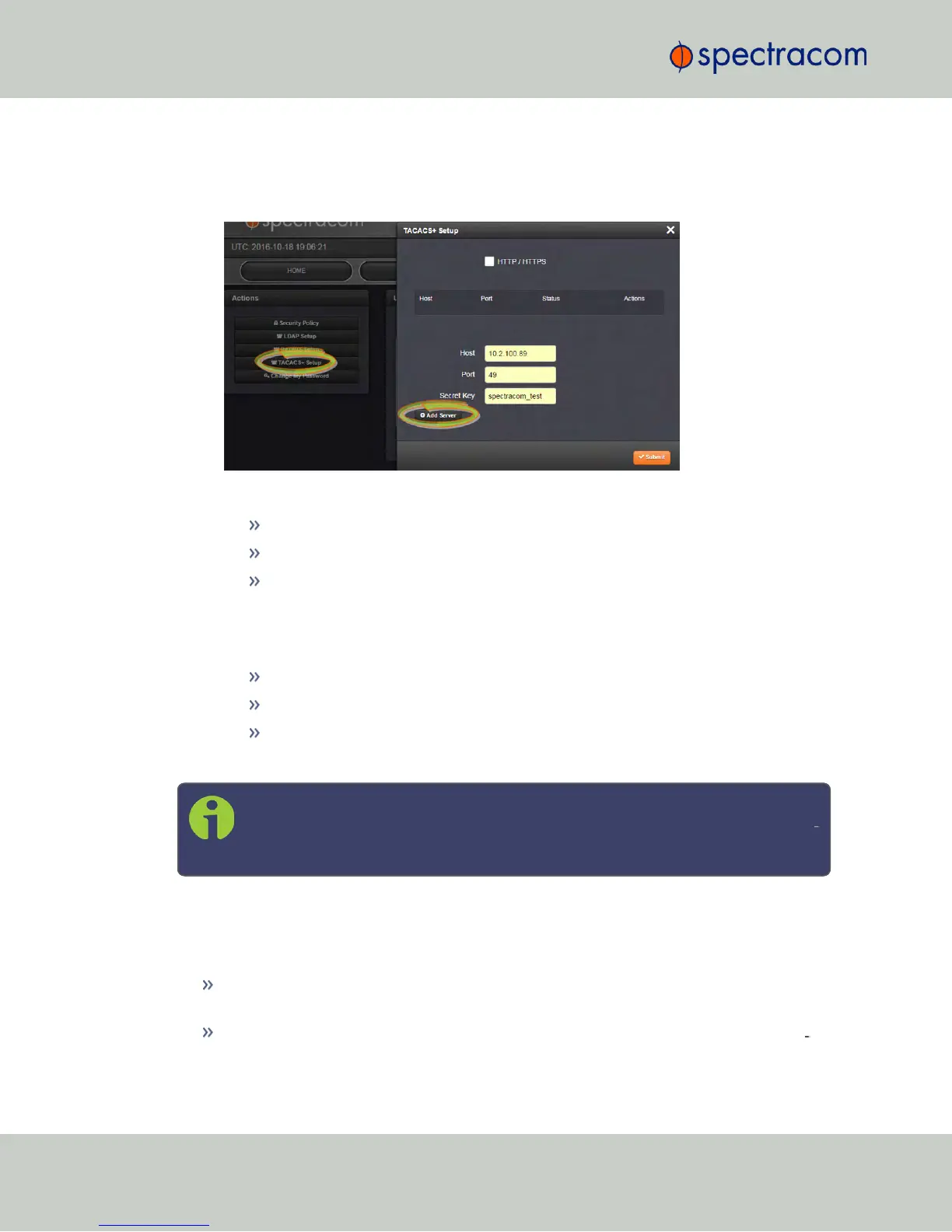
Navigate to MANAGEMENT > OTHER: Authentication.
2.
In the Actions panel on the left, click TACACS+ Setup. The TACACS+ Setup window
will be displayed:
3.
Fill out the fields:
Host: The hostname or IP address of the TACACS+ server
Port: Defines the TACACS+ Port to use.
Secret Key: The same encryption key as used on the TACACS+ server.
4.
Click the Add Server button. A confirmation message The item has been added will be
displayed if the server could be added, and the server will be added to the list. The
server status can be:
DISABLED: The TACACS+ service is disabled.
UNREACHABLE: This TACACS+ server cannot be reached.
REACHABLE: This TACACS+ server can be reached.
5.
To remove a TACACS+ server from the list, click the X-button in the Actions column.
Note: NetClock supports multiple TACACS+ servers. The system performance,
however, will be negatively affected by a large number of servers or invalid serv
ers, respectively.
4.3.6 HTTPS Security Levels
NetClock supports two different modes of HTTPS operation:
The Standard HTTPS Level allows the use of medium strength ciphers and older TLS
(Transport Layer Security) protocols,
while the High-Security Level is restricted to strong ciphers and TLS version 1.2 exclus
ively.
254
CHAPTER 4 • NetClock User Reference Guide Rev. 16
4.3 Managing Users and Security



 To Next Page