ATC: ASCII time code reference
USER: User provided time
LOCL: Local reference (synced to itself)
INIT: NTP on server/peer is initializing
STEP: NTP on server/peer is performing initial synchronization step and restart
ing
AUTH STATUS: Indicates if the selected reference is using MD5 authentication. “None”
indicates authentication not being used.
LAST: The number of seconds that have expired since this reference was last polled for
its time.
POLL: The polling interval, i.e. how often NetClock is polling this NTP reference for its
time.
DELAY (ms): The measured one-way delay between NetClock and its selected reference.
2.15.8.2 NTP Servers: Adding, Configuring, Removing
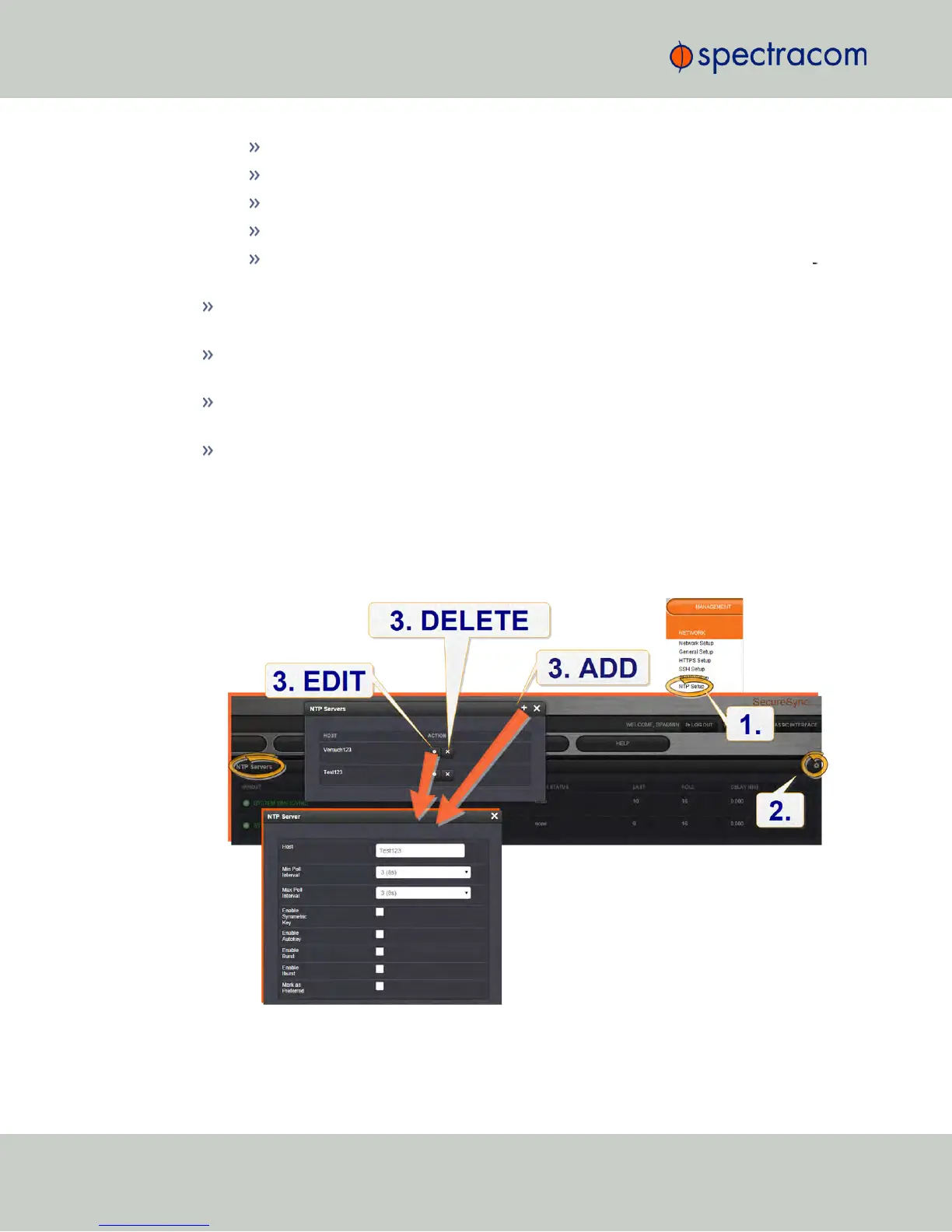
To add, configure, or remove an NTP Server:
1.
Navigate to MANAGEMENT > NETWORK: NTP Setup.
2.
The NTP Setup screen appears. The NTP Servers panel displays a list of recognized NTP
servers. Click the GEAR icon in the upper right-hand corner of the NTP Servers panel.
108
CHAPTER 2 • NetClock User Reference Guide Rev. 16
2.15 Configuring NTP



 To Next Page