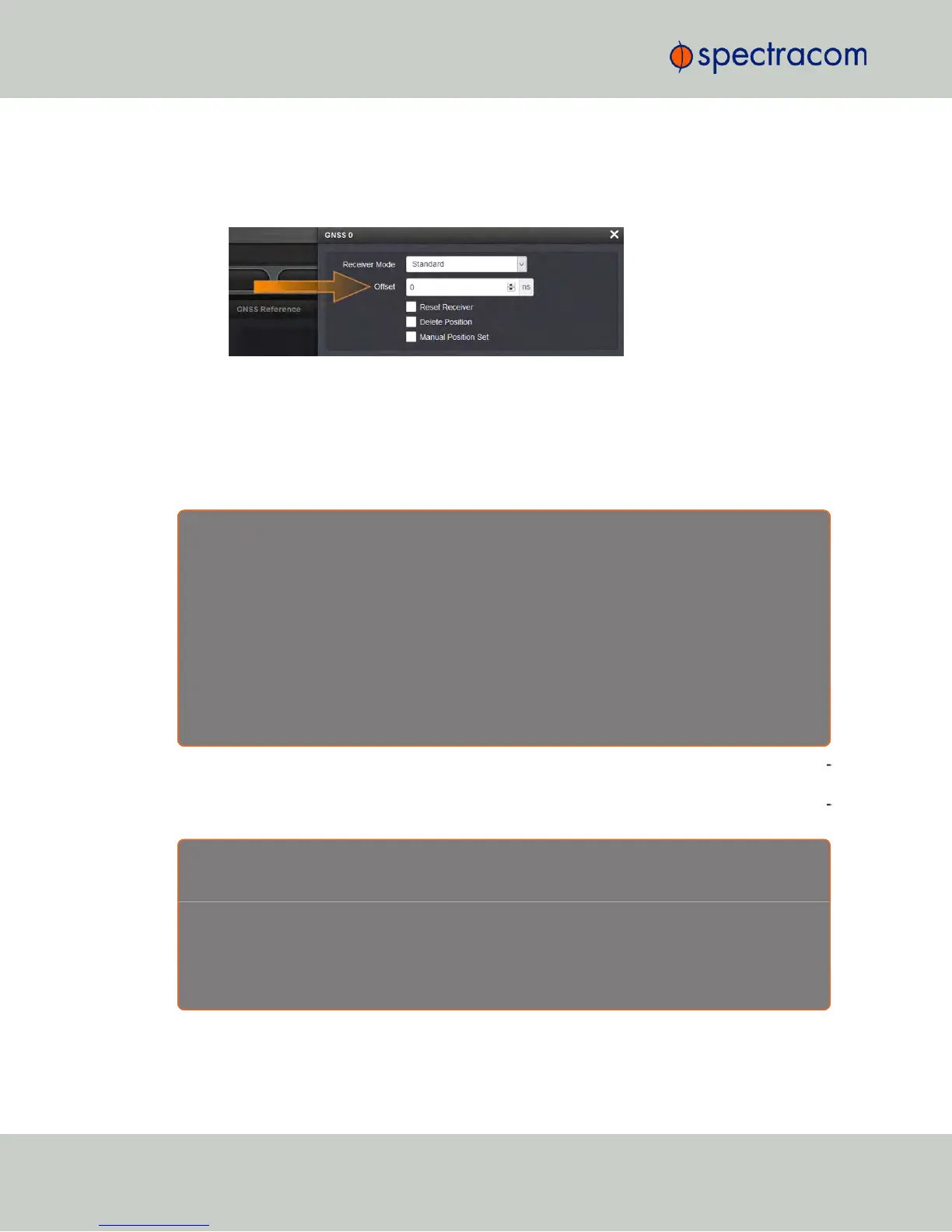
To configure the GNSS receiver offset:
1.
Navigate to Interfaces > References: GNSS Reference
2.
Click on the GEAR button next to the GNSS Reference. The GNSS0 window will open:
3.
Locate the Offset field, and enter the desired value.
4.
Click Submit.
Calculating cable delay
The following formula can be used to calculate antenna cable delay:
D = ( L * C ) / V
Where:
D = Cable delay in nanoseconds
L = Cable length in feet
C = Constant derived from velocity of light: 1.016
V = Nominal velocity of propagation expressed as decimal, i.e. %66 = 0.66 Value is provided by
cable manufacturer.
When using Spectracom LMR-400 or equivalent coaxial cable, this formula equates to approx
imately 1.2 nanoseconds of delay per every foot of cable. To calculate the Offset value (cable
delay), multiply the length of the entire cable run by “1.2” and then enter this value into the Off
set field.
E x a m p l e s o f L M R - 4 0 0 ( o r e q u i v a l e n t ) c o a x c a b l e
d e l a y s :
100 feet of cable = 120 nanoseconds of cable delay
200 feet of cable = 240 nanoseconds of cable delay
300 feet of cable = 360 nanoseconds of cable delay
196
CHAPTER 3 • NetClock User Reference Guide Rev. 16
3.3 Managing Input References



 To Next Page