Note: A self survey will take at least 2000 seconds (33 minutes).
Relocating NetClock
The Delete Position command may need to be used if a NetClock system is physically moved,
and it did not self-initiate a new survey automatically, as is the case with u-blox M8T-series
receivers (see also "Determining Your GNSS Receiver Model" on page187). Note that neg
lecting to delete the old position data and discover the new position data will cause NetClock
not to go into synchronization state.
Note: Software versions 5.4.5 and above by default will initiate a resurvey on
reboot. See "Setting GNSS Receiver Dynamics" on page192.
Sanitization
The Delete Position command must also be used when sanitizing a NetClock unit (ensuring that
no trace of position data remains on the unit). See "Sanitizing the Unit" on page320.
Deleting the GNSS position
To delete the GNSS position:
1.
Disconnect the GNSS antenna from the NetClock unit (this is required only when san
itizing the unit).
2.
Navigate to Interfaces > References: GNSS Reference.
3.
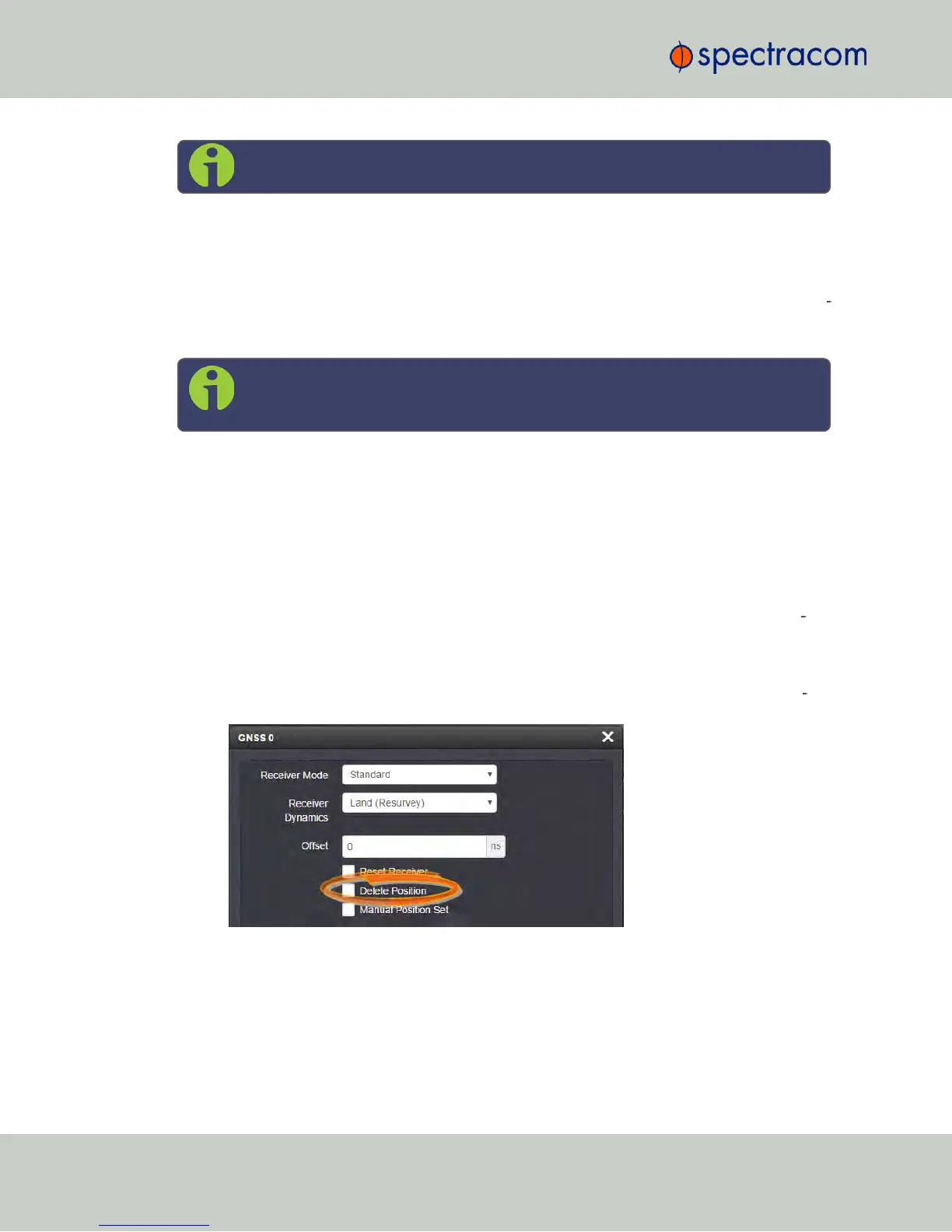
Click on the GEAR button next to the GNSS Reference (typically, there is only one ref
erence, numbered "0"). The GNSS0 window will open:
Locate the Delete Position box, check it, and click Submit.
4.
NetClock will initiate a GNSS self survey.
198
CHAPTER 3 • NetClock User Reference Guide Rev. 16
3.3 Managing Input References



 To Next Page