What is "Holdover Timeout"?
Holdover Timeout is the user-configurable allowable time period in which NetClock remains in
Holdover mode before it declares loss of synchronization. Holdover Timeout can be adjusted
according to application- specific requirements and preferences. See below for recom
mendations on how long (short) the Holdover Timeout should be.
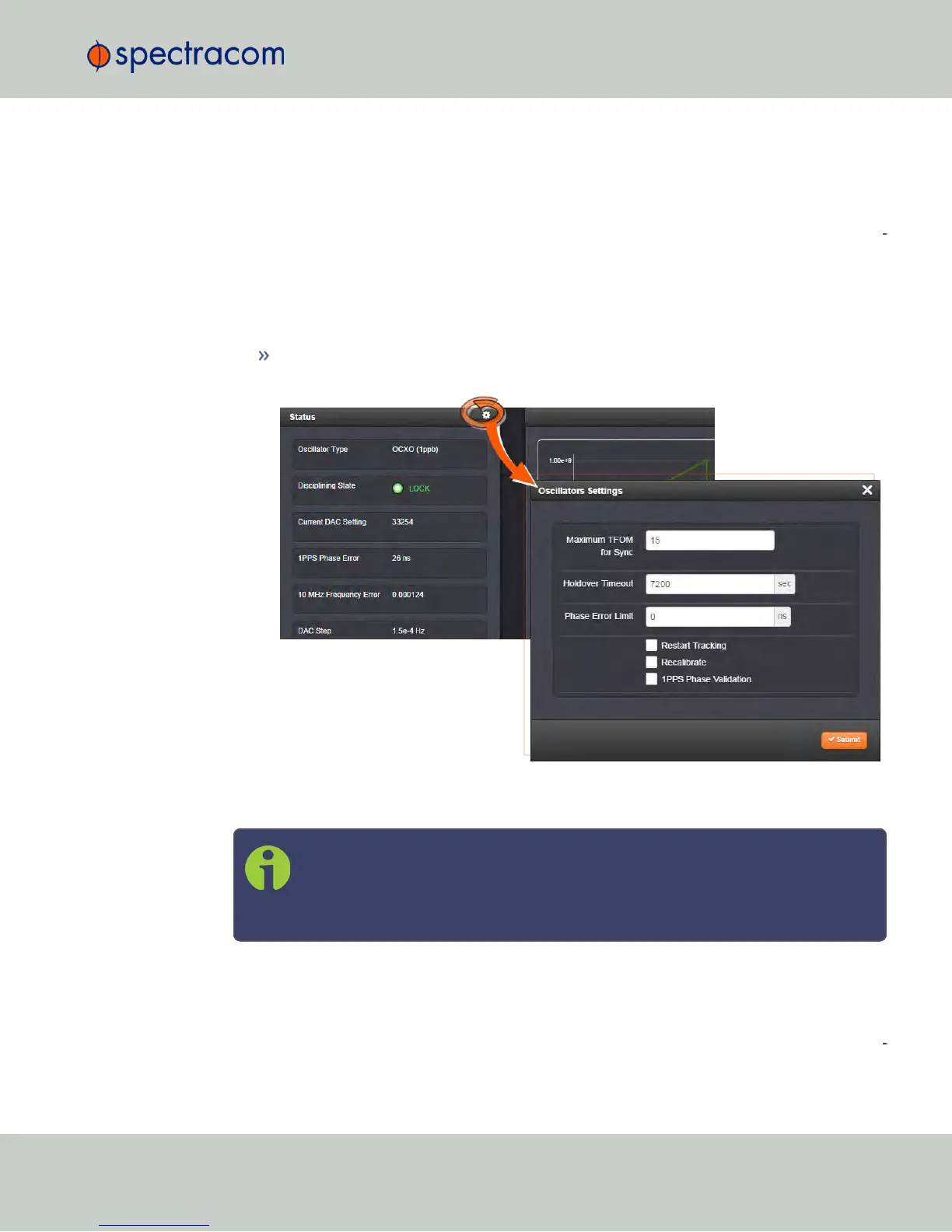
How to configure Holdover Timeout
To set the Holdover Timeout value:
Navigate to MANAGEMENT > OTHER: Disciplining, and click the GEAR icon in the
Status panel:
For more information on the TFOM value and Phase Error Limit, see "Configuring the
Oscillator" on page215.
Note: Changes made to the Holdover Timeout always take effect immediately. If
NetClock is in Holdover and the Holdover timeout is changed to a value that is
less than the current time period that NetClock has been in Holdover Mode, the
unit will immediately declare loss of synchronization.
What is the recommended setting for the Holdover Timeout period?
The factory default Holdover period is 2 hours (7200 seconds). The value can be increased up
to 5 years. During this time period, NetClock will be useable by its NTP clients (or other con
sumers) after GNSS reception has been lost.
3.4 Holdover Mode
CHAPTER 3 • NetClock User Reference Guide Rev. 16
211



 To Next Page