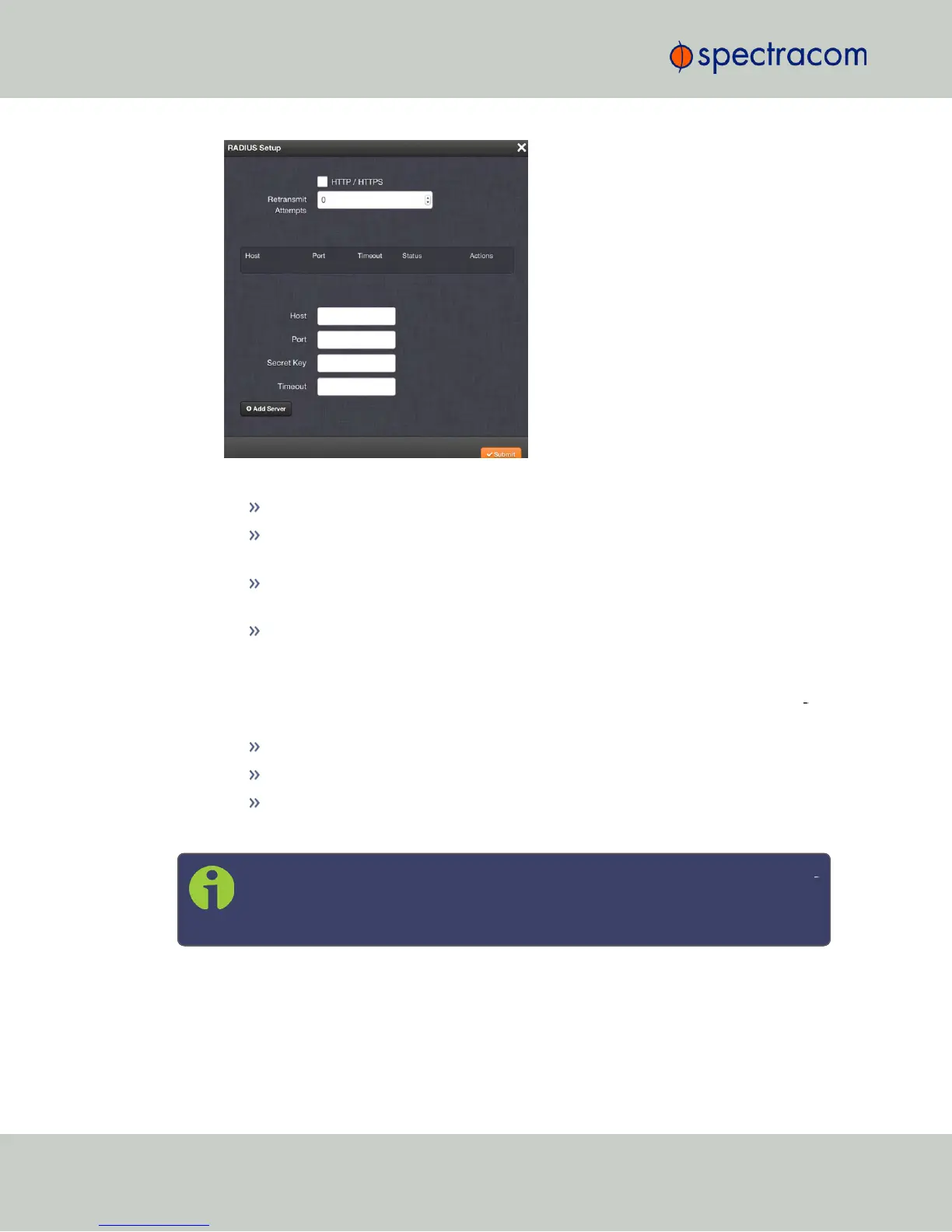
3.
Fill out the fields:
Host: The hostname or IP address of the RADIUS server
Port: Defines the RADIUS Port to use. The default RADIUS Port is 1812, but this can
be changed, as required.
Secret Key: The secret key which is shared by NetClock and the RADIUS server
(the key is used to generate an MD5 hash).
Timeout: [seconds] Defines the Timeout that NetClock will wait to communicate
with the RADIUS server e.g., 10 seconds.
4.
Click the Add Server button. A confirmation message The item has been added will be
displayed if the server could be added, and the server will be added to the list, indic
ating its status. The server status can be:
DISABLED: RADIUS service is disabled.
UNREACHABLE: This RADIUS server cannot be reached.
REACHABLE: This RADIUS server can be reached.
5.
To remove a RADIUS server from the list, click the X-button in the Actions column.
Note: NetClock supports multiple RADIUS servers. The system performance, how
ever, will be negatively affected by a large number of servers or invalid servers,
respectively.
252
CHAPTER 4 • NetClock User Reference Guide Rev. 16
4.3 Managing Users and Security



 To Next Page