Vista 1 Digital Mixing System
4-66 GC Operation
Document generated: 18.04.17
SW V5.3
Later, when the Cue List is armed, and timecode is running through the same
value, this cue will be fired.
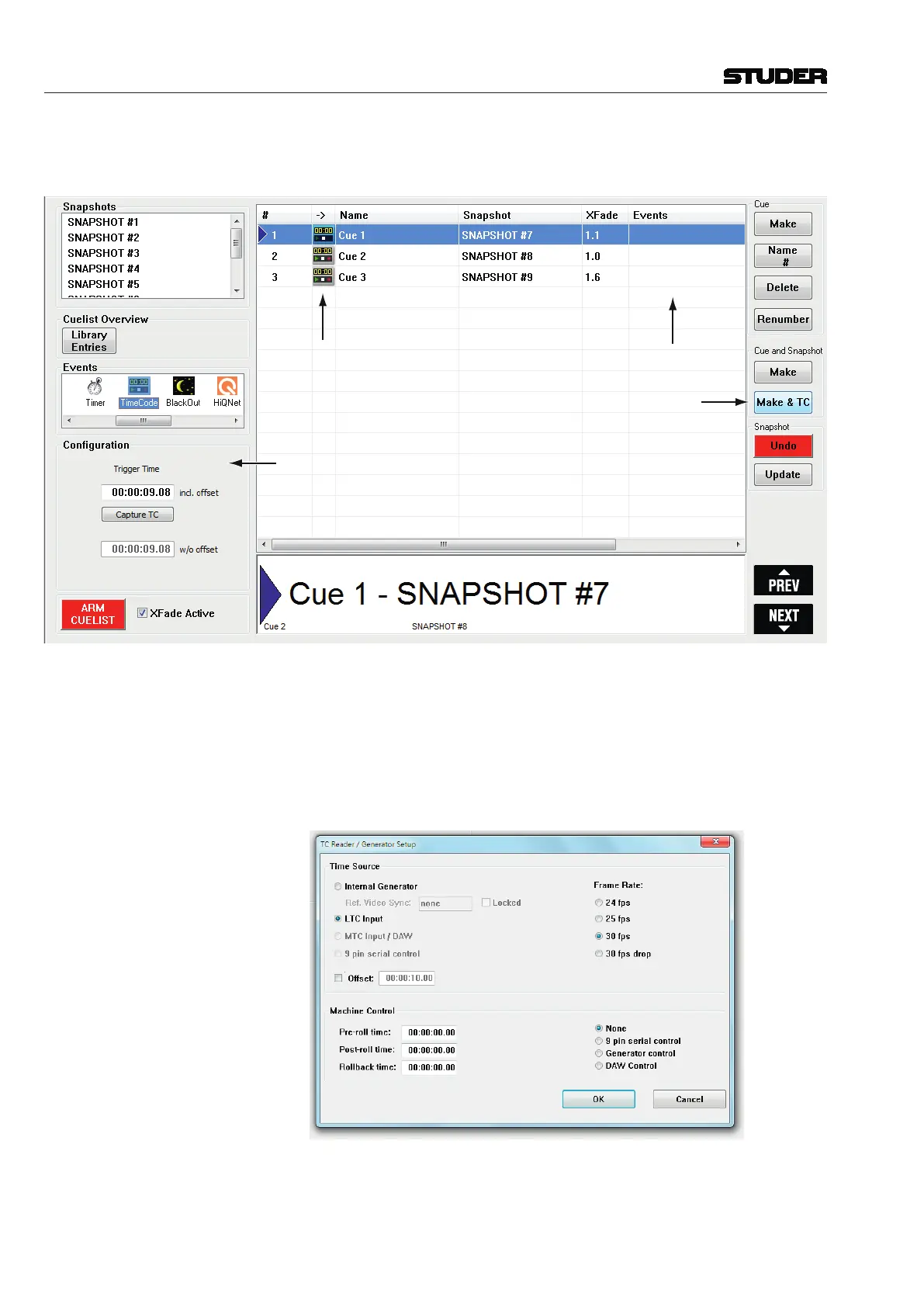
Configuration area
Trigger events
Cue events
New Make button
In the Configuration area of the Cue List, the stored timecode value is visible
and can also be edited. Editing is very convenient, as numbers can be entered
directly, but also clicking on a digit and draging the trackball up or down
allows very quick changes to a timecode value. Also right-clicking onto the
event icon allows to shift the timecode trigger value.
In the Ribbon tab Tools, category Setups, opening the “TC Reader/Gen.”
dialog, all parameters regarding TC reader can be entered.
There is also the possibility to enter and activate a global TC “Offset” – this
is useful in the case all configured TimeCode trigger events in the whole Cue
List need to be shifted up or down against the external TC source.



 To Next Page